Memgraph MCP server
The Memgraph MCP Server is a lightweight server implementation of the Model Context Protocol (MCP) that connects Memgraph with LLMs. An MCP client, such as Claude, talks to the server over MCP, and the server runs queries in Memgraph:

Run Memgraph MCP server
To run the server with Claude Desktop:
- Install
uv. - Install Claude Desktop.
- Add the Memgraph server to the Claude Desktop configuration.
The location of the configuration file depends on your operating system:
macOS
~/Library/Application\ Support/Claude/claude_desktop_config.jsonWindows
$env:AppData\Claude\claude_desktop_config.jsonAdd the server to it:
{
    "mcpServers": {
      "mcp-memgraph": {
        "command": "uv",
        "args": [
            "run",
            "--with",
            "mcp-memgraph",
            "--python",
            "3.13",
            "mcp-memgraph"
        ]
     }
   }
}
If Claude Desktop can’t find uv, put the full path to the uv executable
in the command field. To get it, run which uv on macOS or where uv on
Windows.
Chat with the database
-
Start Memgraph with MAGE:
docker run -p 7687:7687 memgraph/memgraph-mage --schema-info-enabled=true--schema-info-enabled=truelets the LLM run theSHOW SCHEMA INFOquery. -
Open Claude Desktop. The Memgraph tools and resources are listed. To try them on sample data, load a dataset from Memgraph Lab datasets.
Run Memgraph MCP server with Docker
Get the Docker image
Pull the published image:
docker pull memgraph/mcp-memgraph:latestTo build it from your local memgraph-toolbox code instead, run this from the
root of the Memgraph AI Toolkit
repository:
cd /path/to/ai-toolkit
docker build -f integrations/mcp-memgraph/Dockerfile -t memgraph/mcp-memgraph:latest .
Run the Docker image
Streamable HTTP mode (recommended)
Publish port 8000 to make the server available at http://localhost:8000/mcp/:
docker run --rm -p 8000:8000 memgraph/mcp-memgraph:latestStdio mode, for MCP clients that use stdio
Configure your MCP host to run the docker command and use stdio:
docker run --rm -i -e MCP_TRANSPORT=stdio memgraph/mcp-memgraph:latestBy default, the server connects to Memgraph on the host at
bolt://host.docker.internal:7687. To connect to Memgraph on another host or
port, set the environment variables shown below.
Custom Memgraph connection
To connect to another Memgraph instance, such as a container on the same Docker network or a remote server:
docker run --rm \
  -p 8000:8000 \
  -e MEMGRAPH_URL=bolt://memgraph:7687 \
  -e MEMGRAPH_USER=myuser \
  -e MEMGRAPH_PASSWORD=password \
  memgraph/mcp-memgraph:latest
Connect from developer tools
Visual Studio Code (HTTP MCP extension)
If you are using VS Code MCP extension or similar, your configuration for an HTTP server would look like:
{
  "servers": {
    "mcp-memgraph-http": {
      "url": "http://localhost:8000/mcp/"
    }
  }
}
The URL must end in /mcp/.
Visual Studio Code (stdio using Docker)
You can also run the server using stdio for integration with MCP stdio clients:
- Open Visual Studio Code, open Command Palette (Ctrl+Shift+P or Cmd+Shift+P on
Mac), and select
MCP: Add server.... - Choose
Command (stdio) - Enter
dockeras the command to run. - For Server ID enter
mcp-memgraph. - Choose “User” (adds to user-space
settings.json) or “Workspace” (adds to.vscode/mcp.json).
When the settings open, enhance the args as follows:
{
  "servers": {
    "mcp-memgraph": {
      "type": "stdio",
      "command": "docker",
      "args": [
        "run",
        "--rm",
        "-i",
        "-e", "MCP_TRANSPORT=stdio",
        "memgraph/mcp-memgraph:latest"
      ]
    }
  }
}
To connect to a remote Memgraph instance with authentication, add environment
variables to the args list:
{
  "servers": {
    "mcp-memgraph": {
      "type": "stdio",
      "command": "docker",
      "args": [
        "run",
        "--rm",
        "-i",
        "-e", "MCP_TRANSPORT=stdio",
        "-e", "MEMGRAPH_URL=bolt://memgraph:7687",
        "-e", "MEMGRAPH_USER=myuser",
        "-e", "MEMGRAPH_PASSWORD=mypassword",
        "memgraph/mcp-memgraph:latest"
      ]
    }
  }
}
Then open GitHub Copilot in Agent mode, and interact with Memgraph using natural language.
Multi-tenant authentication (OIDC / JWT)
The MCP server can optionally enforce OIDC / JWT authentication on the streamable-HTTP transport and route each authenticated session to a different Memgraph logical database based on JWT claims. This is disabled by default — when off, the server behaves exactly as documented in the sections above.
Enable it when you want to:
- Serve different users different Memgraph databases on the same MCP deployment.
- Place MCP behind an OIDC provider (Keycloak, Auth0, Okta, Entra ID, …).
- Capture per-user audit trails on tool calls.
Auth-only tools
When MCP_AUTH_ENABLED=true, the server exposes two additional tools:
| Tool | Description |
|---|---|
list_databases() | Returns the databases the calling user is authorized to access (the intersection of their JWT tenants claim and MCP_TENANT_CATALOG). Flags the currently-active database. |
use_database(name) | Switches the active database for the current MCP session. name must be in the caller’s allowed set — the tool cannot expand authorization beyond what the JWT grants. |
Environment variables
All of these are no-ops when MCP_AUTH_ENABLED=false (the default). When auth
is enabled, the server fails fast at startup if any of the three required
variables are missing.
| Variable | Default | Required | Purpose |
|---|---|---|---|
MCP_AUTH_ENABLED | false | — | Master switch. |
MCP_AUTH_ISSUER | — | ✓ | OIDC issuer URL, e.g. https://auth.example.com/realms/memgraph. |
MCP_AUTH_AUDIENCE | — | ✓ | Expected aud claim on accepted JWTs. |
MCP_TENANT_CATALOG | — | ✓ | Comma-separated tenants this MCP deployment serves. Names must match both JWT tenants claim values and Memgraph database names. |
MCP_AUTH_JWKS_URL | derived: <issuer>/protocol/openid-connect/certs | — | Override the JWKS endpoint (rarely needed). |
MCP_AUTH_TENANTS_CLAIM | tenants | — | Claim holding the user’s allowed tenant list (must be an array of strings). |
MCP_AUTH_DEFAULT_TENANT_CLAIM | default_tenant | — | Optional claim selecting the user’s preferred initial tenant; if absent, the server picks the alphabetically-first allowed one. |
MCP_AUTH_REQUIRED_SCOPE | mcp:tools | — | Scope the JWT must carry. |
MCP_AUTH_STATIC_CLIENT_ID | — | — | Opt-in DCR intercept — see DCR intercept below. |
How it works
- Every request to
/mcpmust carryAuthorization: Bearer <JWT>. - The middleware validates the JWT signature against the IdP’s JWKS (cached
in-process and auto-refreshed when an unknown
kidarrives). - It verifies
iss,aud,exp, and the required scope. - It reads the
tenantsarray claim, intersects it withMCP_TENANT_CATALOG, and builds a per-sessionSessionAuthkeyed byMcp-Session-Id. - The session’s
current_tenantdefaults to the JWT’sdefault_tenantclaim (when present and allowed), otherwise the first allowed tenant. - Each tool call routes to the Memgraph database with the same name as
current_tenant.
Within a session, users can switch among their allowed databases with the
use_database tool, and discover them with list_databases.
Discovery endpoints exposed when auth is enabled
| Path | Purpose |
|---|---|
GET /.well-known/oauth-protected-resource | RFC 9728 PRM telling MCP clients which authorization server to use. |
GET /.well-known/oauth-authorization-server | RFC 8414 AS metadata (proxied from the upstream IdP). |
GET /.well-known/openid-configuration | OIDC discovery (proxied from the upstream IdP). |
POST /register | DCR intercept — only present when MCP_AUTH_STATIC_CLIENT_ID is set. |
The discovery document fetched from the upstream IdP is cached in-process and re-fetched on the next request if the cache is empty (e.g., the IdP was down on the first attempt).
DCR intercept (workaround for Claude Code)
Some MCP clients — notably current Claude Code (see
anthropics/claude-code#26675)
— force Dynamic Client Registration even when a pre-registered clientId is
configured. Setting MCP_AUTH_STATIC_CLIENT_ID=<your-public-client-id> makes
the MCP server return the same pre-registered client ID for every DCR request,
sidestepping the bug.
When that variable is set, the PRM document also advertises the MCP server
itself as the authorization_server so DCR requests come back to the MCP
server instead of going directly to the IdP. All other OAuth flows
(authorize, token, JWKS) still happen against the real IdP.
Leave MCP_AUTH_STATIC_CLIENT_ID unset for production deployments whose
clients respect pre-configured clientId values.
What you need on the IdP side
In any OIDC provider, roughly:
- A public client with PKCE enabled, with redirect URI patterns matching the
IDEs you’ll use (e.g.,
http://localhost:*,vscode://*,cursor://*,claude://*). - A
tenantsclaim mapper that emits a JSON-array claim of the user’s tenant memberships (in Keycloak: a Group Membership mapper; in Auth0/Okta: a custom rule reading group or role attributes). - An audience claim mapper baking your
MCP_AUTH_AUDIENCEvalue into issued tokens. - A scope (default:
mcp:tools) attached to the client. - For each tenant in
MCP_TENANT_CATALOG, a corresponding Memgraph logical database created viaCREATE DATABASE <name>.
Run Memgraph MCP server on Kubernetes
A dedicated memgraph-mcp Helm
chart
deploys the MCP server on Kubernetes alongside an existing Memgraph backend.
See the Memgraph MCP Helm
chart
section for installation steps and configuration options.
Resources
- Introducing the Memgraph MCP Server: A blog post on running the Memgraph MCP server.
MCP server in Lab
Memgraph Lab is an MCP client: GraphChat can connect to MCP servers, including the Memgraph MCP server and servers you build with the Memgraph AI Toolkit:
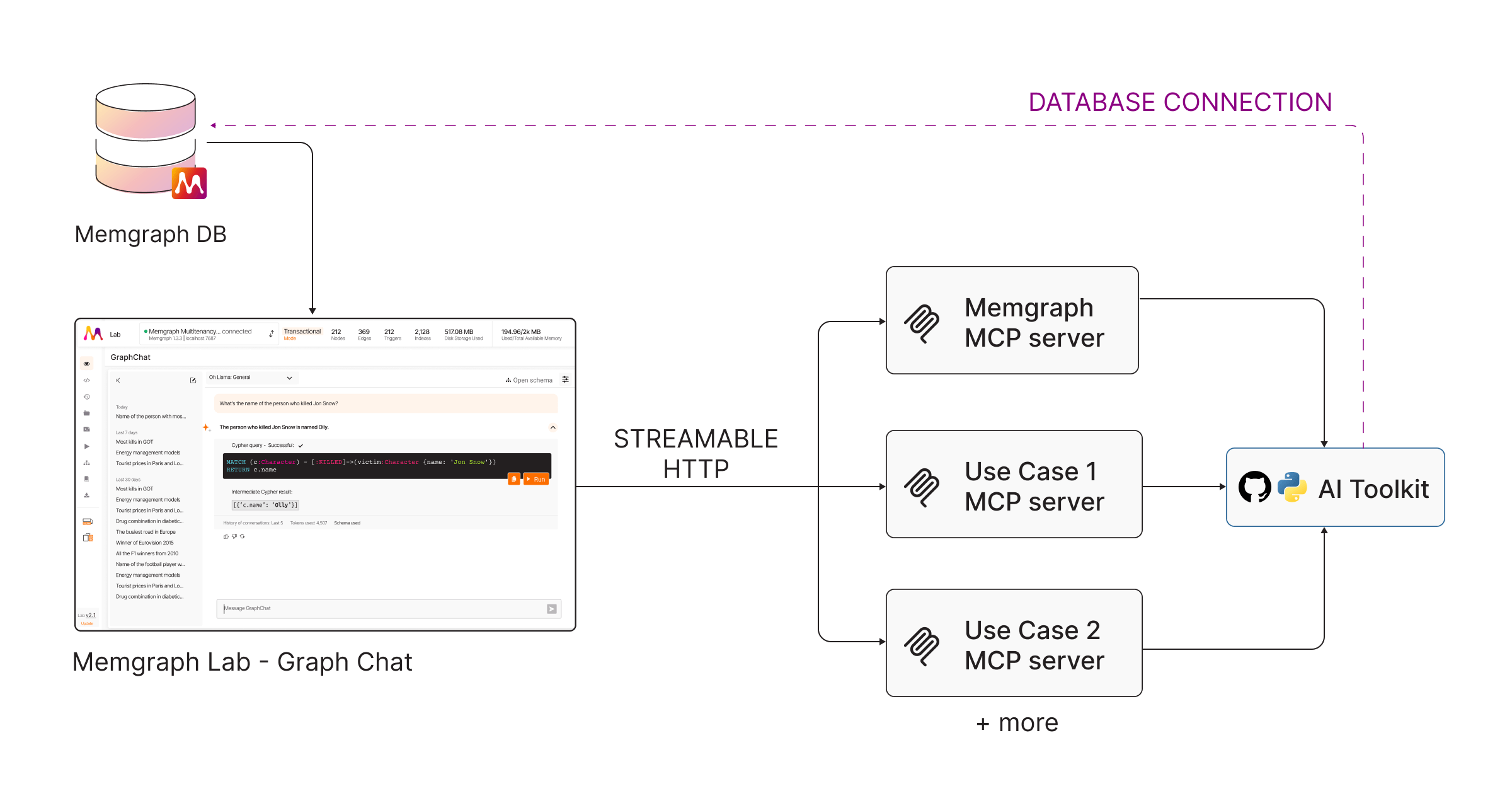
To connect MCP servers in Memgraph Lab, see GraphChat MCP servers.
MCP server for docs
To let your AI assistant search the Memgraph documentation instead of your database, connect the Docs MCP server.