Agentic GraphRAG
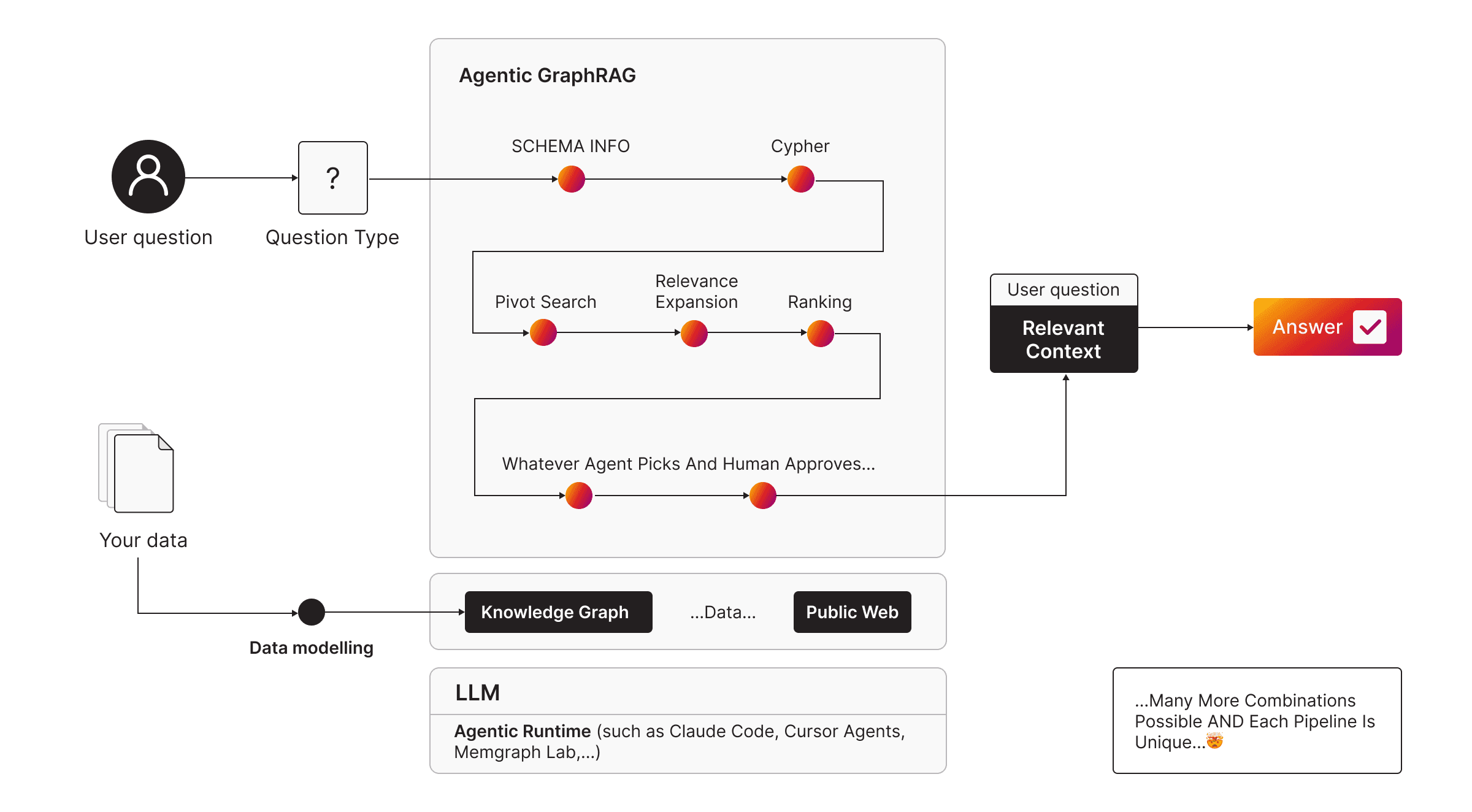
In Agentic GraphRAG, an agent reads the question, chooses the retrieval pipeline that fits it and runs it on the knowledge graph. Because each Atomic GraphRAG pipeline is one Cypher query, the agent only has to write or pick one query per question.
The three pipelines match three types of question:
| Pipeline | Question type | Example |
|---|---|---|
| Text2Cypher | Analytical | “How many organizations of each type are covered?” |
| Local graph search | Local | “What is connected to NVIDIA?” |
| Query-focused summarization | Global | “What are the main themes overall?” |
An agent can also combine the building blocks of the pipelines in its own way when a question doesn’t fit one type.
Let an agent choose the pipeline
The agent needs two things:
- A connection to Memgraph. Most agents run queries through the Memgraph MCP server. Memgraph Lab has an agent built in, GraphChat, that is already connected.
- Instructions for choosing a pipeline. The GraphRAG skill tells the agent which pipeline to use for which question. For the other Memgraph skills, see Agent Skills.
For example, in GraphChat:
Using https://github.com/memgraph/skills/blob/main/skills/memgraph-graph-rag/SKILL.md,
what's the most important person in the dataset?
The agent classifies the question, then runs the steps of the pipeline it chose, or a combination of steps from several pipelines:
Run the example
The example loads a knowledge graph of finance news, runs all three pipelines on it as Cypher queries and starts the Memgraph MCP server, so your own agent can query the same graph. If you set an OpenAI API key, it also starts an agent app that chooses the pipeline for each question.
You need:
- Docker
- git
- For the agent app only: Python 3.10–3.13 and an OpenAI API key. The app’s dependencies don’t support Python 3.14 yet; the script picks a compatible Python if you have one.
Run the script from the web:
curl -sSL https://install.memgraph.com/agentic-graphrag | bashTo also start the agent app, set the key first:
export OPENAI_API_KEY=YOUR_OPENAI_API_KEY
curl -sSL https://install.memgraph.com/agentic-graphrag | bashThe app opens at http://localhost:8501.
The scripts are agentic-graphrag.sh and agentic-graphrag.ps1 in the
memgraph/memgraph-platform
repository. To remove what the example created, download the script and run it
with clean; when you run it from the web, it prints the docker commands
that do the same. If Windows blocks the script, allow scripts for the current
session first: Set-ExecutionPolicy -Scope Process -ExecutionPolicy Bypass.
What the example does
The script runs these steps for you. They show what each part of the example is and what it returns.
Start Memgraph and the MCP server
Memgraph starts with schema info enabled, so a connected agent can read the graph’s schema. The MCP server connects to it over the Docker network:
docker network create agenticgraphrag-net

docker run -d --name agenticgraphrag-memgraph --network agenticgraphrag-net \
  -p 7687:7687 \
  memgraph/memgraph-mage:3.12.0 --schema-info-enabled=True

docker run -d --name agenticgraphrag-mcp --network agenticgraphrag-net \
  -p 8000:8000 --env MEMGRAPH_URL=bolt://agenticgraphrag-memgraph:7687 \
  memgraph/mcp-memgraph:0.2.0
Load the knowledge graph
The dataset is a .cypherl file of queries. mgconsole reads a limited
amount of input per call, so the script sends the file in batches of 300 lines
over the Docker network, which works the same on Linux, macOS and Windows:
lines=$(wc -l < asknews-finance-graph.cypherl); batch=300; start=1
while [ "$start" -le "$lines" ]; do
  sed -n "${start},$((start + batch - 1))p" asknews-finance-graph.cypherl \
    | docker run -i --rm --network agenticgraphrag-net memgraph/mgconsole:1.6.0 \
        --host agenticgraphrag-memgraph --port 7687
  start=$((start + batch))
done
The graph has about 1,000 nodes and 1,600 relationships: organizations,
people, markets and events from finance news. To use your own data, load your
own .cypherl file instead.
Run the three pipelines
Each pipeline is one Cypher query. An agent only decides which one to run.
Text2Cypher answers an analytical question with one aggregating query:
MATCH (n:organization) WHERE n.detailed_type IS NOT NULL
RETURN n.detailed_type AS organization_type, count(*) AS count
ORDER BY count DESC LIMIT 8;
Local graph search starts from one entity and expands to its neighborhood in one traversal. In production, a vector search finds the starting entity; this example finds it by name:
MATCH (seed {id: 'nvidia'})-[*1..2]-(context)
RETURN DISTINCT context.id AS related_entity, context.main_type AS type
LIMIT 10;
Query-focused summarization ranks the whole graph with PageRank to find the central themes, which an LLM then summarizes:
CALL pagerank.get() YIELD node, rank
RETURN node.id AS theme, node.main_type AS type, round(rank * 10000) / 10000 AS importance
ORDER BY importance DESC LIMIT 10;
On this graph, the top themes are “federal reserve”, “us stock market” and “wall street”.
Start the agent app
If OPENAI_API_KEY is set, the script creates a Python virtual environment,
installs the app’s dependencies (Streamlit, the Neo4j Python driver,
sentence-transformers and openai) and starts the app:
streamlit run agenticGraphRAG.pyThe agent classifies each question and runs the matching pipeline. It decides on its own, so the same question can take different paths in different runs. The app connects to Memgraph on port 7687.
Connect your own agent
The MCP server the example started lets any agent that supports MCP, such as Claude Desktop, Cursor or VS Code, query the same graph. Add the server to the agent’s MCP configuration:
{
  "mcpServers": {
    "memgraph": {
      "url": "http://localhost:8000/mcp/"
    }
  }
}
The agent then has tools such as run_query, get_schema, get_page_rank
and search_node_vectors, the same building blocks the three pipelines use.
Clean up
Download the script and run it with clean:
./agentic-graphrag.sh cleanIt stops the containers and removes the network and the working directory.