Query the cluster in high availability Enterprise
Before continuing, read the guides on how replication works and how high availability works to familiarize yourself with the underlying concepts.
Why the Bolt protocol is not enough
For a standalone Memgraph instance, the simplest way to connect is via the
bolt:// protocol. However, in a high-availability cluster, this becomes
insufficient for several reasons:
-
Bolt only connects to a single instance. In a cluster, you would need to maintain separate connections to every instance you want to query. A typical setup already includes five instances (3 coordinators + 2 data instances).
-
Clients do not know which instance is MAIN. Automatic failovers can happen at any time. Sending a write query to a REPLICA will fail, as replicas cannot accept writes.
To solve this, Memgraph supports a routing mechanism built on top of Bolt.
The Bolt+routing protocol (neo4j://) ensures that:
- Writes always go to the current MAIN instance.
- Reads are routed to either the MAIN or any REPLICA (depending on configuration).
- Clients automatically switch to the new MAIN after a failover, avoiding split-brain scenarios.
How the routing protocol works
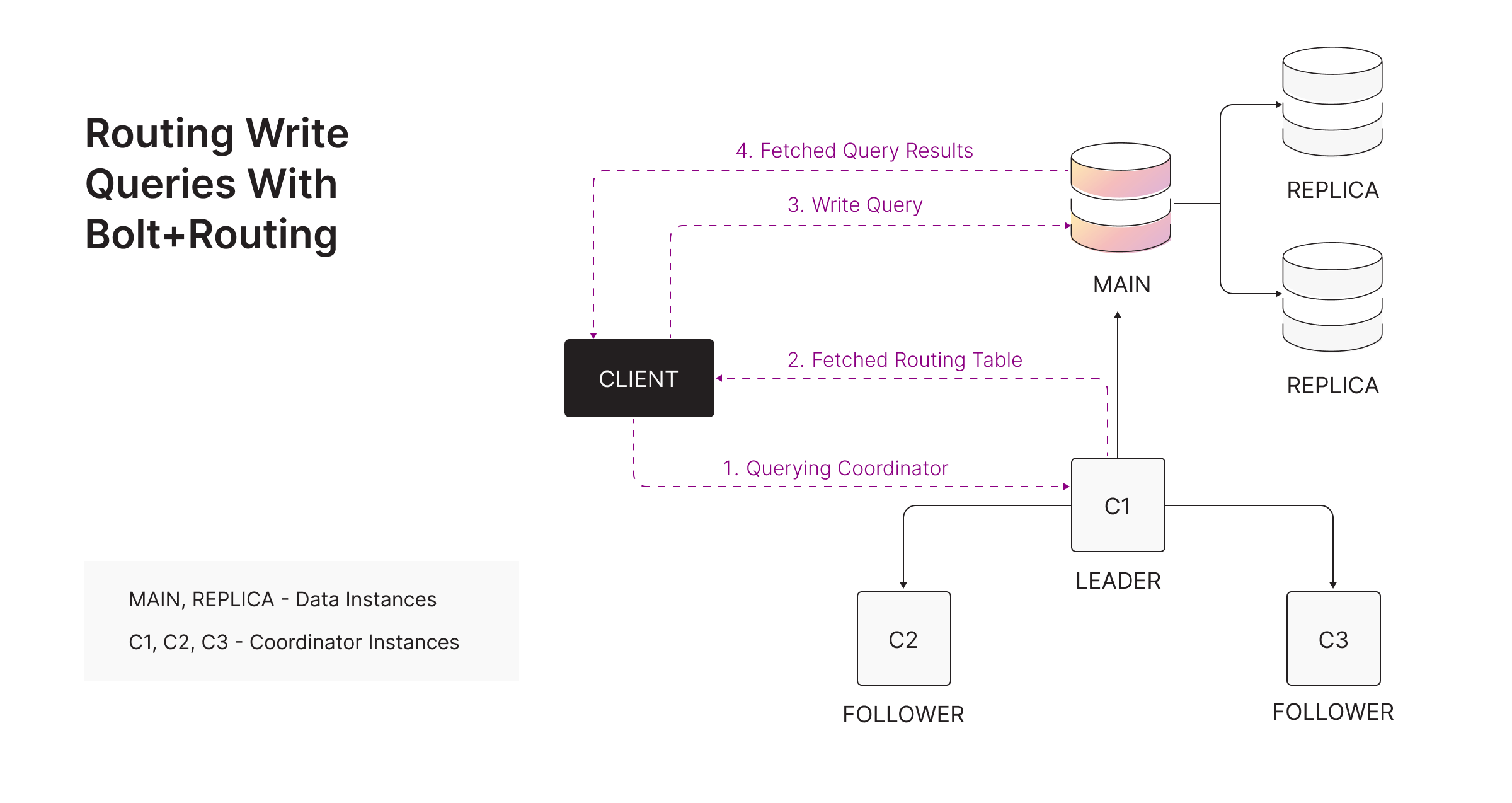
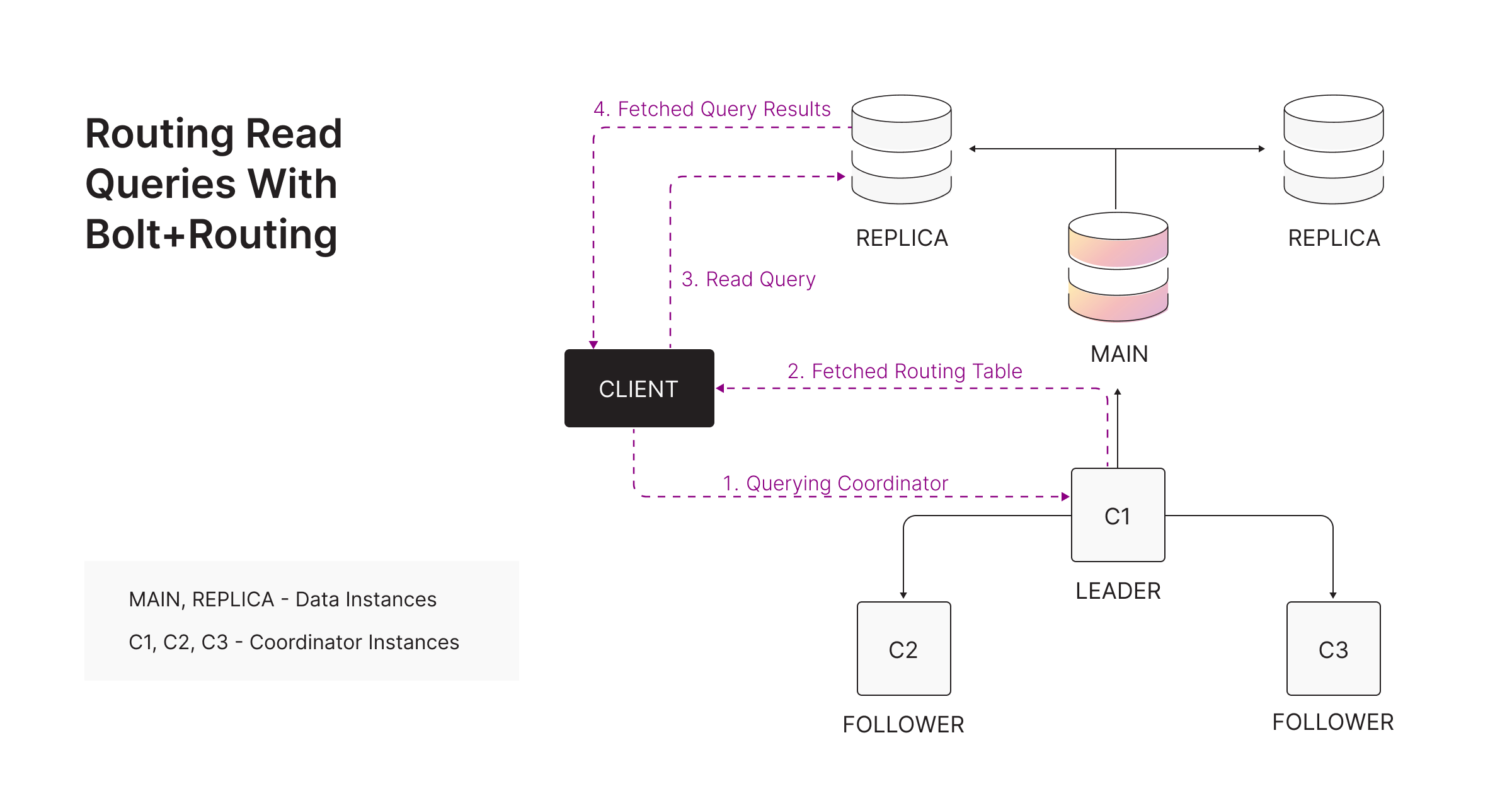
The routing protocol works as follows:
-
The client sends a
ROUTEBolt message to any coordinator. -
The coordinator returns a routing table containing:
- Readers: REPLICAs (and optionally MAIN).
- Writers: only the current MAIN.
- Routers: all coordinator endpoints.
-
Using this routing table, the client forwards queries to the correct instance.
Leader and follower behavior
- If the client happens to contact the leader coordinator, it immediately receives the latest routing table.
- If it contacts a follower, the follower forwards the request to the leader and returns the leader’s result.
- If the leader cannot be reached at all, an empty routing table is returned and the driver retries against another coordinator.
Because leader state is synchronized via Raft, routing information is always accurate.
This ensures:
- Consistency: All clients receive the same routing table.
- Reliability: The leader always holds the latest cluster state.
- Transparency: Clients work seamlessly whether they connect to leaders or followers.
Inspecting the routing table
The routing table a coordinator hands out can be inspected manually with the
SHOW ROUTING TABLE
query:
SHOW ROUTING TABLE;It returns one row per role (WRITE, READ, ROUTE) with the Bolt endpoints
serving that role, for the default database. The query can only be run on a
coordinator, and it is always answered from the leader’s state, so every
coordinator returns the same result. If the leader cannot be contacted, an empty
routing table is returned.
Routing table TTL and refresh behavior
Because routing is entirely client-side, the driver caches the routing table and decides when to refresh it. There are two triggers:
-
TTL expiration. Memgraph returns a TTL alongside the routing table, and it is hard-coded to 5 minutes. Once the TTL expires, the driver fetches a new routing table from a coordinator on the next request.
-
Driver-detected failure. If the driver notices that the cached routing table is wrong, it refreshes it before retrying:
execute_readrefreshes the routing table when all read instances from the previous routing table become unavailable.execute_writerefreshes the routing table when the MAIN goes down.session.rundoes not trigger a refresh on failure - it is up to the application to handle the error and retry.
The driver only refreshes the routing table for failures that match the query type it dispatched. This means some topology changes stay hidden until the TTL expires:
- If the set of REPLICAs changes (a REPLICA is added, removed, or swapped) and the driver is only issuing write queries, the routing table is not refreshed.
- If the MAIN changes to an instance that was not part of the previously cached routing table and the driver is only issuing read queries, the routing table is not refreshed.
In both cases, the routing table will eventually self-heal after the 5-minute TTL expires.
Routing examples
WRITE query using Bolt+routing - routed to MAIN:
READ query using Bolt+routing - routed to a REPLICA:
Bolt+routing is entirely client-side, meaning:
- Drivers perform endpoint resolution internally.
- Routing decisions do not happen inside Memgraph itself.
For the details of the Bolt messages involved, see the official Bolt routing message documentation.
Memgraph does not implement server-side routing.
How to connect
Users only need to change the scheme they use for connecting to coordinators.
This means instead of using bolt://<main_ip_address>, you should use
neo4j://<coordinator_ip_adresss> to get an active connection to the current
main instance in the cluster.
Examples in multiple programming languages can be found here.
Use Bolt+routing only when querying data through coordinators. Do NOT use
Bolt+routing when configuring the cluster (registering coordinators or data
instances). For cluster setup, always connect to coordinators via plain
bolt://.
Authentication
User accounts exist only on data instances. Coordinators do not store user accounts and therefore:
- Ignore the
MEMGRAPH_USERandMEMGRAPH_PASSWORDenvironment variables. - Do not accept authentication queries such as
CREATE USER.
When using the bolt+routing protocol, provide credentials for users that exist on the data instances. The authentication flow works as follows:
- The client authenticates and connects to a coordinator.
- The coordinator returns a routing table.
- The client connects to the appropriate data instance using the same credentials.
- The data instance performs authentication and executes the query.
- By default, you may connect to a coordinator via plain Bolt without authentication — username and password are accepted as a passthrough and ignored.
- When using Bolt+routing, you must provide credentials — authentication is performed on the data instances.
Authenticating against coordinators
From Memgraph 3.13, coordinators are no longer unconditionally open. They can enforce single sign-on and coordinator privileges, which changes the flow above in two ways:
- Step 1 becomes a real authentication. Once SSO is configured on the
coordinators, basic auth is refused and the client must present a valid IdP
token for a scheme listed in
--auth-module-mappings. - Step 2 requires a privilege. Serving the routing table requires
COORDINATOR_READ. A session whose roles carry no coordinator privilege is denied the routing table withYou don't have permission to read the routing table on the coordinator!— reported as a non-retryable client error so drivers do not retry it.
Because the driver reuses one set of credentials for both legs of a routing
connection, a neo4j:// session works only when the same role names exist on
both the coordinators and the data instances, and the same SSO scheme is
configured on both. The privileges attached to those roles differ by design —
coordinators know only COORDINATOR_READ / COORDINATOR_WRITE, data instances
know only the data privilege set — but the names must match.
See Bolt+routing with SSO for the full setup.