MATCH clause
The MATCH clause is used to obtain data from the database by matching it to a given pattern.
- Matching nodes
1.1. Get all nodes
1.2. Get all nodes with a label
1.3. Get nodes with with all of multiple labels
1.4. Get nodes with any of multiple labels
1.5. Get nodes without a label
1.6. Get nodes with any label
1.7. Combine label expressions
1.8. Label expressions in expressions - Matching relationships
2.1. Get all related nodes
2.2. Get related nodes with a label
2.3. Get related nodes with a directed relationship
2.4. Get a relationship
2.5. Matching on a relationship with a type
2.6. Matching on relationships with multiple types
2.7. Uncommon characters in relationship types
2.8. Match with multiple relationships - Matching with variable length relationships
3.1. Variable length relationships
3.2. Variable length relationships with multiple relationship types
3.3. Returning multiple relationships with variable length - Using multiple MATCH clauses
4.1. Cartesian product of nodes
4.2. Creating a list
4.3. Matching a variable that is already bound
Each node and relationship gets a identifier generated during their initialization which is persisted through the durability mechanism.
Return it with the id() function.
Dataset
The following examples are executed with this dataset. You can replicate this dataset locally by executing the queries at the end of the page: Dataset queries.
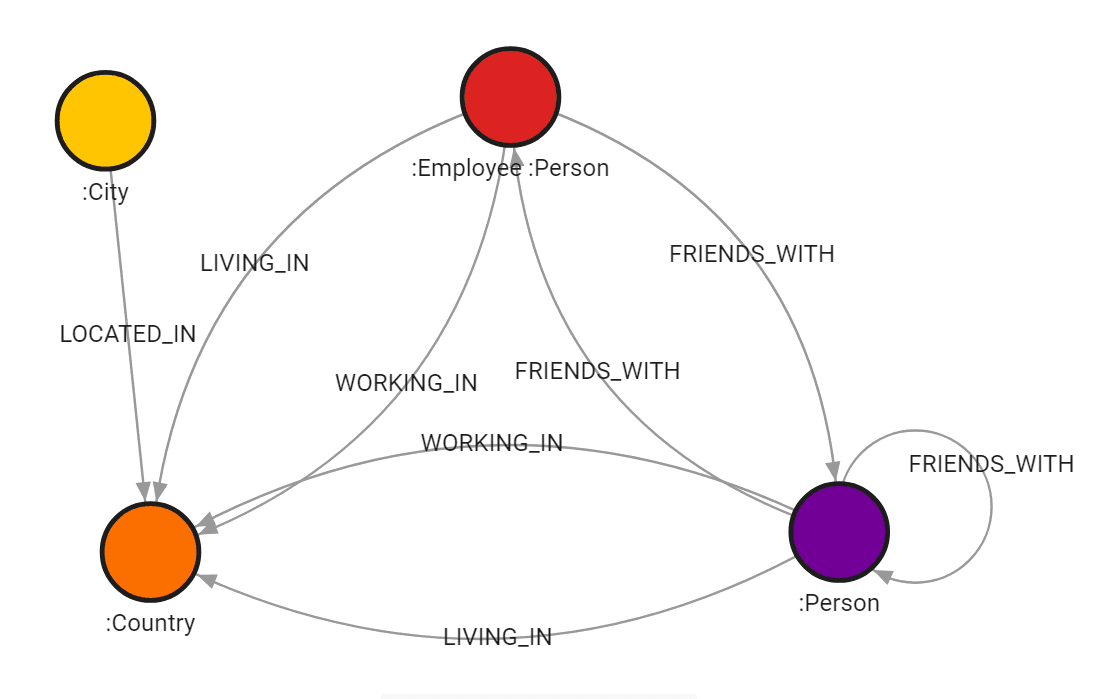
1. Matching nodes
1.1. Get all nodes
Without specifying labels, the query will return all the nodes in a graph:
MATCH (n)
RETURN n;
Output:
+-----------------------------------------------------------------------------------------------------+
| n                                                                                                   |
+-----------------------------------------------------------------------------------------------------+
| (:Country {continent: "Europe", language: "German", name: "Germany", population: 83000000})         |
| (:Country {continent: "Europe", language: "French", name: "France", population: 67000000})          |
| (:Country {continent: "Europe", language: "English", name: "United Kingdom", population: 66000000}) |
| (:Person:Employee {name: "John"})                                                                   |
| (:Person {name: "Harry"})                                                                           |
| (:Person {name: "Anna"})                                                                            |
| (:City {name: "Berlin", population: 3600000})                                                       |
| (:City {name: "Paris", population: 2140000})                                                        |
+-----------------------------------------------------------------------------------------------------+
1.2. Get all nodes with a label
By specifying the label of a node, all the nodes with that label are returned:
MATCH (c:Country)
RETURN c;
Output:
+-----------------------------------------------------------------------------------------------------+
| c                                                                                                   |
+-----------------------------------------------------------------------------------------------------+
| (:Country {continent: "Europe", language: "German", name: "Germany", population: 83000000})         |
| (:Country {continent: "Europe", language: "French", name: "France", population: 67000000})          |
| (:Country {continent: "Europe", language: "English", name: "United Kingdom", population: 66000000}) |
+-----------------------------------------------------------------------------------------------------+
1.3. Get nodes with all labels
If you want to match nodes that have both labels (e.g. :Person and
:Employee), you can use a chained label. This only returns nodes that have
both Person and Employee labels.
MATCH (n:Person:Employee)
RETURN n;
The & (AND) operator gives the same result:
MATCH (n:Person&Employee)
RETURN n;
Output:
+-----------------------------------+
| n                                 |
+-----------------------------------+
| (:Person:Employee {name: "John"}) |
+-----------------------------------+
1.4. Get nodes with any of labels
You can use the OR (|) operator to match nodes that have any of the
specified labels:
MATCH (n:Country|Person)
RETURN n;
Output:
+-----------------------------------------------------------------------------------------------------+
| n                                                                                                   |
+-----------------------------------------------------------------------------------------------------+
| (:Country {continent: "Europe", language: "German", name: "Germany", population: 83000000})         |
| (:Country {continent: "Europe", language: "French", name: "France", population: 67000000})          |
| (:Country {continent: "Europe", language: "English", name: "United Kingdom", population: 66000000}) |
| (:Person:Employee {name: "John"})                                                                           |
| (:Person {name: "Harry"})                                                                           |
| (:Person {name: "Anna"})                                                                            |
+-----------------------------------------------------------------------------------------------------+
This allows you to retrieve nodes of different types in a single query, making label-based exploration more flexible.
CREATE and MERGE accept only a conjunction of labels, such as (n:Person:Employee) or
(n:Person&Employee). A label expression with |, ! or % raises an error there, because it does
not name the labels a new node gets.
1.5. Get nodes without a label
Use the ! (NOT) operator to match nodes that do not have a label:
MATCH (n:!Person)
RETURN n;
Output:
+-----------------------------------------------------------------------------------------------------+
| n                                                                                                   |
+-----------------------------------------------------------------------------------------------------+
| (:Country {continent: "Europe", language: "German", name: "Germany", population: 83000000})         |
| (:Country {continent: "Europe", language: "French", name: "France", population: 67000000})          |
| (:Country {continent: "Europe", language: "English", name: "United Kingdom", population: 66000000}) |
| (:City {name: "Berlin", population: 3600000})                                                       |
| (:City {name: "Paris", population: 2140000})                                                        |
+-----------------------------------------------------------------------------------------------------+
1.6. Get nodes with any label
The % (wildcard) matches a node that has at least one label. !% matches a node that has no labels.
MATCH (n:%)
RETURN count(n) AS labelled;
Output:
+----------+
| labelled |
+----------+
| 8        |
+----------+
1.7. Combine label expressions
The operators &, |, ! and % combine into one label expression. ! binds tightest, then &, then
|. Use parentheses to change the order.
MATCH (n:Person&!Employee)
RETURN n;
Output:
+---------------------------+
| n                         |
+---------------------------+
| (:Person {name: "Harry"}) |
| (:Person {name: "Anna"})  |
+---------------------------+
City|Person&Employee reads as City|(Person&Employee):
MATCH (n:City|Person&Employee)
RETURN n.name AS name ORDER BY name;
Output:
+----------+
| name     |
+----------+
| "Berlin" |
| "John"   |
| "Paris"  |
+----------+
With parentheses, the same labels give a different result:
MATCH (n:(City|Person)&Employee)
RETURN n.name AS name ORDER BY name;
Output:
+--------+
| name   |
+--------+
| "John" |
+--------+
The colon form :A:B can’t be mixed with the operators in one expression: (n:Person:Employee&!City)
raises a syntax error. Write (n:Person&Employee&!City) instead.
1.8. Label expressions in expressions
A label expression can test a node anywhere an expression is allowed, such as WHERE, RETURN, WITH
and CASE. It returns true or false, and null for a null value.
MATCH (n)
WHERE n:City|Country
RETURN n.name AS name ORDER BY name;
Output:
+------------------+
| name             |
+------------------+
| "Berlin"         |
| "France"         |
| "Germany"        |
| "Paris"          |
| "United Kingdom" |
+------------------+
MATCH (p:Person)
RETURN p.name AS name, p:Employee AS employee, p:!Employee AS not_employee ORDER BY name;Output:
+--------------+--------------+--------------+
| name         | employee     | not_employee |
+--------------+--------------+--------------+
| "Anna"       | false        | true         |
| "Harry"      | false        | true         |
| "John"       | true         | false        |
+--------------+--------------+--------------+
A label expression binds tighter than every other operator, so n:A&B = true tests (n:A&B) = true.
In a list comprehension, the last | is the projection. [x IN list WHERE x:A|B] filters on x:A and
projects B. Write [x IN list WHERE x:(A|B)] to filter on the disjunction.
2. Matching relationships
2.1. Get all related nodes
By using the related to symbol --, nodes that have a relationship with the specified node can be returned.
The symbol represents an undirected relationship which means the direction of the relationship is not taken into account.
MATCH (:Person {name: 'John'})--(n)
RETURN n;
Output:
+---------------------------------------------------------------------------------------------+
| n                                                                                           |
+---------------------------------------------------------------------------------------------+
| (:Person {name: "Anna"})                                                                    |
| (:Country {continent: "Europe", language: "French", name: "France", population: 67000000})  |
| (:Country {continent: "Europe", language: "German", name: "Germany", population: 83000000}) |
| (:Person {name: "Harry"})                                                                   |
+---------------------------------------------------------------------------------------------+
2.2. Get related nodes with a label
To only return related to nodes with a specific label you need to add it using the label syntax:
MATCH (:Person {name: 'John'})--(p:Person)
RETURN p;
Output:
+---------------------------+
| p                         |
+---------------------------+
| (:Person {name: "Harry"}) |
| (:Person {name: "Anna"})  |
+---------------------------+
2.3. Get related nodes with a directed relationship
The related to symbol -- can be extended by using:
-->to specify outgoing relationships,<--to specify ingoing relationships.
MATCH (:Country {name: 'France'})<--(p:Person)
RETURN p;
Output:
+-----------------------------------+
| p                                 |
+-----------------------------------+
| (:Person:Employee {name: "John"}) |
+-----------------------------------+
2.4. Get a relationship
If you want to return the relationship between two nodes or a property of the relationship, a variable is required. A directed or undirected relationship can be used.
This query returns the relationship and its type:
MATCH (:Person {name: 'John'})-[r]->()
RETURN type(r);
Output:
+--------------+
| type(r)      |
+--------------+
| WORKING_IN   |
| LIVING_IN    |
| FRIENDS_WITH |
+--------------+
This query also returns the property date_of_start of the relationship:
MATCH (:Person {name: 'John'})-[r]->()
RETURN type(r), r.date_of_start;
Output:
+-----------------+-----------------+
| type(r)         | r.date_of_start |
+-----------------+-----------------+
| WORKING_IN      | 2014            |
| LIVING_IN       | 2014            |
| FRIENDS_WITH    | 2011            |
+-----------------+-----------------+
2.5. Matching on a relationship with a type
To return a relationship with a specified type you need to use the type syntax. A directed or undirected relationship can be used:
MATCH (p:Person {name: 'John'})-[:LIVING_IN]->(c)
RETURN c.name;
Output:
+---------+
| c.name  |
+---------+
| Germany |
+---------+
2.6. Matching on relationships with multiple types
To return relationships with any of the specified types, the types need to be chained together with the pipe symbol |:
MATCH (p:Person {name: 'John'})-[:LIVING_IN |:WORKING_IN]->(c)
RETURN c.name;
Output:
+---------+
| c.name  |
+---------+
| France  |
| Germany |
+---------+
2.7. Uncommon characters in relationship types
If a type has non-letter characters, like spaces, for example, the backtick symbol ` needs to be used to quote these.
If the relationship type LIVING_IN had a space instead of an underscore, a possible query would look like this.
MATCH (:Country {name: 'France'})<-[r:`LIVING IN`]-()
RETURN r.name;
2.8. Match with multiple relationships
Multiple relationship statements can be specified in the query:
MATCH (:Country {name: 'France'})<-[l:WORKING_IN]-(p)-[w:LIVING_IN]->(:Country {name: 'Germany'})
RETURN p.name;
Output:
+--------+
| p.name |
+--------+
| John   |
+--------+
3. Matching with variable length relationships
3.1. Variable length relationships
If a node needs to be specified by its distance in relationship→node hops, the following syntax is used: -[:TYPE*minHops..maxHops]→.
minHops and maxHops are optional and default to 1 and infinity respectively.
The dots can be omitted if both are not specified or if only one is set which
implies a fixed length pattern.
MATCH ({name: 'United Kingdom'})<-[:LIVING_IN*1..2]-(n)
RETURN n;
Output:
+---------------------------+
| n                         |
+---------------------------+
| (:Person {name: "Harry"}) |
| (:Person {name: "Anna"})  |
+---------------------------+
3.2. Variable length relationships with multiple relationship types
If variable lengths are used with multiple stacked up relationship types, *minHops..maxHops applies to any combination of relationships:
MATCH ({name: 'United Kingdom'})<-[:WORKING_IN|FRIENDS_WITH*1..2]-(p:Person)
RETURN p;
Output:
+-----------------------------------+
| p                                 |
+-----------------------------------+
| (:Person {name: "Harry"})         |
| (:Person:Employee {name: "John"}) |
| (:Person {name: "Anna"})          |
+-----------------------------------+
3.3. Returning multiple relationships with variable length
If a variable length is used, the list of relationships can be returned by adding variable= at the beginning of the MATCH clause:
MATCH p=({name: 'John'})<-[:FRIENDS_WITH*1..2]-()
RETURN relationships(p);
Output:
+----------------------------------------+
| relationships(p)                       |
+----------------------------------------+
| [[FRIENDS_WITH {date_of_start: 2012}]] |
+----------------------------------------+
4. Using multiple MATCH clauses
4.1. Cartesian product of nodes
To create a Cartesian product, match the nodes in two separate MATCH queries.
For example, the following query will match each person from the dataset with each European country from the dataset:
MATCH (p:Person)
MATCH (c:Country {continent: "Europe"})
RETURN p.name,c.name;
Output:
+------------------+------------------+
| p.name           | c.name           |
+------------------+------------------+
| "John"           | "Germany"        |
| "Harry"          | "Germany"        |
| "Anna"           | "Germany"        |
| "John"           | "France"         |
| "Harry"          | "France"         |
| "Anna"           | "France"         |
| "John"           | "United Kingdom" |
| "Harry"          | "United Kingdom" |
| "Anna"           | "United Kingdom" |
+------------------+------------------+
The query returns the Cartesian product of matched nodes. The output of the first MATCH clause is matched with each output of the second MATCH clause. In this case, each person from the dataset is matched with each European country.
4.2. Creating a list
If you want to create a list containing the results of different MATCH queries, you can achieve that with multiple MATCH clauses in one query:
MATCH (p:Person)
WITH COLLECT(p.name) as people
MATCH (c:Country {continent: "Europe"})
WITH people + COLLECT(c.name) as names
RETURN names;
Output:
+------------------------------------------------------------------+
| names                                                            |
+------------------------------------------------------------------+
| ["John", "Harry", "Anna", "Germany", "France", "United Kingdom"] |
+------------------------------------------------------------------+
The query returns a list of names of all people from the dataset concatenated with the names of all European countries.
If any of the sets MATCH clause returns is empty, the whole output will be an empty list.
The following query will return an empty list:
MATCH (p:Person)
WITH COLLECT(p.name) as people
MATCH (c:Country {continent: "Asia"})
WITH people + COLLECT(c.name) as names
RETURN names;
Output:
Empty set
Since the dataset doesn’t contain any nodes labeled as Country with a property continent with the value Asia, the second MATCH clause returns an empty dataset and therefore the output is also an empty list. To avoid getting an empty list as an output, due to any of the MATCH clauses returning an empty set, use OPTIONAL MATCH clause:
MATCH (p:Person)
WITH COLLECT(p.name) as people
OPTIONAL MATCH (c:Country {continent: "Asia"})
WITH people + COLLECT(c.name) as names
RETURN names;
Output:
+---------------------------+
| names                     |
+---------------------------+
| ["John", "Harry", "Anna"] |
+---------------------------+
The OPTIONAL MATCH clause bypasses the empty set and the query returns only non-empty sets. Therefore, the output of the query is a list containing only the results of the first MATCH clause.
4.3. Matching a variable that is already bound
A pattern may hold nothing but a variable the query has already bound. Such a pattern does not scan the graph — it matches on the value bound to that name:
MATCH (p:Person)
MATCH (p)
RETURN p.name AS name
ORDER BY name;
Output:
+---------+
| name    |
+---------+
| "Anna"  |
| "Harry" |
| "John"  |
+---------+
A node matches and the row is kept. A null, which an OPTIONAL MATCH leaves
behind when nothing matched, matches nothing and the row is dropped:
MATCH (p:Person)
OPTIONAL MATCH (p)-[:LIVING_IN]->(c:Country {continent: 'Asia'})
WITH p, c
MATCH (c)
RETURN p.name AS name, c.name AS country
ORDER BY name;
Output:
Empty set
No person lives in an Asian country, so c is null on every row and MATCH (c)
keeps none of them. Without the MATCH (c), the query returns all three people
with a null country.
A value that is neither a node nor null raises an error:
MATCH (p:Person)
WITH p.name AS p
MATCH (p)
RETURN p;
Output:
Expected a node for 'p', but got string.This applies wherever a pattern appears — a top-level MATCH, a CALL {}
subquery, and the body of a subquery
expression. Before Memgraph 3.14 a pattern
holding only a bound variable was ignored, so the row passed through whatever the
variable held. Queries that carried a null or a non-node value through such a
pattern now return fewer rows or raise an error.
A pattern that also states a label or a property, such as MATCH (p:Person), is
unaffected — it already raised on a non-node value.
Dataset queries
We encourage you to try out the examples by yourself. You can get our data set locally by executing the following query block.
MATCH (n) DETACH DELETE n;

CREATE (c1:Country {name: 'Germany', language: 'German', continent: 'Europe', population: 83000000});
CREATE (c2:Country {name: 'France', language: 'French', continent: 'Europe', population: 67000000});
CREATE (c3:Country {name: 'United Kingdom', language: 'English', continent: 'Europe', population: 66000000});

MATCH (c1),(c2)
WHERE c1.name = 'Germany' AND c2.name = 'France'
CREATE (c2)<-[:WORKING_IN {date_of_start: 2014}]-(p:Person:Employee {name: 'John'})-[:LIVING_IN {date_of_start: 2014}]->(c1);

MATCH (c)
WHERE c.name = 'United Kingdom'
CREATE (c)<-[:WORKING_IN {date_of_start: 2014}]-(p:Person {name: 'Harry'})-[:LIVING_IN {date_of_start: 2013}]->(c);

MATCH (p1),(p2)
WHERE p1.name = 'John' AND p2.name = 'Harry'
CREATE (p1)-[:FRIENDS_WITH {date_of_start: 2011}]->(p2);

MATCH (p1),(p2)
WHERE p1.name = 'John' AND p2.name = 'Harry'
CREATE (p1)<-[:FRIENDS_WITH {date_of_start: 2012}]-(:Person {name: 'Anna'})-[:FRIENDS_WITH {date_of_start: 2014}]->(p2);

MATCH (p),(c1),(c2)
WHERE p.name = 'Anna' AND c1.name = 'United Kingdom' AND c2.name = 'Germany'
CREATE (c2)<-[:LIVING_IN {date_of_start: 2014}]-(p)-[:LIVING_IN {date_of_start: 2014}]->(c1);

CREATE (city1:City {name: 'Berlin', population: 3600000});
CREATE (city2:City {name: 'Paris', population: 2140000});

MATCH (city1:City {name: 'Berlin'}), (country1:Country {name: 'Germany'})
CREATE (city1)-[:LOCATED_IN]->(country1);

MATCH (city2:City {name: 'Paris'}), (country2:Country {name: 'France'})
CREATE (city2)-[:LOCATED_IN]->(country2);

MATCH (n)-[r]->(m) RETURN n,r,m;