How replication works in Memgraph
Uninterrupted data and operational availability in production systems are critical and can be achieved in many ways. In Memgraph we opted for replication.
In distributed systems theory the CAP theorem, also named Brewer’s theorem, states that any distributed system can simultaneously guarantee two out of the three properties:
- Consistency (C) - every node has the same view of data at a given point in time
- Availability (A) - all clients can find a replica of the data, even in the case of a partial node failure
- Partition tolerance (P) - the system continues to work as expected despite a partial network failure
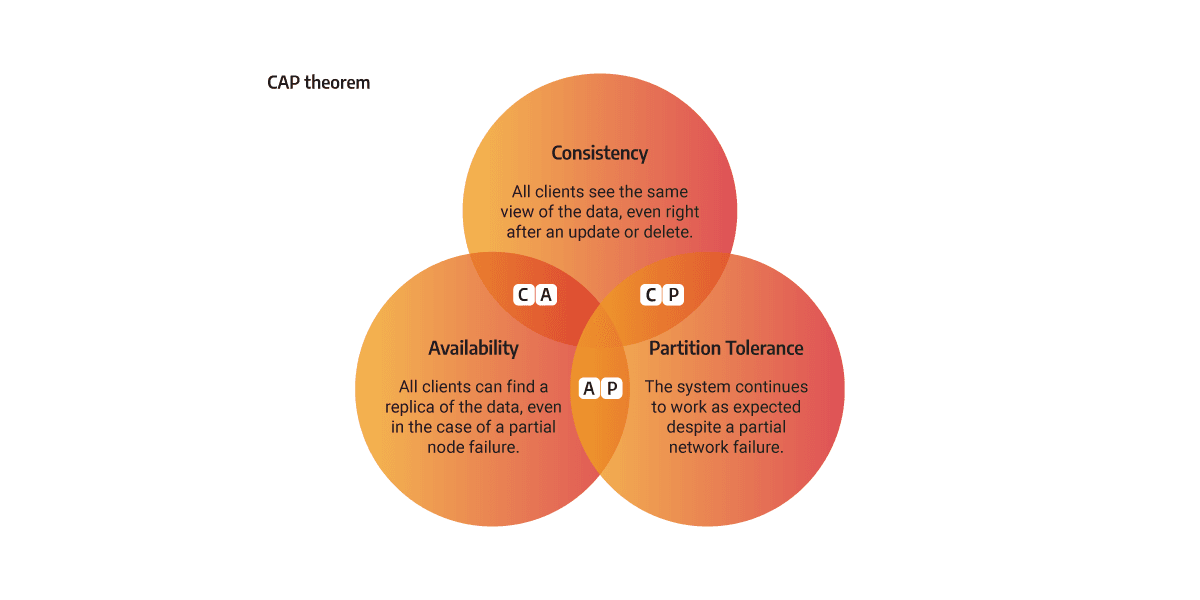
Most of the Memgraph use cases do not benefit from well-known algorithms that strive to achieve all three CAP properties, such as Raft, because due to their complexity, they produce performance issues. Memgraph use-cases are based on running analytical graph workloads on real-time data, demanding a simpler concept such as replication.
Replication consists of replicating data from one storage to one or several other storages. The downside of its simplicity is that only two out of three CAP properties can be achieved.
Implementation in Memgraph
To enable replication, there must be at least two instances of Memgraph in a cluster. Each instance has one of two roles: MAIN or REPLICA.
The MAIN instance can accept read and write queries to the database, while the REPLICA instances accept only read queries.
During the initial startup, all instances are MAIN by default. When creating a replication cluster, one instance has to be chosen as the MAIN instance. The rest of the instances have to be demoted to REPLICA roles. Replicas receive data by creating an RPC replication server which is listening on an arbitrary port.
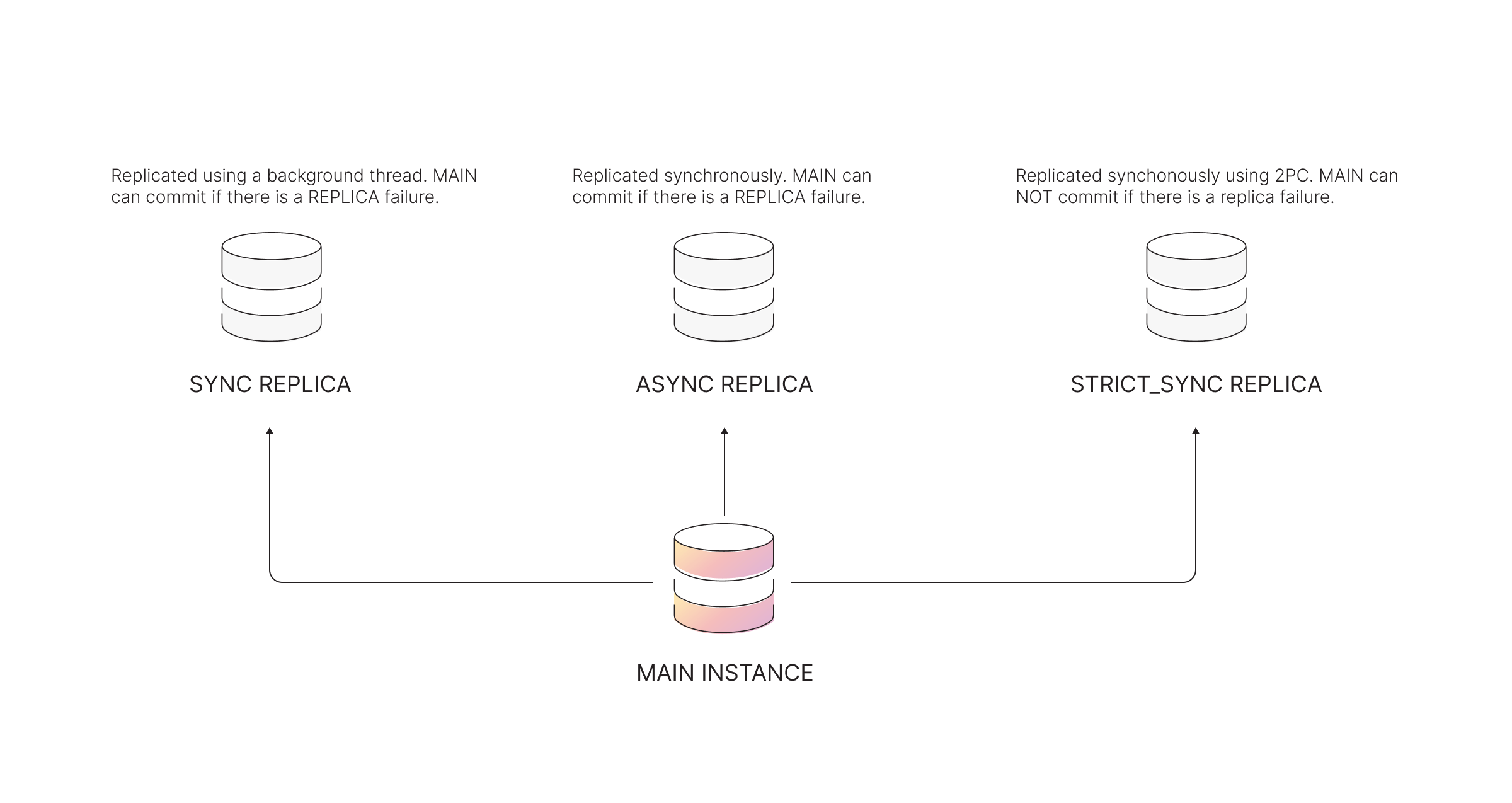
The way MAIN instance replicates data to the REPLICA instances can be carried out in a SYNC, ASYNC, or STRICT_SYNC mode. The replication mode defines the terms by which the MAIN instance can commit the changes to the database, thus modifying the system to prioritize either consistency or availability.
-
STRICT_SYNC mode - Replication is implemented as a two-phase commit protocol (2PC). After committing a transaction, the MAIN instance will communicate the changes to all REPLICA instances and wait until it receives a response or information that a timeout is reached. The STRICT_SYNC mode ensures consistency and partition tolerance (CP), but not availability for writes. If the primary database has multiple replicas, the system is highly available for reads. But, when a replica fails, the MAIN instance can’t process the write due to the nature of synchronous replication.
-
SYNC mode - After committing a transaction, the MAIN instance will communicate the changes to all REPLICA instances and wait until it receives a response or information that a timeout is reached. It is different from STRICT_SYNC mode because it the MAIN can continue committing even in situations when SYNC replica is down.
-
ASYNC mode - The MAIN instance will commit a transaction without receiving confirmation from REPLICA instances that they have received the same transaction. ASYNC mode ensures system availability and partition tolerance (AP), while data can only be eventually consistent.
By using the timestamp, the MAIN instance knows the current state of the REPLICA. If the REPLICA is not synchronized (lagging behind) with the MAIN instance, the MAIN instance sends the correct data for synchronization as WAL files. When all the WAL files have been successfully transferred to the REPLICA instance, the system is then considered to be in-sync. This procedure is similar to how PostgreSQL does replication.
If the REPLICA is so far behind the MAIN instance that the synchronization using WAL files is impossible, Memgraph will use snapshots.
Replication modes
Replication mode defines the terms by which the MAIN instance can commit the changes to the database, thus modifying the system to prioritize either consistency or availability. There are three possible replication modes implemented in Memgraph replication: SYNC, STRICT_SYNC or ASYNC replication mode.
When a REPLICA instance is registered and added to the cluster, it will start replicating to catch up to the current state of the MAIN instance. Initial replication when a REPLICA instance is registered is handled in ASYNC mode by design decision.
When the REPLICA instance synchronizes with the MAIN instance, the replication mode will change according to the mode defined during registration.
SYNC replication mode
SYNC mode is the most straightforward replication mode in which the main storage thread waits for the response and cannot continue until the response is received or a timeout is reached. If the REPLICA fails, MAIN instance will still commit the data and move forward. This behaviour does not block writes on REPLICA failure, and still ensures other REPLICAs to receive new data.
When a SYNC replica fails to confirm a transaction, the transaction is still
committed on the MAIN instance and on every alive replica, so the query
succeeds. Memgraph reports the failure as a WARNING
notification with the code
SyncReplicationFailure, which identifies the specific replica and the reason
for the failure, for example: Failed to replicate to SYNC replica 'instance_1': replica is not reachable or not in sync with the main. Failed
replicas will be recovered automatically.
Breaking change in Memgraph 3.13: a SYNC replication failure used to be
reported as a ReplicationException, which failed the query even though the
write had been committed. It is now reported as a warning notification instead.
Applications that caught the exception around writes should read the
notification from the query summary instead of relying on an error. A
ReplicationException is now raised only when the transaction was actually
rolled back everywhere, which happens in a STRICT_SYNC cluster.
The following diagrams express the behavior of the MAIN instance in cases when SYNC REPLICA doesn’t answer within the expected timeout.
SYNC replication ensures consistency and partition tolerance (CP). However, there is an extremely minimal chance of data loss. For complete consistency without data loss, Memgraph offers STRICT_SYNC replication mode.
STRICT_SYNC replication mode
The STRICT_SYNC replication mode behaves very similarly to a SYNC mode except that MAIN won’t commit a transaction locally in a situation in which one of STRICT_SYNC replicas is down. To achieve that, all instances run together a two-phase commit protocol which allows you such a synchronization. This reduces the throughput but such a mode is super useful in a high-availability scenario in which a failover is the most critical operation to support. Such a mode then allows you a failover without the fear of experiencing a data loss.
When a STRICT_SYNC replica fails to confirm a transaction, the transaction is
aborted on all instances and the query fails with a ReplicationException. The
error message identifies the specific replica and the reason, for example:
Failed to replicate to STRICT_SYNC replica 'instance_2': replica is not reachable or not in sync with the main.
Both phases fan out across replicas in parallel: the prepare phase encodes and ships the transaction to every STRICT_SYNC replica at once (overlapping with the MAIN instance’s WAL write, see parallel WAL writes and delta shipping), and the commit decision of the second phase is sent to all of them concurrently. The throughput cost of the protocol therefore comes from the extra round trip rather than from the number of replicas.
STRICT_SYNC mode ensures consistency and partition tolerance (CP).
ASYNC replication mode
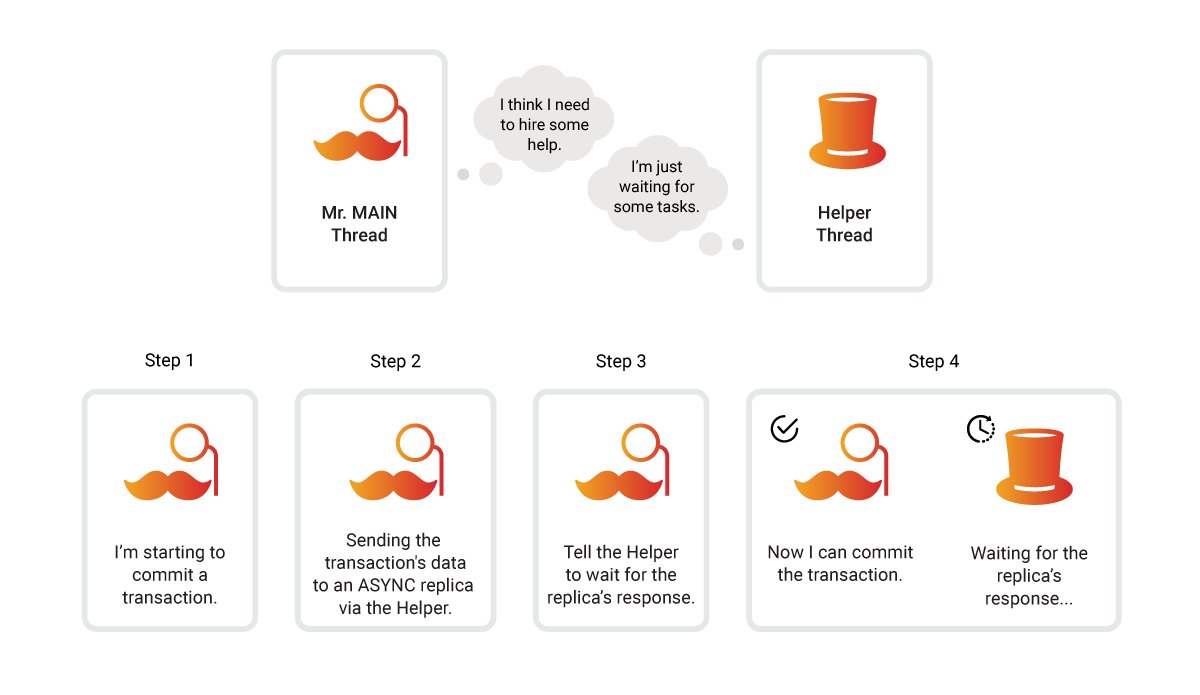
In the ASYNC replication mode, the MAIN instance will commit a transaction without receiving confirmation from REPLICA instances that they have received the same transaction. This means that the MAIN instance does not wait for the response from the REPLICA instances in the main thread but in some other thread.
For each registered REPLICA, the MAIN instance keeps a permanent background worker that carries the commit-path work for that replica: it encodes the transaction, ships it, and receives the confirmation of successful replication. In ASYNC mode the commit thread does not wait for that worker, so confirmations are handled entirely off the main storage thread. A second per-replica worker runs the periodic state checks and recovery, so a long recovery cannot delay replication of new transactions. See parallel WAL writes and delta shipping for how the commit-path workers overlap with the MAIN instance’s own WAL write.
ASYNC mode ensures system availability and partition tolerance (AP).
REPLICA states
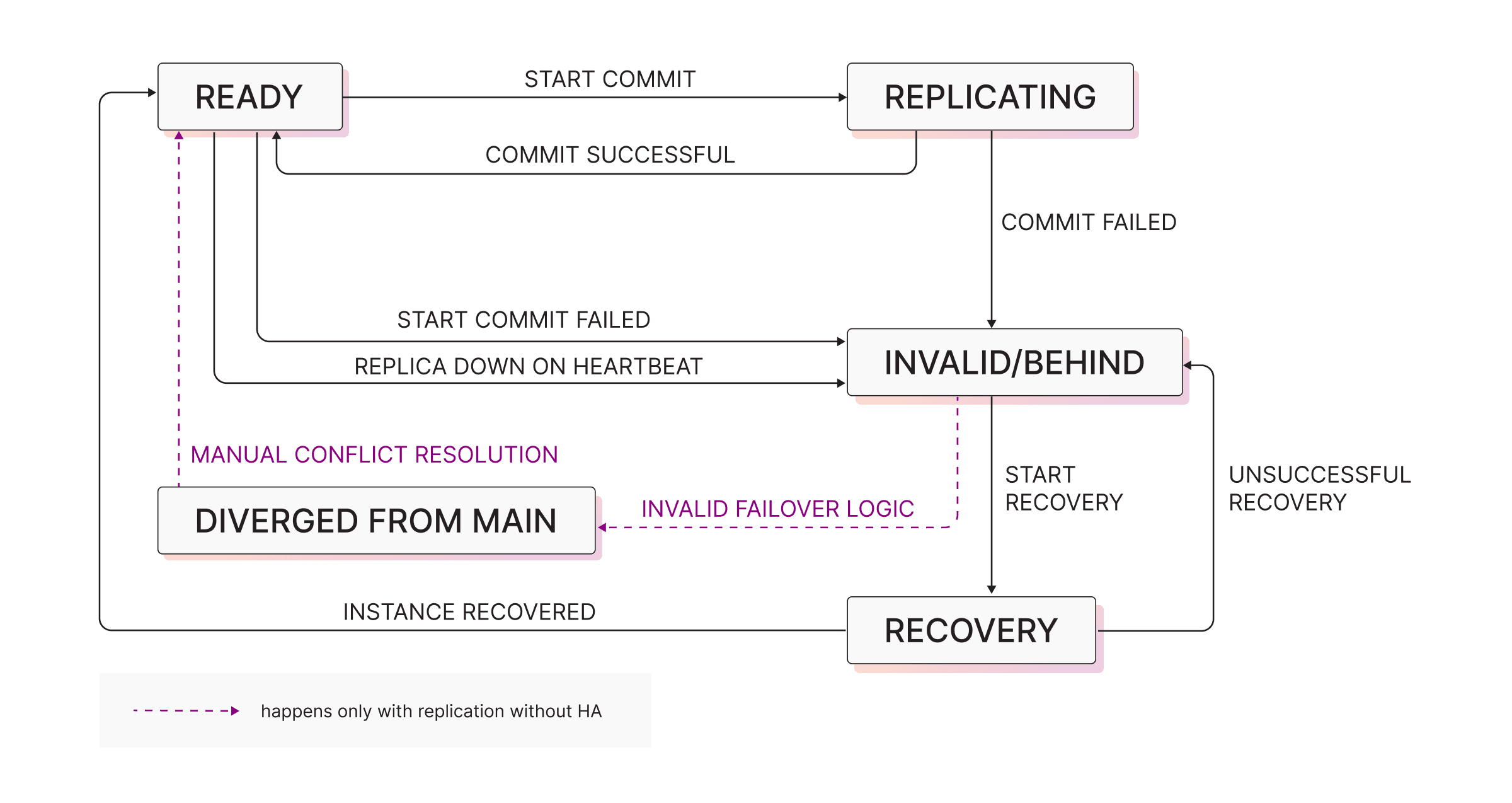
There are 5 states in which replica can be at a point in time:
- READY - replica is not lagging behind and all the data is replicated
- REPLICATING - state the REPLICA is in when it’s receiving transaction commits. If this action succeeds, the replica will again move to READY state. If it fails, it will move to INVALID.
- INVALID/BEHIND - replica is behind, and needs to be synced with MAIN
- RECOVERY - after MAIN detects that a REPLICA is invalid/behind, the REPLICA state is changed to RECOVERY. At this point, the transfer of durability files is performed in order for the REPLICA to catch up with MAIN
- DIVERGED - this is a state in which REPLICA can be found if you’re performing manual failover. Manual conflict resolution and recovery of the cluster is needed in order for this state to convert to READY.
Based on RPC heartbeats, MAIN decides in which state the REPLICA is in at a point in time. REPLICA doesn’t know by itself in which state it is in. It doesn’t need to know that, as MAIN is the sole initiator of synchronization mechanisms when performing replication or recovery.
Instance synchronization
To understand how individual instances are keeping the state of the data in sync, we need to understand the basic durability entities which are replicated from MAIN:
- Snapshots - Point-in-time images of the full database state. Snapshots are the largest durability objects that are replicated
- WALs (write-ahead logs) - Append-only durability files that store sequences of committed deltas. Because WALs are much smaller than snapshots, Memgraph prefers them for recovery when possible.
- Delta objects - The smallest atomic updates produced when MAIN commits a transaction (e.g., create/update/delete of nodes/edges/properties). A single transaction can have multiple deltas that need to be replicated on commit. If the REPLICA is fully in sync, only Delta objects will be replicated during the commit time. For more information about delta objects, please refer to the in-memory transactional storage mode guides.
To learn more about durability in Memgraph, check out the data durability fundamentals.
Each transaction in Memgraph has an auto-incrementing timestamp which acts as a time variable.
In the ideal scenario, the MAIN will just send the Delta objects to the REPLICA. In that case, REPLICA will transfer from READY to REPLICATING state, and then come back again to the READY state. Transfer of delta objects in real-time is the optimal approach, because they’re the smallest units to be transferred over the network. This happy flow ensures the REPLICA is always in-sync with MAIN.
There are a variety of scenarios when that happy flow can not be maintained, such as network issues, or failing of the instance. By comparing timestamps, the MAIN instance knows when a REPLICA instance is not synchronized and is missing some earlier transactions. If the REPLICA is behind (INVALID replica state), it will have a lower timestamp than the MAIN instance. The REPLICA instance is then set into a RECOVERY state, where it remains until it is fully synchronized with the MAIN instance.
The missing data changes can be sent as snapshots or WAL files, which are the main data durability files for Memgraph. Because of the difference in file size, Memgraph favors to send the WAL files over, rather than the snapshots. After all the necessary durability files have been sent over, REPLICA can then move to READY state.
While the REPLICA instance is in the RECOVERY state, the MAIN instance calculates the optimal synchronization path based on the REPLICA instance’s timestamp and the current state of the durability files while keeping the overall size of the files necessary for synchronization to a minimum.
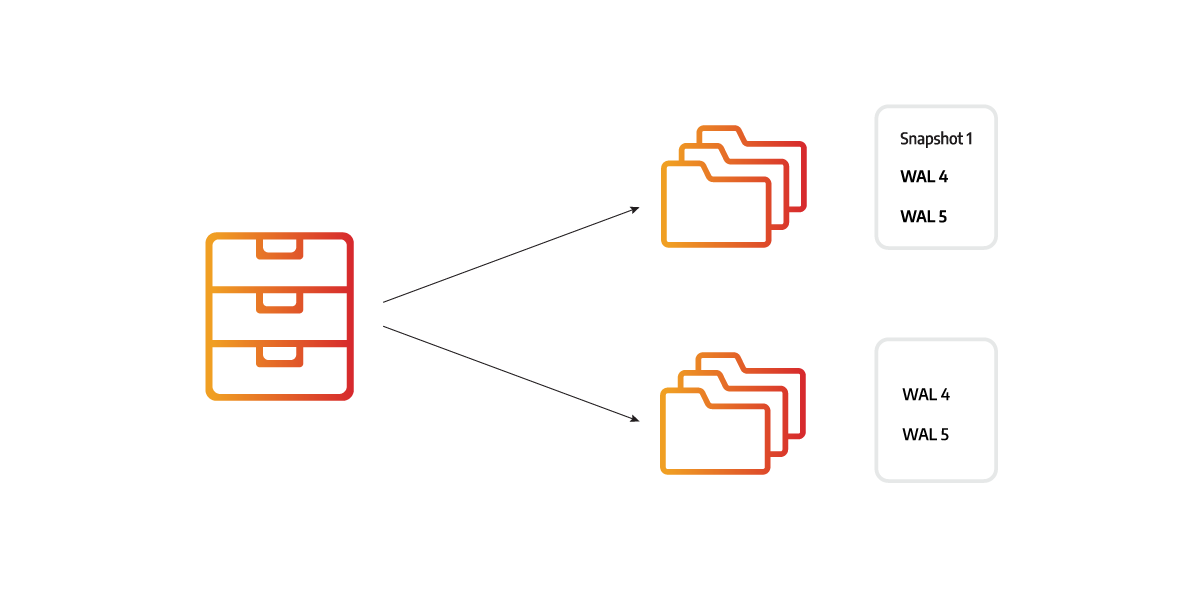
Imagine there were 5 changes made to the database. Each change is saved in a WAL file, so there are 5 WAL files, and the snapshot was created after 3 changes. The REPLICA instance can be synchronized using a snapshot and the 2 latest WAL files or using 5 WAL files. Both options would correctly synchronize the instances, but 5 WAL files are much smaller.
If the RECOVERY did not succeed, the REPLICA again moves back and forth the INVALID and RECOVERY states. Reason for this can again be network issues, but also data corruption. If you believe the system is not able to recover at all, please contact our Enterprise support or Discord channel.
Multi-tenant data replication Enterprise
Memgraph’s multi-tenancy offers management of multiple logically isolated databases. The word database here is a synonym to a tenant. Learn more about this in our multi-tenancy documentation page.
When running multi-tenancy, there can be multiple durability files sent over the network for each database. To ensure correct mapping between the MAIN and REPLICA databases, each database has its own database UUID. When creating a new database on MAIN, the database is also replicated to the REPLICAs, as well as the identical UUIDs of the databases. This ensures there is a mapping between the set of MAIN databases and the set of REPLICA databases.
When sending replication data over the network, durability files are also assigned the database UUID. It serves as a unique location of which database to apply the durability files to in the replicas.
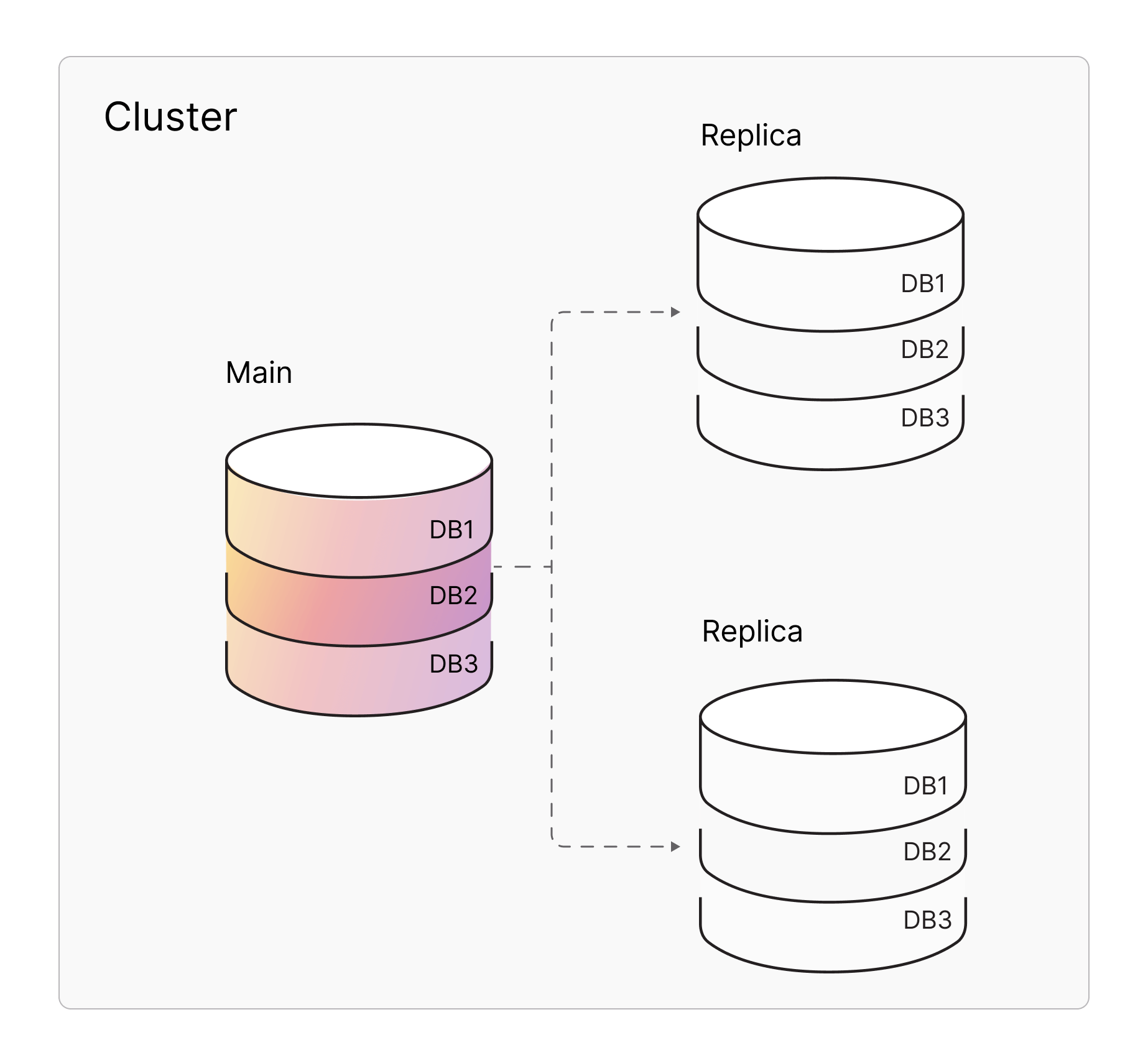
Ensure replication / high-availability at the very beginning in order to make sure the correct information is replicated from MAIN to REPLICA. In this particular case, if you created databases respectively on the standalone instances, and then connected the cluster, it would not work because UUIDs are generated randomly. The operation would end up in a mismatch of database UUIDs, and you would not be able to recover the cluster.
Advanced replication topics
The following section explains highly technical topics, dedicated to those who would like to know more about technical implementations of replication in Memgraph.
The durability files are constantly being created, deleted, and appended to. Also, each replica could need a different set of files to sync. There are several ways to ensure that the necessary files persist and that instances can read the WAL files currently being updated without affecting the performance of the rest of the database.
Locking durability files
Durability files are also used for recovery and are periodically deleted to eliminate redundant data. The problem is that they can be deleted while they are being used to synchronize a REPLICA with the MAIN instance.
To delay the file deletion, Memgraph uses a file retainer that consists of multiple lockers. Threads can store and lock the files they found while searching for the optimal recovery path in the lockers, thus ensuring the files will still exist once they are sent to the REPLICA instance as a part of the synchronization process. If another part of the system sends a deletion request for a certain file, the file retainer first checks if that file is locked in a locker. If it is not, it is deleted immediately. If the file is locked, the file retainer adds the file to the deletion queue. The file retainer will periodically clean the queue by deleting the files that are no longer locked inside the locker.
Writing and reading files simultaneously
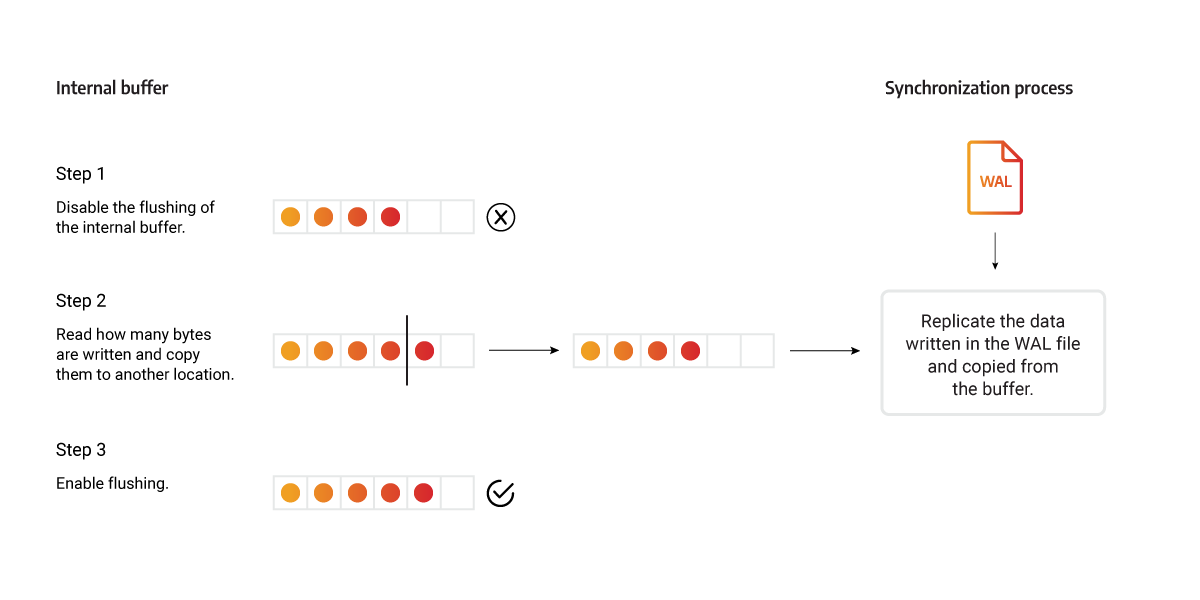
Memgraph internal file buffer is used when writing deltas to WAL files, and mid-writing, the content of one WAL file can be divided across two locations. If at that point that WAL file is used to synchronize the REPLICA instance, once the data is being read from the internal buffer, the buffer can be flushed, and the REPLICA could receive an invalid WAL file because it is missing a chunk of data. It could also happen that the WAL file is sent before all the transactions are written to the internal buffer.
To avoid these issues, flushing of that internal buffer is disabled while the current WAL is sent to a REPLICA instance. To get all the data necessary for the synchronization, the replication thread reads the content directly from the WAL file, then reads how many bytes are written in the buffer and copies the data to another location. Then the flushing is enabled again, and the transaction is replicated using the copied buffer. Because the access to the internal buffer was not blocked, new data can be written. The content of the buffer (including any new data) is then written in a new WAL file that will be sent in the next synchronization process.
Parallel WAL writes and delta shipping
When the MAIN instance commits a transaction, it has to do two things: make the transaction durable in its own WAL file, and hand the transaction’s deltas to every registered REPLICA. Both happen on the commit path, but they do not happen one after another.
The commit thread walks the transaction’s deltas once and records everything that has to be written. It then schedules one task per streaming REPLICA — each task encodes the whole transaction (metadata deltas first, then data deltas) into that replica’s RPC stream, on that replica’s own background worker — and writes its own WAL inline, at the same time. Encoding for all replicas and the WAL write therefore overlap instead of running in sequence. This matters most on clusters with several replicas, where commit latency no longer grows linearly with the number of registered replicas.
Shipping remains gated on durability. After it finishes encoding, each per-replica task waits for the MAIN instance’s WAL write to complete before it sends the transaction end that allows the REPLICA to apply the transaction. If the WAL write fails, that gate never opens, the task drops its stream instead of shipping, and no REPLICA can commit a transaction the MAIN instance did not make durable.
Ordering and failure containment are preserved:
- Each replica has a single commit-path worker, so transactions reach a given REPLICA in the same order the MAIN instance committed them.
- WAL order still follows the MAIN instance’s commit order, because the WAL write happens while the commit holds the storage engine lock.
- A failure while encoding or shipping to one REPLICA is contained to that REPLICA: its stream is dropped, it is marked as behind, and it is picked up by recovery. The MAIN instance and the remaining replicas still commit, and the failure is reported for SYNC and STRICT_SYNC replicas exactly as described in replication modes.
The commit thread collects every per-replica task before it publishes the transaction’s commit timestamp, because encoding reads live node and edge state that later transactions may overwrite in place. Waiting for a replica’s reply still follows the replica’s replication mode: SYNC and STRICT_SYNC block the commit, ASYNC does not.
Fixing timestamp consistency
Timestamps are used to compare the state of the REPLICA instance in comparison to the MAIN instance.
At first, we used the current timestamp without increasing its value for global operations, like creating an index or creating a constraint. By using a single timestamp, it was impossible to know which operations the REPLICA had applied because sequential global operations had the same timestamp. To avoid this issue, a unique timestamp is assigned to each global operation.
As replicas allow read queries, each of those queries was assigned with its own timestamp. Those timestamps caused issues when the replicated write transactions were assigned an older timestamp. A read transaction would return different data from the same read query if a transaction was replicated between those two read transactions which obstructed the snapshot isolation. To avoid this problem, the timestamp on REPLICA instances isn’t increased because the read transactions don’t produce any changes, so no deltas need to be timestamped.
Epoch ID as a complement to timestamp ID
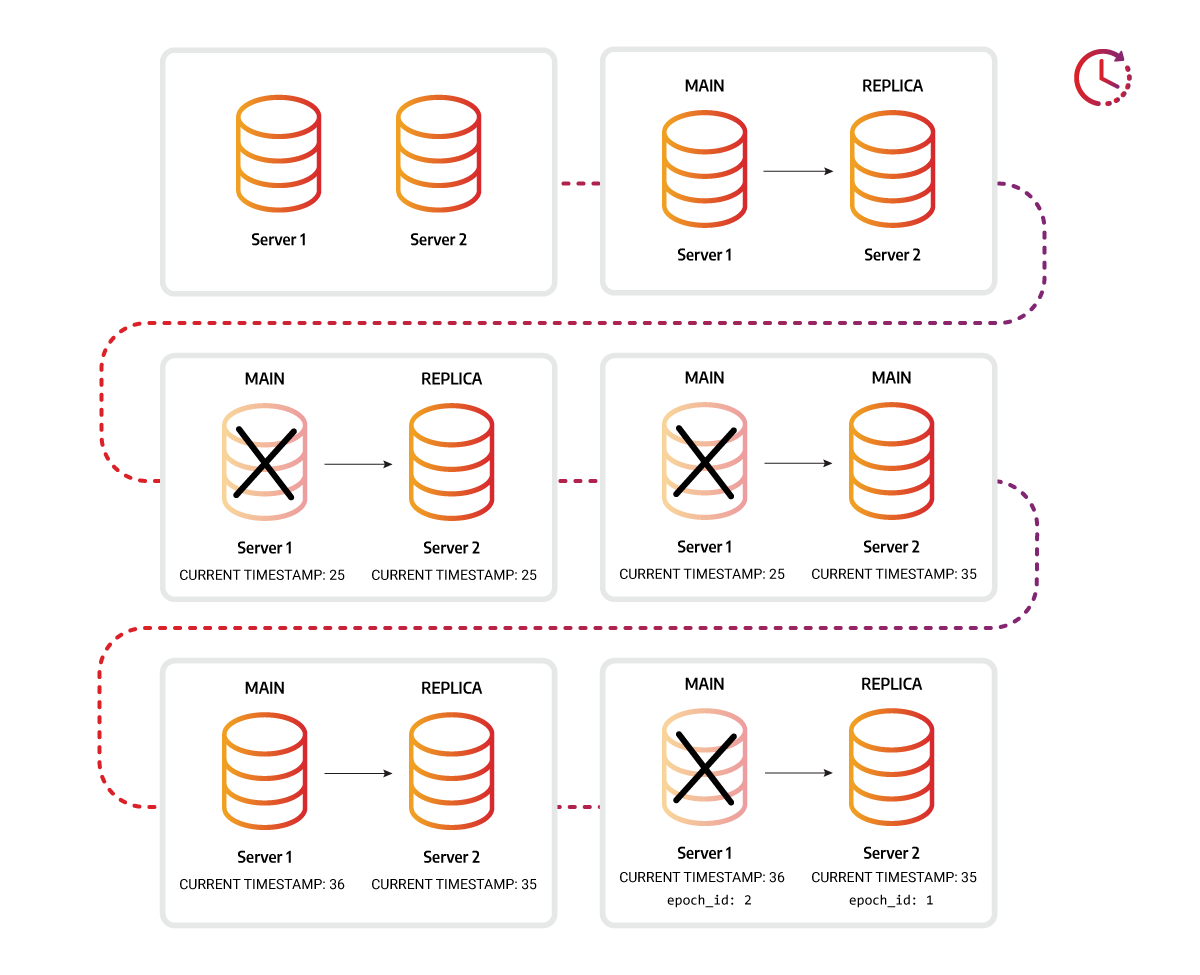
A unique ID epoch_id is also assigned each time an instance is run as the MAIN
instance in the replication cluster to check if the data is compatible for
replication. The epoch_id is necessary when the original MAIN instance fails,
a REPLICA instance becomes a new MAIN, and after some time, the original MAIN
instance is brought back online. If no transactions were run on the original
MAIN instance, the difference in timestamps will indicate that it is behind the
new MAIN, and it would be impossible to set the original MAIN-REPLICA
relationship. But if the transactions were run on the original MAIN after it was
brought back online, the timestamp would be of no help, but the epoch_id would
indicate incomparability, thus preventing the original MAIN from reclaiming its
original role.
Progress reporting during long recovery steps
When the MAIN sends a REPLICA a transaction, a set of WAL files, or a snapshot, it waits a bounded amount of time for the REPLICA’s response before dropping the connection. Some of the work a REPLICA does while answering such a request is not divided into small steps: populating an index, validating a constraint, loading a snapshot, clearing storage before a reset, and aborting an interrupted two-phase commit all walk the entire dataset and can run for minutes on a large tenant.
To keep those requests alive, a REPLICA emits an in-progress message on a fixed interval for as long as the operation it is running keeps advancing. The message carries no data — it only tells the MAIN that the REPLICA is still working, so the MAIN extends its wait instead of closing the socket. Reporting is tied to actual advancement rather than to wall-clock time alone: an operation that stops progressing stops reporting, so a REPLICA that is genuinely stuck is still caught by the MAIN’s timeout rather than kept alive indefinitely by a blind keepalive.
If the MAIN disappears while a REPLICA is populating an index or validating a constraint, the REPLICA abandons that build instead of finishing work whose result can no longer be delivered. Loading a snapshot is the exception: the data is already on disk at that point, so the REPLICA finishes deriving indices and constraints from it. That advances its commit timestamp, which means a reconnecting MAIN may only need to ship WAL deltas from that point rather than the whole snapshot again.
Progress reporting used to be driven by the number of processed deltas, tunable
through the deltas_batch_progress_size coordinator setting. That setting has
had no effect since 3.13. See the HA commands
reference.
System data replication
We have outlined in the main section of this guide how graph data replication works. When we talk about data storage, we strictly mean the graph itself, along with the complementary performance and correctness data structures, such as nodes, relationships, properties, indices, constraints, triggers, and streams. For replication support of non-graph data, such as authentication configurations, multi-tenant data, please refer to the system replication reference.