Local graph search
Local graph search answers a question from the part of the knowledge graph around the entities it’s about. It’s the GraphRAG pipeline for local questions, such as “What is connected to NVIDIA?”
It has two steps:
- Pivot search finds the starting nodes, called pivot nodes, with vector, text or geospatial search.
- Relevance expansion collects the context around the pivot nodes with traversals, community detection or centrality algorithms.
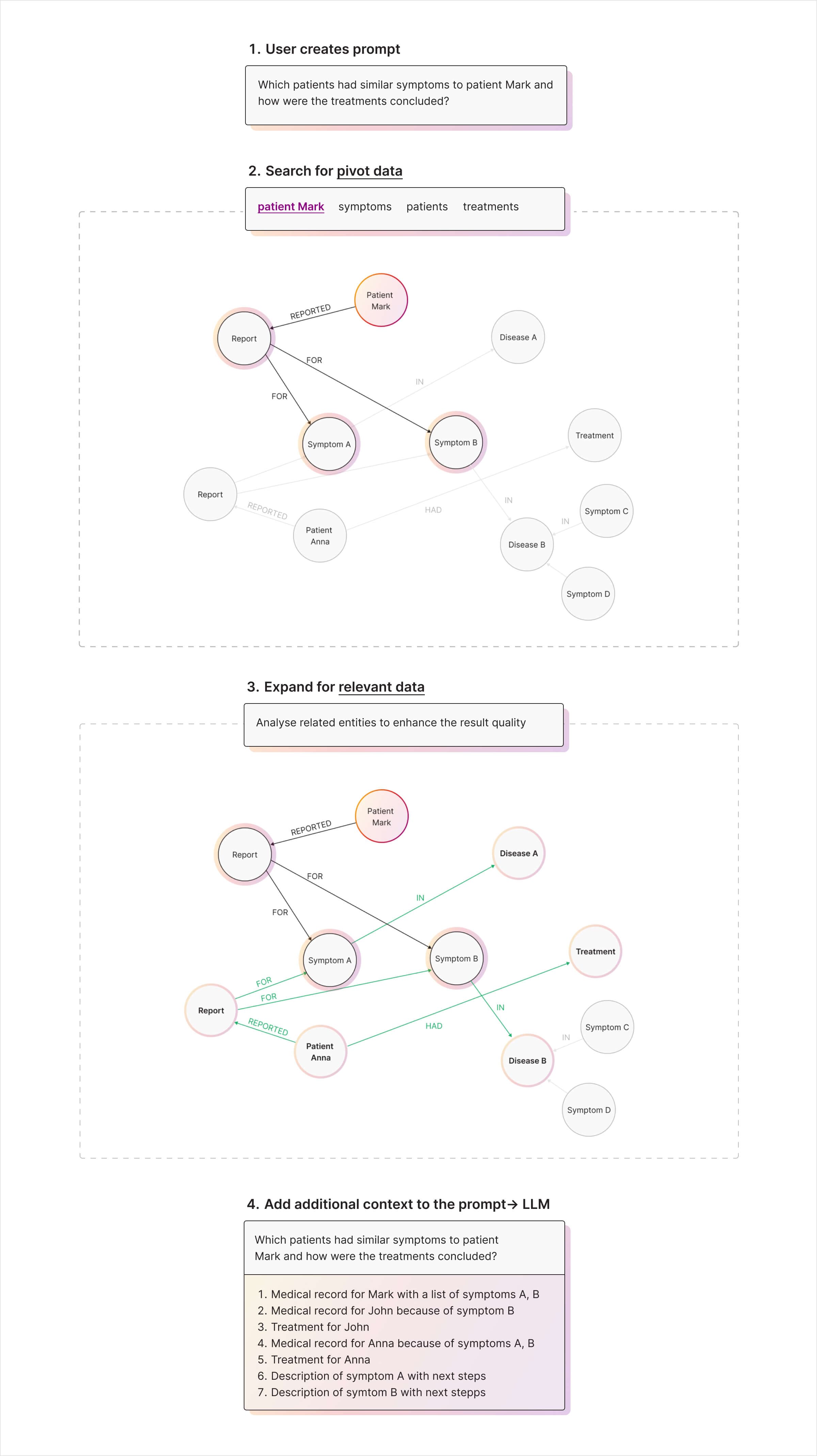
In this example from medical records, pivot search finds the patient a question names, and relevance expansion adds the symptoms, treatments and similar patients connected to them before the context goes to the LLM:
Which methods to use depends on your data and the questions you expect. See Choose a retrieval strategy.
Retrieval types
The methods below are grouped by the step they belong to.
Pivot search
Pivot search finds the nodes a question is about, where the retrieval starts.
Vector search
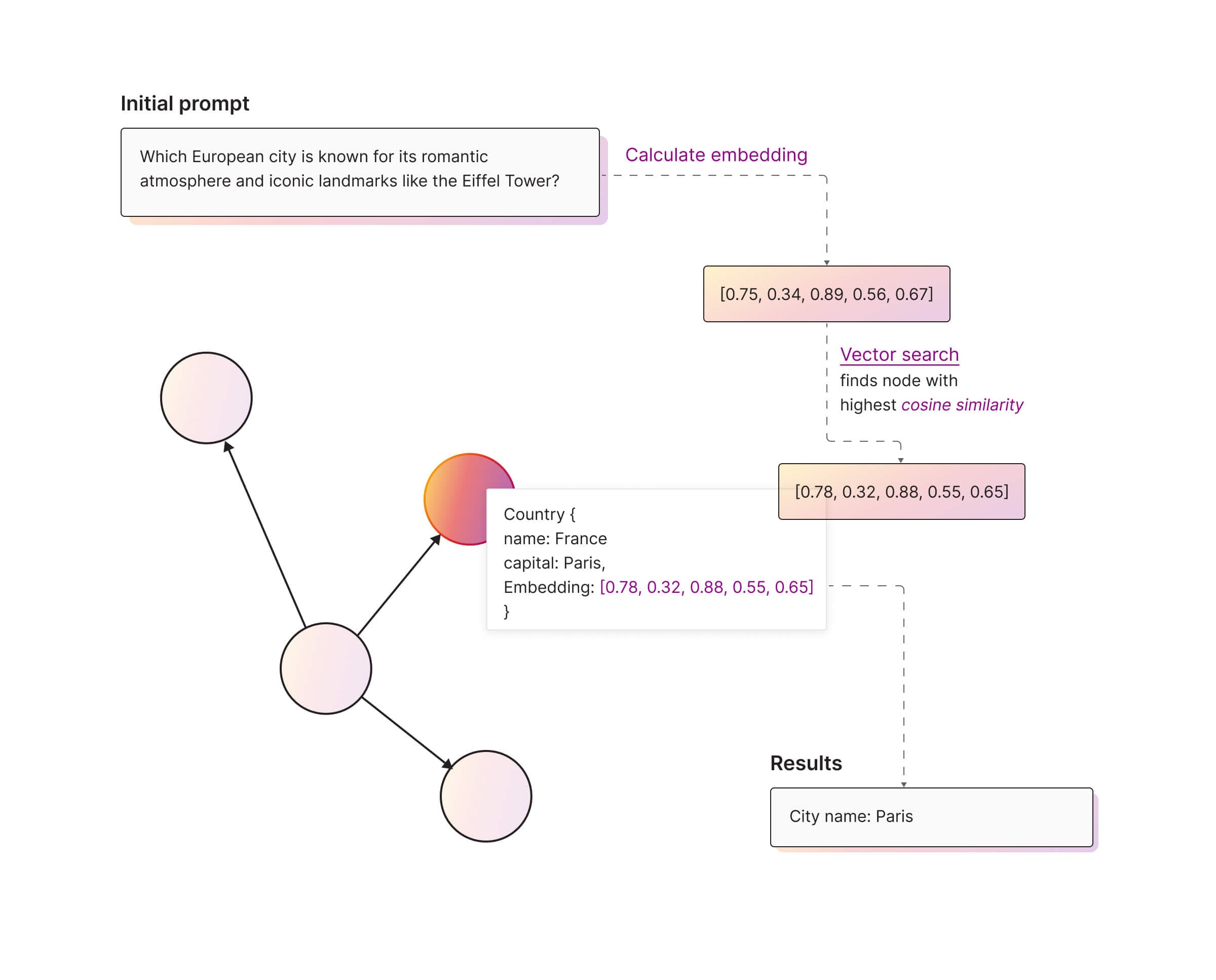
Vector search finds nodes by the similarity of their embeddings, not by exact words. Use it when the meaning of the question matters more than its terms, for example to find similar topics or concepts.
For the question “Which European city is known for its romantic atmosphere and iconic landmarks like the Eiffel Tower?”, vector search finds the node most similar to “romantic atmosphere” and “iconic landmarks”, which leads to Paris:
Read more
- Vector search
- Simplify Data Retrieval with Memgraph’s Vector Search
- Building a Movie Similarity Search Engine with Vector Search in Memgraph
Text search
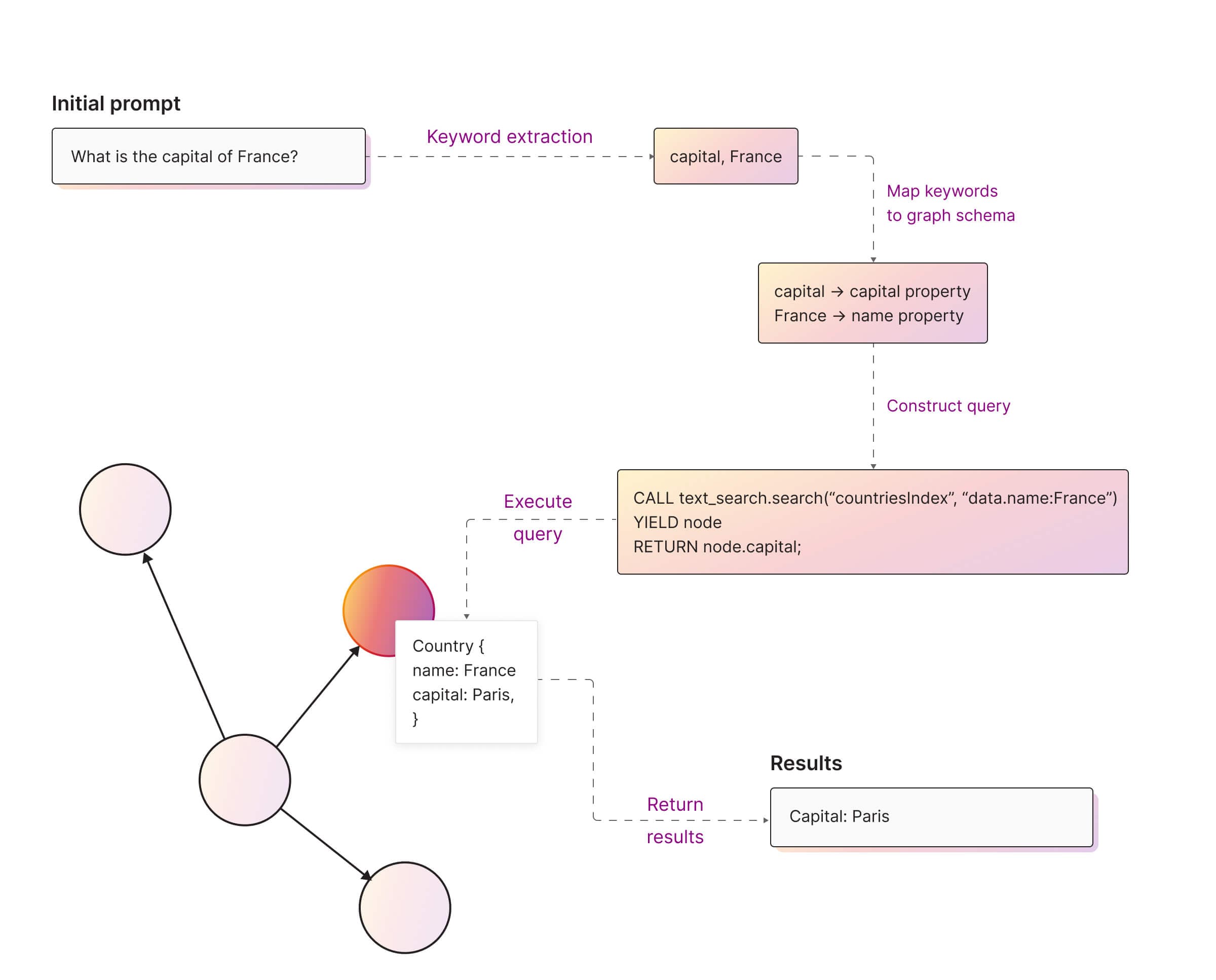
Text search finds nodes by the words in their properties. Use it for questions that name specific terms, phrases or entities, for example “Find all nodes that mention climate change”.
For the question “What is the capital of France?”, the keywords map to the
name and capital properties, and a text search query finds the node:
For details, see Text search.
Geospatial search
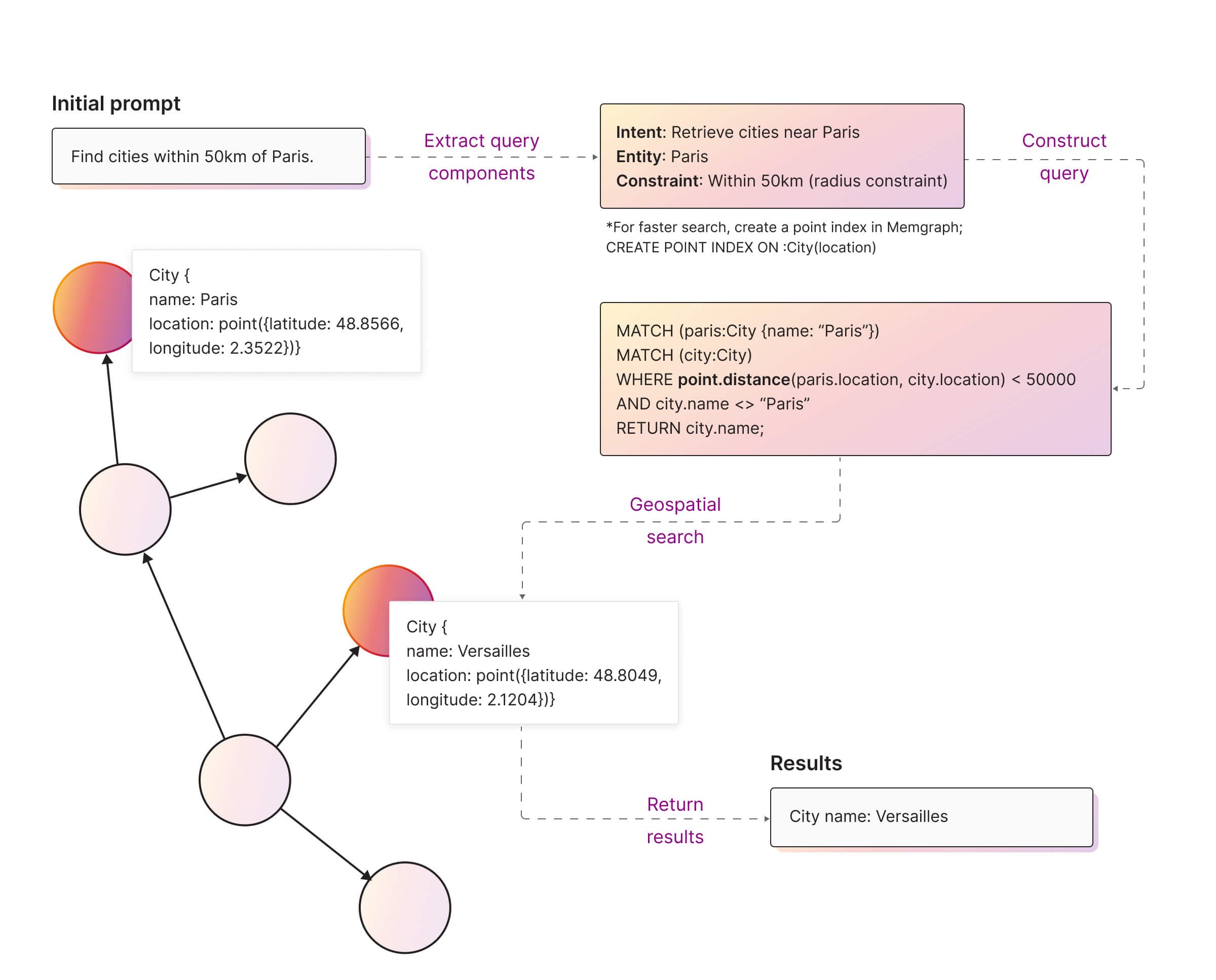
Geospatial search finds nodes by location. Store locations as the Point
type, with latitude and longitude, and create
a point index for proximity queries.
For the question “Find cities within 50 km of Paris”, the query compares the distance between city locations and returns Versailles:
Hybrid knowledge retrieval
Hybrid retrieval combines text, vector and geospatial search in one query, for questions whose results must match on meaning, specific terms and location at once. For example:
Find all nearby Italian restaurants with excellent reviews and vegetarian options.
Relevance expansion
Relevance expansion adds the entities and relationships connected to the pivot nodes to the context. It’s optional, and it gives the LLM the connections that a similarity search alone doesn’t return.
Deep path traversals
Deep path traversals follow relationships from the pivot nodes across one or more hops. Memgraph has them built into Cypher, so they need no extra module. The nodes and relationships on the paths go into the LLM prompt as context.
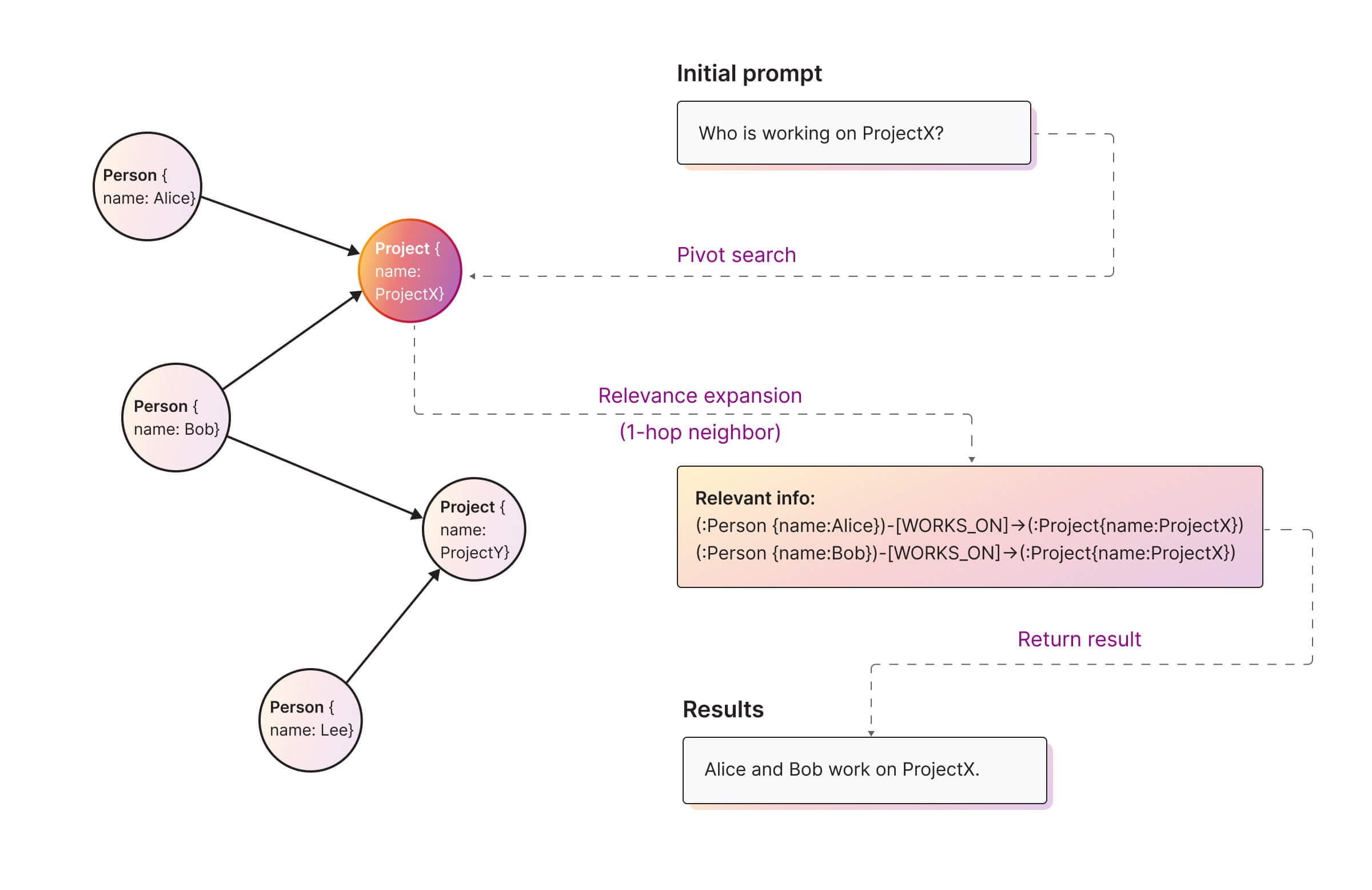
For the question “Who is working on ProjectX?”, pivot search finds the ProjectX node, and a one-hop expansion returns the people connected to it:
Read more:
- Deep path traversal algorithms
- Memgraph’s Deep Path Traversal Capabilities
- Memgraph Cypher Implementation: Flexibility and Advanced Traversals
Community detection
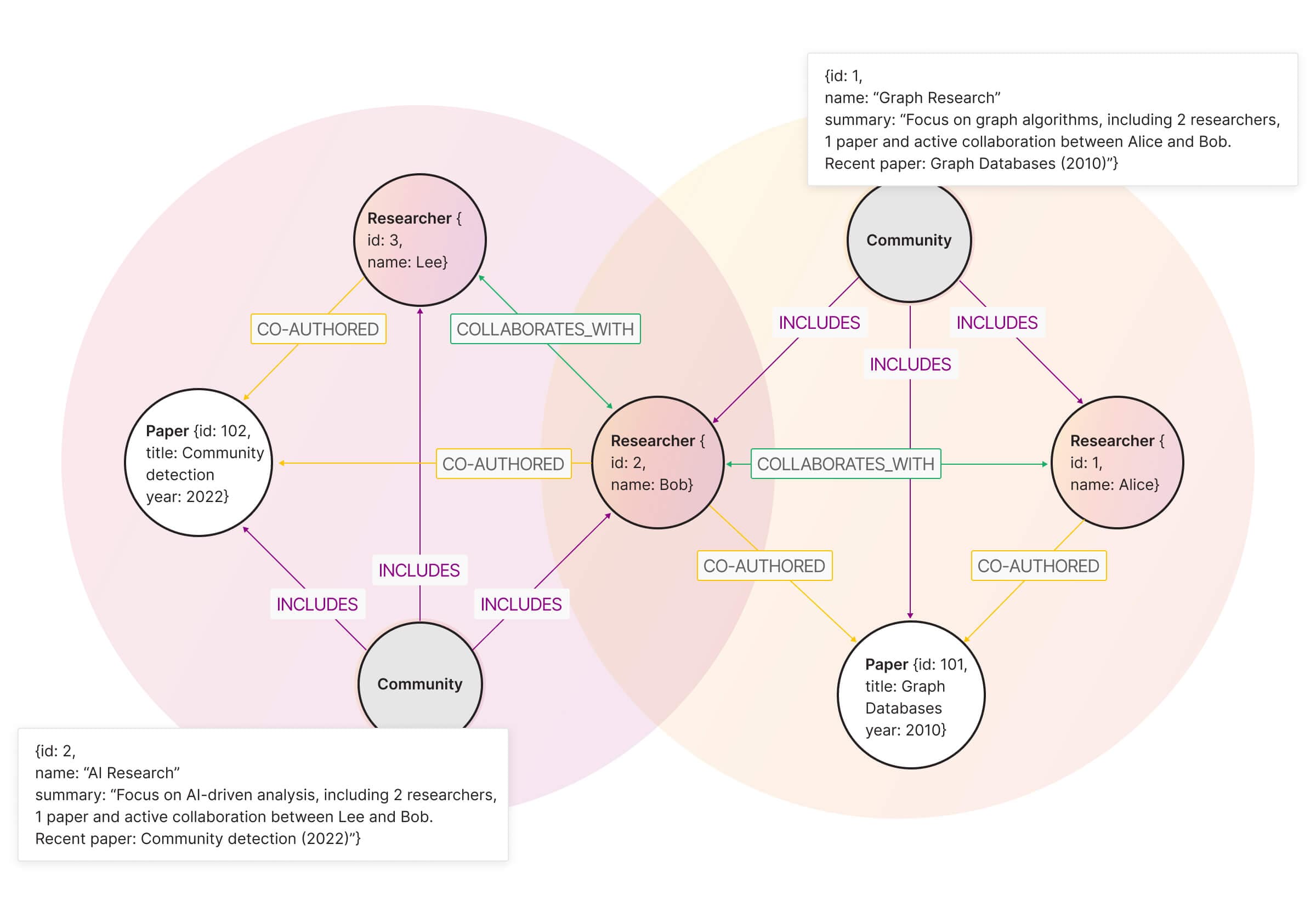
Community detection algorithms, such as Leiden or Louvain, group closely connected nodes into communities. You can summarize each community into a community node and add the summary of a pivot node’s community to the context, instead of searching the whole graph:
Centrality measures
Centrality algorithms rank nodes by their position in the graph, so you can put the most central or influential nodes first in the context:
- PageRank ranks nodes by influence, which puts highly connected information first.
- Betweenness centrality ranks the nodes that connect communities or topics, so the context covers how they relate.
For example, if several nodes could answer a question, rank them by PageRank and keep the most important ones.
Choose a retrieval strategy
Choose the methods for each step by the kind of question you expect:
| Question | Pivot search | Relevance expansion | Example |
|---|---|---|---|
| Fact | Vector or text search | Little or none | “Where was Memgraph founded?” |
| Relationship | Vector or text search | 1-hop or 2-hop traversal | “Who collaborates on Memgraph?” |
| Context | Vector or text search | Community detection | “Can you give me more details about Memgraph?” |
| Path | Vector or text search | Deep path traversal | “How is Alice connected to Memgraph?” |
| Location | Geospatial search | 1-hop traversal | “How many employees work within a 50-mile radius?” |
Most applications need some tuning beyond this table. For complete applications, see the GraphRAG examples.