LangChain
LangChain is a framework for building
applications with large language models (LLMs). The Memgraph integration,
langchain-memgraph, has three parts:
MemgraphToolkitgives a LangGraph agent tools for querying Memgraph and reading its schema.LLMGraphTransformerwithadd_graph_documents()builds a knowledge graph in Memgraph from unstructured text.MemgraphQAChainanswers questions in natural language by generating and running Cypher queries.
You need a running Memgraph instance. To start one, see Getting started. The examples use OpenAI, so you also need an OpenAI API key.
Build an agent with the Memgraph toolkit
The toolkit is built on the Memgraph Toolbox and has these tools:
| Tool | What it does |
|---|---|
RunQueryTool | Runs a Cypher query |
RunSearchSchemaTool | Searches the graph schema by a regular expression |
RunNodeSchemaTool | Returns the schema of a node by its labels |
RunRelationshipSchemaTool | Returns the schema of a relationship |
RunEnumSchemaTool | Returns the definition of an enum by its name |
To ask for another tool, open an issue in the Memgraph AI Toolkit repository, or contribute one with a pull request.
Install the packages. The toolkit needs langgraph:
pip install langchain langchain-openai langchain-memgraph langgraphConnect to Memgraph, create the toolkit and give its tools to an agent. The
connection settings come from the MEMGRAPH_URL, MEMGRAPH_USER and
MEMGRAPH_PASSWORD environment variables, with defaults for a local Memgraph
without authentication:
import os
from langchain.chat_models import init_chat_model
from langchain_memgraph import MemgraphToolkit
from langchain_memgraph.graphs.memgraph import MemgraphLangChain
from langgraph.prebuilt import create_react_agent

url = os.getenv("MEMGRAPH_URL", "bolt://localhost:7687")
username = os.getenv("MEMGRAPH_USER", "")
password = os.getenv("MEMGRAPH_PASSWORD", "")

llm = init_chat_model("gpt-4o-mini", model_provider="openai")

db = MemgraphLangChain(url=url, username=username, password=password)
toolkit = MemgraphToolkit(db=db, llm=llm)

agent_executor = create_react_agent(
    llm,
    toolkit.get_tools(),
    prompt="You will get a cypher query, try to execute it on the Memgraph database.",
)
Run the agent with a request. It chooses a tool from the toolkit and uses it to answer:
example_query = "MATCH (n) WHERE n.name = 'Jon Snow' RETURN n"
events = agent_executor.stream(
    {"messages": [("user", example_query)]},
    stream_mode="values",
)

for event in events:
    event["messages"][-1].pretty_print()
Build and query a knowledge graph
You can also follow this example in the LangChain docs.
Install the packages:
pip install langchain langchain-openai langchain-memgraph langchain-experimentalConnect to Memgraph. refresh_schema=False skips reading the schema, because
the database is still empty:
import os
from langchain_core.documents import Document
from langchain_experimental.graph_transformers import LLMGraphTransformer
from langchain_memgraph.chains.graph_qa import MemgraphQAChain
from langchain_memgraph.graphs.memgraph import MemgraphLangChain
from langchain_openai import ChatOpenAI

url = os.getenv("MEMGRAPH_URL", "bolt://localhost:7687")
username = os.getenv("MEMGRAPH_USER", "")
password = os.getenv("MEMGRAPH_PASSWORD", "")

graph = MemgraphLangChain(
    url=url, username=username, password=password, refresh_schema=False
)
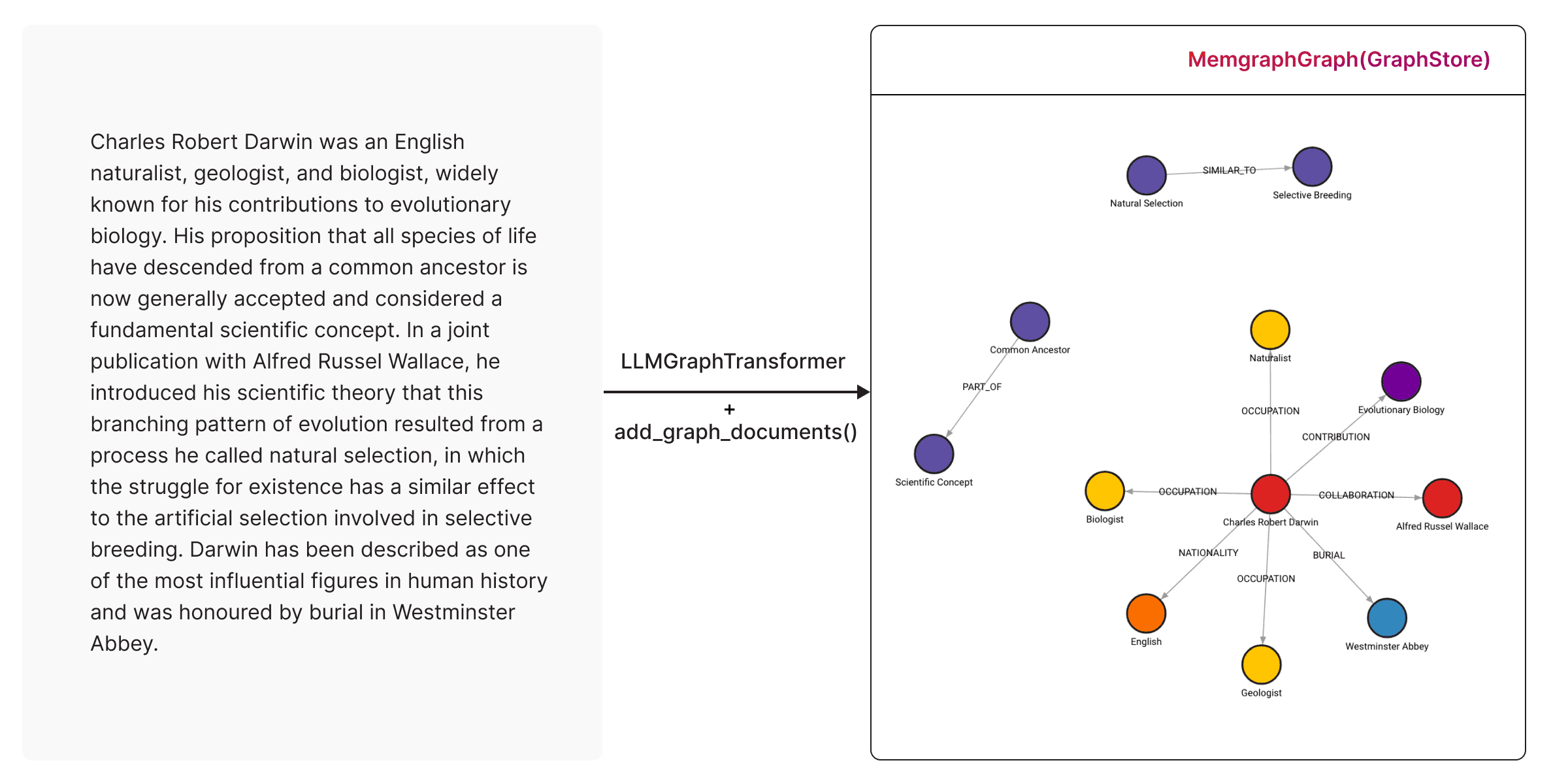
The example builds the graph from this text about Charles Darwin:
text = """
    Charles Robert Darwin was an English naturalist, geologist, and biologist,
    widely known for his contributions to evolutionary biology. His proposition that
    all species of life have descended from a common ancestor is now generally
    accepted and considered a fundamental scientific concept. In a joint
    publication with Alfred Russel Wallace, he introduced his scientific theory that
    this branching pattern of evolution resulted from a process he called natural
    selection, in which the struggle for existence has a similar effect to the
    artificial selection involved in selective breeding. Darwin has been
    described as one of the most influential figures in human history and was
    honoured by burial in Westminster Abbey.
"""
LLMGraphTransformer uses the LLM to turn the text into graph documents:
llm = ChatOpenAI(temperature=0, model_name="gpt-4-turbo")
llm_transformer = LLMGraphTransformer(llm=llm)
documents = [Document(page_content=text)]
graph_documents = llm_transformer.convert_to_graph_documents(documents)
add_graph_documents() turns the graph documents into Cypher queries and runs
them in Memgraph. This example empties the database first:
graph.query("STORAGE MODE IN_MEMORY_ANALYTICAL")
graph.query("DROP GRAPH")
graph.query("STORAGE MODE IN_MEMORY_TRANSACTIONAL")

graph.add_graph_documents(graph_documents)
The text becomes a knowledge graph in Memgraph:
For more options, see the LangChain guide.
To query the graph in natural language, create a MemgraphQAChain. It reads
the schema, so refresh it first:
graph.refresh_schema()

chain = MemgraphQAChain.from_llm(
    ChatOpenAI(temperature=0),
    graph=graph,
    model_name="gpt-4-turbo",
    allow_dangerous_requests=True,
)
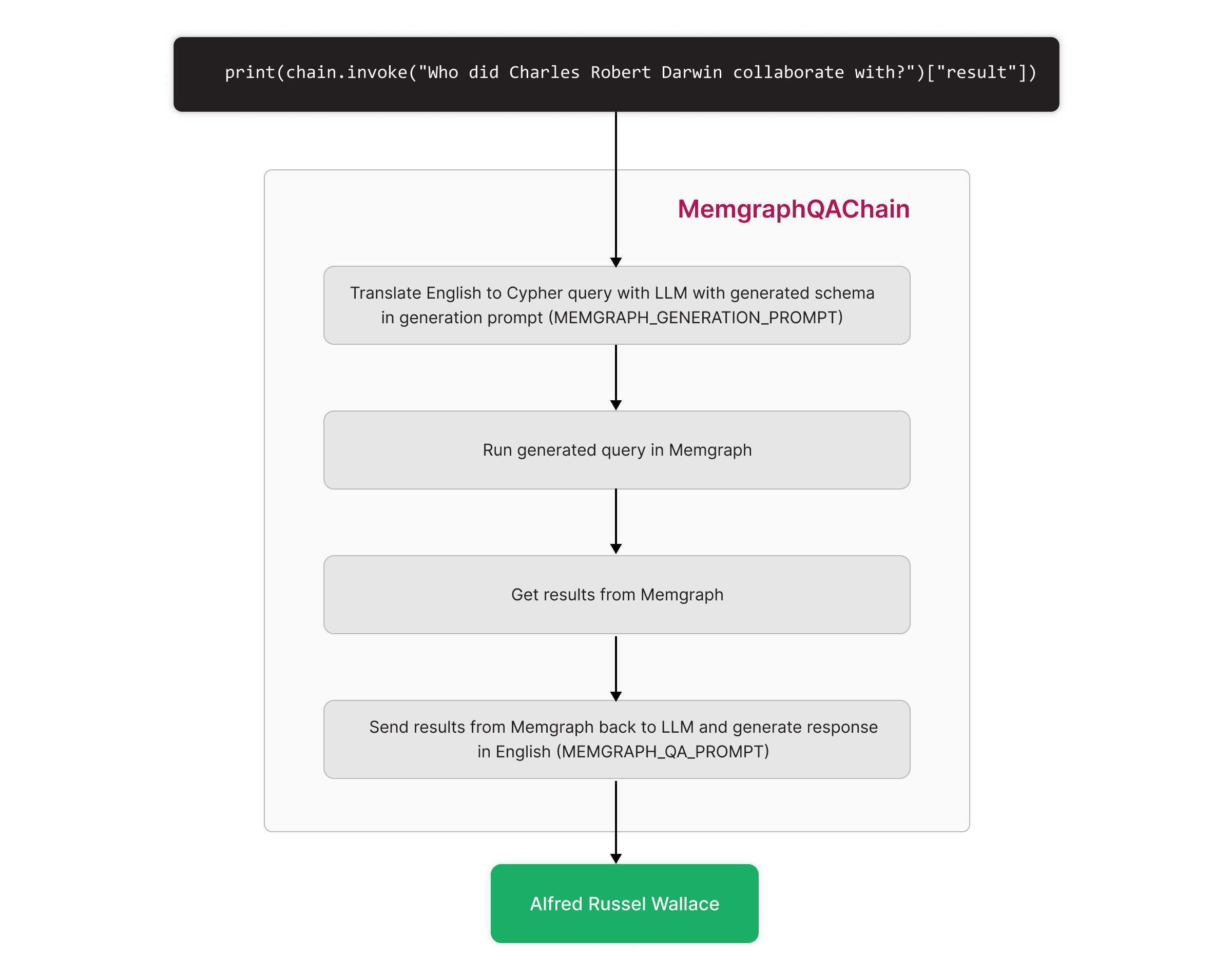
print(chain.invoke("Who did Charles Robert Darwin collaborate with?")["result"])
The chain generates and runs this query, and answers with the result:
MATCH (:Person {id: "Charles Robert Darwin"})-[:COLLABORATION]->(collaborator)
RETURN collaborator;
Alfred Russel Wallace
allow_dangerous_requests=True confirms that you allow the chain to run the
queries the LLM generates. Use a database user with only the privileges the
chain needs.
The chain generates a Cypher query with the LLM, runs it in Memgraph and sends the result back to the LLM for the answer: