LlamaIndex
LlamaIndex is a data framework for connecting your own data to large language models (LLMs). With the Memgraph graph store, LlamaIndex builds a knowledge graph in Memgraph from unstructured data and answers questions about it in natural language. You can also follow the example in the LlamaIndex docs.
Installation
Install LlamaIndex and the Memgraph graph store:
pip install llama-index llama-index-graph-stores-memgraphEnvironment setup
You need a running Memgraph instance. To start one, see Getting started.
Create the graph store with the connection details of your database:
from llama_index.graph_stores.memgraph import MemgraphPropertyGraphStore

username = ""  # Enter your Memgraph username (default "")
password = ""  # Enter your Memgraph password (default "")
url = ""  # Specify the connection URL, e.g., 'bolt://localhost:7687'

graph_store = MemgraphPropertyGraphStore(
    username=username,
    password=password,
    url=url,
)
The example uses OpenAI, so set your OpenAI API key:
import os
os.environ["OPENAI_API_KEY"] = "YOUR_OPENAI_API_KEY"
Dataset
The example uses this text about Charles Darwin, saved in the
./data/charles_darwin/charles.txt file:
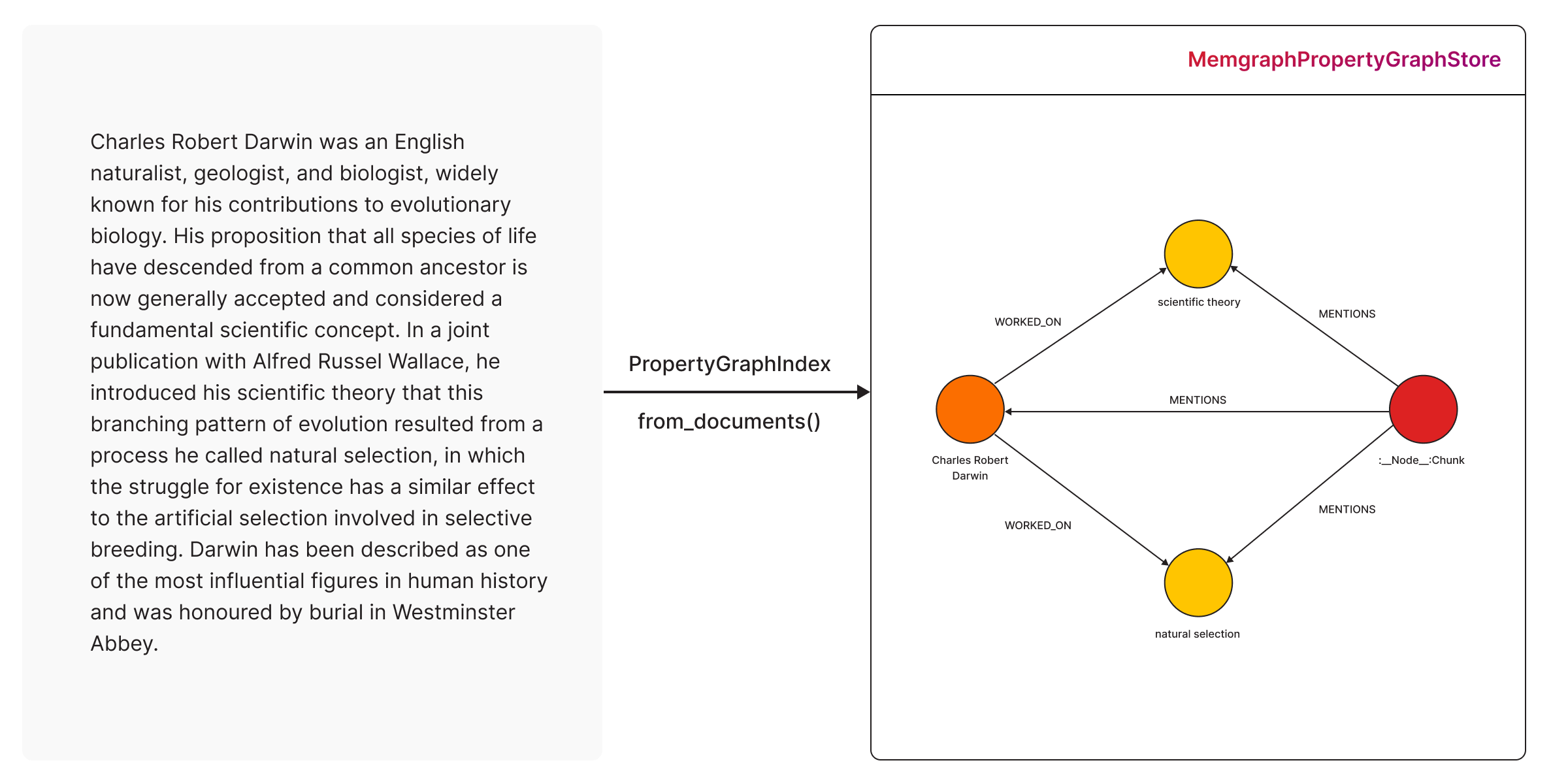
Charles Robert Darwin was an English naturalist, geologist, and biologist,
widely known for his contributions to evolutionary biology. His proposition that
all species of life have descended from a common ancestor is now generally
accepted and considered a fundamental scientific concept. In a joint publication
with Alfred Russel Wallace, he introduced his scientific theory that this
branching pattern of evolution resulted from a process he called natural
selection, in which the struggle for existence has a similar effect to the
artificial selection involved in selective breeding. Darwin has been described
as one of the most influential figures in human history and was honoured by
burial in Westminster Abbey.
from llama_index.core import SimpleDirectoryReader
documents = SimpleDirectoryReader("./data/charles_darwin/").load_data()The documents variable now holds the text, ready for building the graph.
Graph construction
LlamaIndex has several graph
constructors.
This example uses
SchemaLLMPathExtractor,
which can use a schema you define or let the LLM choose the entities.
from llama_index.core import PropertyGraphIndex
from llama_index.embeddings.openai import OpenAIEmbedding
from llama_index.llms.openai import OpenAI
from llama_index.core.indices.property_graph import SchemaLLMPathExtractor

index = PropertyGraphIndex.from_documents(
    documents,
    embed_model=OpenAIEmbedding(model_name="text-embedding-ada-002"),
    kg_extractors=[
        SchemaLLMPathExtractor(
            llm=OpenAI(model="gpt-4", temperature=0.0),
        )
    ],
    property_graph_store=graph_store,
    show_progress=True,
)
The text becomes a graph in Memgraph:
Querying
LlamaIndex can combine several retrievers to find nodes and paths in the graph.
If you don’t choose any, it uses
LLMSynonymRetriever
and
VectorContextRetriever.
The Memgraph graph store creates a vector index on the entity embeddings, and
VectorContextRetriever queries it with Memgraph’s vector
search.
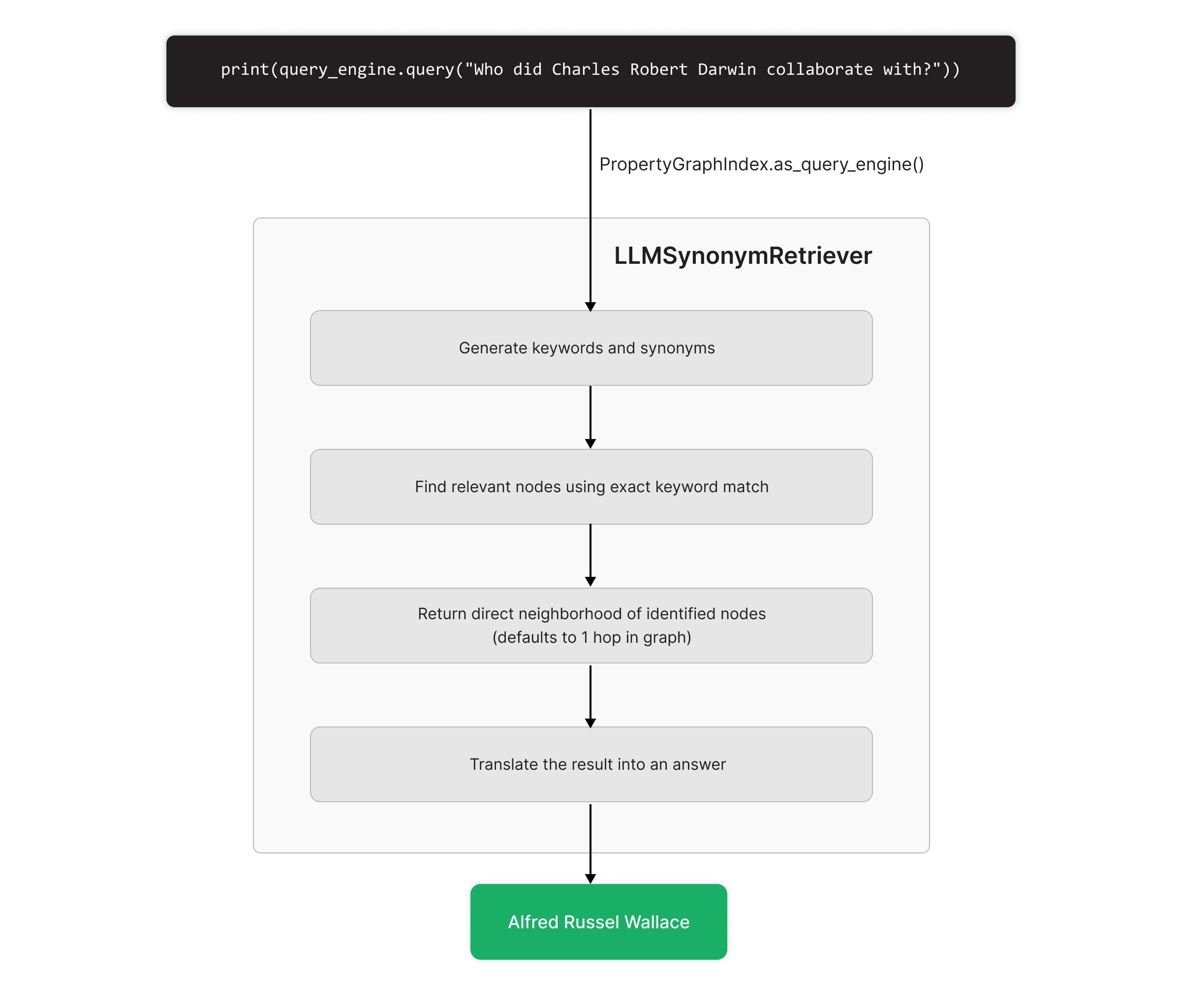
query_engine = index.as_query_engine(include_text=True)

response = query_engine.query("Who did Charles Robert Darwin collaborate with?")
print(str(response))
LLMSynonymRetriever finds the nodes that match the question’s keywords and
returns their neighborhood:
Demos
- Single-agent GraphRAG system: An agent that uses Memgraph and LlamaIndex for GraphRAG.
- Multi-agent GraphRAG system: Several agents that work together in a GraphRAG system.