Knowledge graph creation
A knowledge graph stores the entities of your domain as nodes and the facts that connect them as relationships, with labels and properties that say what each one means. GraphRAG, AI memory and agents retrieve their context from it, so the quality of their answers depends on the quality of the graph.
The meaning is what separates a knowledge graph from any other graph. In the top graph, the labels and relationship types say what a report, a symptom and a disease are and how they relate; the bottom graph only connects nodes:
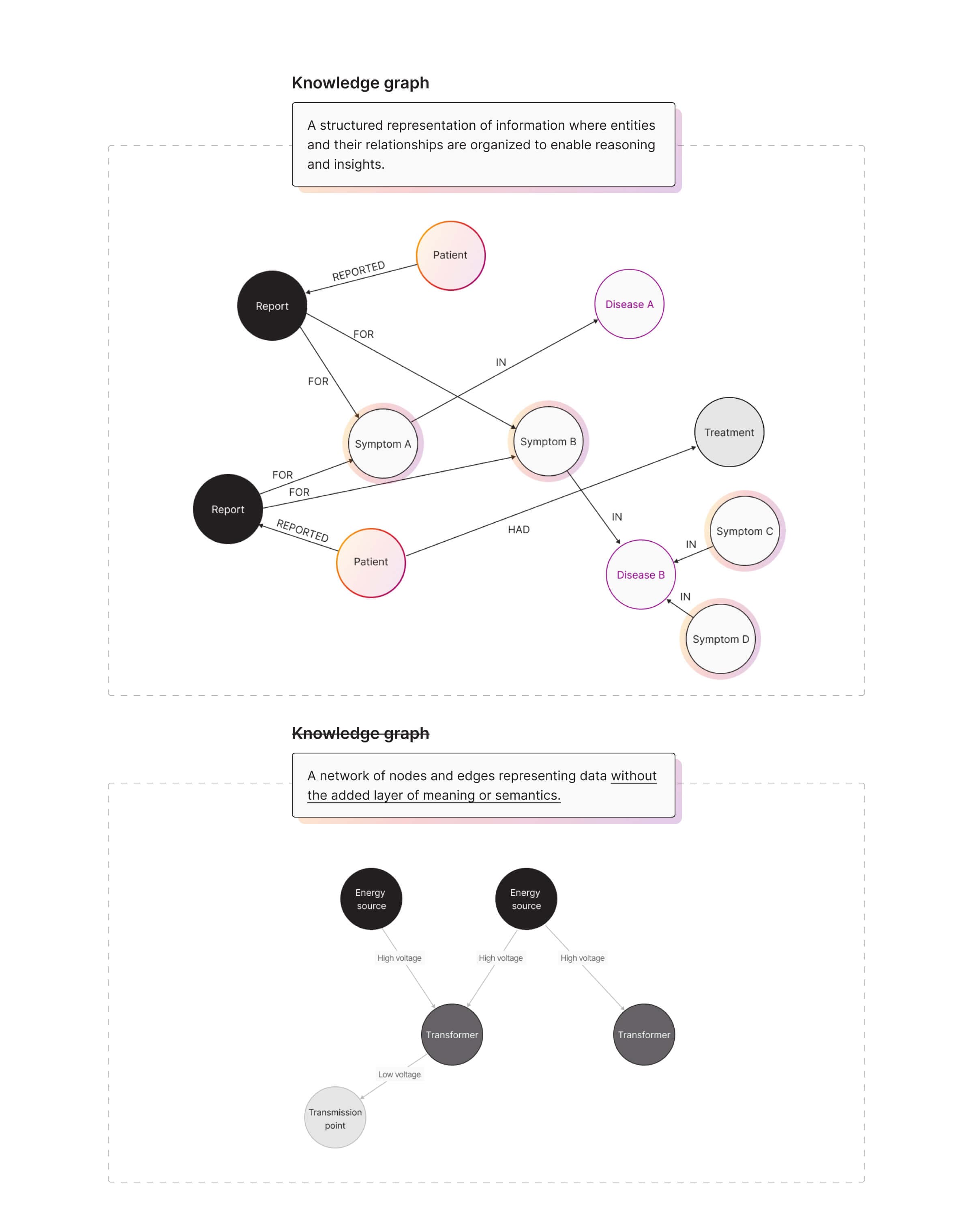
Start by designing the graph: which entities become nodes, which facts become relationships and which properties a query needs. See Model a knowledge graph and Data modeling.
Choose how to create the graph
How you create the graph depends on where your data is:
| Your data | Use |
|---|---|
| A MySQL or PostgreSQL database | SQL2Graph, which proposes a graph model and migrates the data |
| Another relational database | Migrate from a relational database |
| CSV, JSON, Parquet or Cypher files | Data migration, for example LOAD CSV |
| Documents such as PDF, DOCX or text | Unstructured2Graph, which extracts entities and relationships with an LLM |
| Neo4j | Migrate from Neo4j |
| A stream, such as Kafka | Data streams |
For large imports, follow the import best practices.
Structured data
Structured data, such as tables and CSV files, already has explicit entities and fields, so you decide the graph model and map the data to it:
- Map tables or files to nodes, and foreign keys or references to relationships.
- Choose the properties to keep on each node and relationship, including metadata that adds context for the LLM.
- Import the data into Memgraph.
If your data is in MySQL or PostgreSQL, SQL2Graph can do the mapping for you, either by rules or with an LLM, and you review the model before it migrates the data.
Unstructured data
Unstructured data, such as text, PDFs or logs, has no explicit entities, so the entities and relationships have to be extracted first. You choose how much to automate:
- Unstructured2Graph parses and chunks documents, extracts entities and relationships with an LLM and writes them to Memgraph.
- Framework integrations build a knowledge graph from documents in your LangChain or LlamaIndex application.
- A custom pipeline gives you the most control over accuracy, which matters in production.
A custom extraction pipeline usually has these steps:
- Preprocessing: Clean and split the raw data.
- Named entity recognition (NER): Find and classify the entities.
- Relationship extraction: Find the connections between the entities.
- Disambiguation: Merge mentions of the same entity and resolve ambiguous ones from their context.
- Post-processing: Validate the entities and relationships before you write them to the graph.
For an example, see How to Extract Entities and Build a Knowledge Graph with Memgraph and spaCy.
Read more:
- Improved Knowledge Graph Creation with LangChain and LlamaIndex
- Constructing a Knowledge Graph with LlamaIndex and Memgraph
When the graph is ready, retrieve from it with GraphRAG.