AI memory
AI memory lets an AI agent use what happened in earlier sessions: what you decided, what it did and what it learned about your work.
Context Graph is Memgraph’s AI memory. It records the sessions of your coding agents, such as Claude Code and Codex, as a graph in Memgraph, and serves them back to every connected agent in later sessions.
It connects to the supported agents with no code to write. Custom agents, built on the Claude Agent SDK or the OpenAI Agents SDK, can use the same memory.
Every connected agent gets:
- Recording. Hooks in the agent write each session to the graph as it happens. You use the agent as before.
- Recall. A
recalltool, served over the Model Context Protocol (MCP), returns what your past sessions hold about a question. Each session also starts with a short note on where you left off in the current project. - Memory, if you turn it on. A
memorytool replaces the agent’s own memory, so the notes the agent saves are stored in the graph and shared by all your agents.
Context Graph is open source, part of the Memgraph AI Toolkit.
Get started
One command installs Context Graph, finds or starts Memgraph and connects the agents you choose. It shows its plan and changes nothing until you confirm.
curl -sSL https://install.memgraph.com/ai-memory | bashSee Get started for the prerequisites, the choices setup offers and how to check that sessions are recorded.
How it works
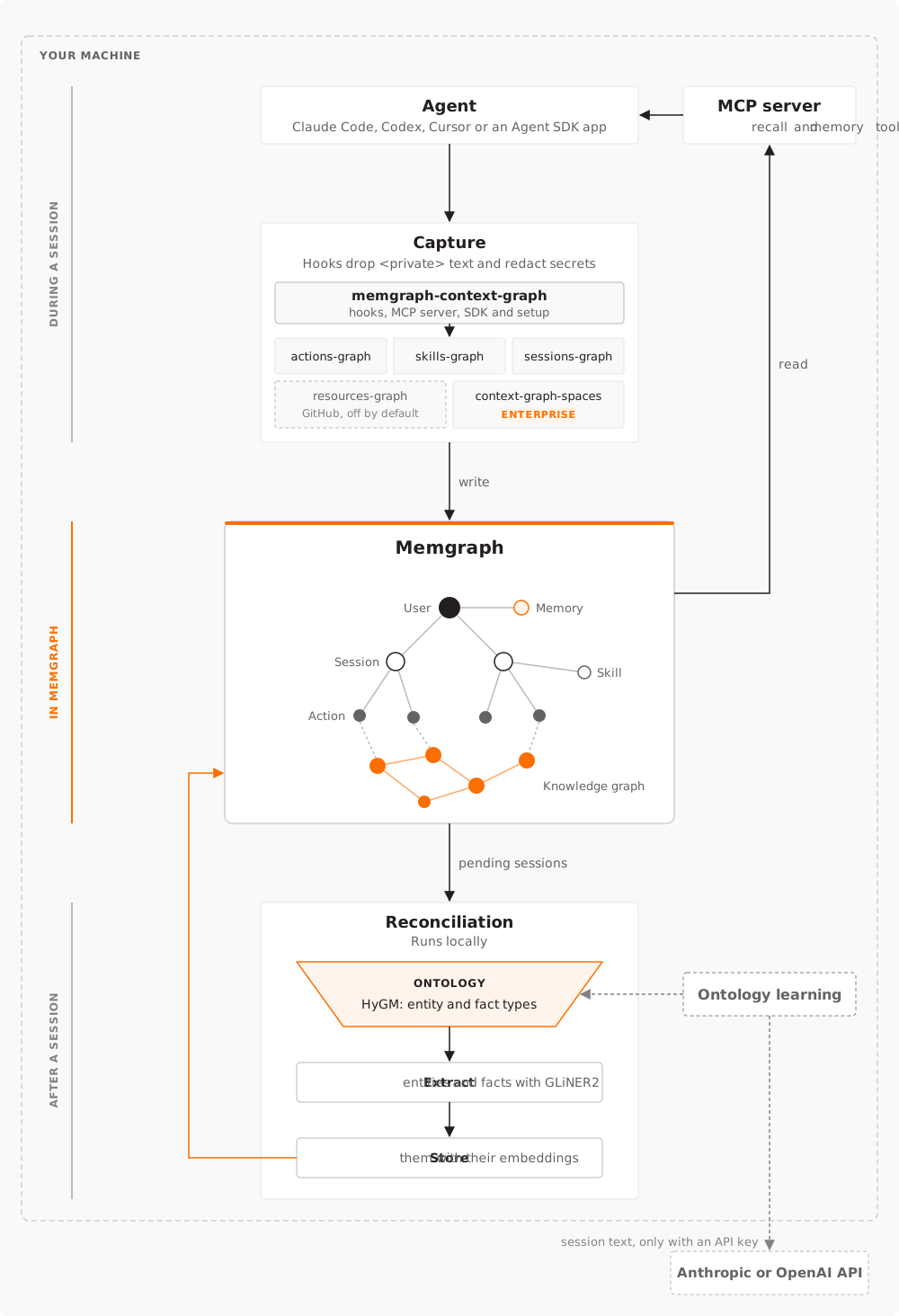
Context Graph works in three phases, shown in the diagram: during a session, it records each event and serves recall from Memgraph; after the session, reconciliation builds a knowledge graph from what was recorded.
During a session
-
Hooks. The
memgraph-context-graphhooks run in the agent, whether a coding agent or a custom agent, on each event: a prompt, a reply, a tool call or its result. They drop text marked as private and redact secrets before anything is stored. -
Connectors. The hooks pass each event to the connectors, which write it to Memgraph. Each one records one part of a session:
actions-graph: prompts, replies, tool calls and their results;skills-graph: the agent skills a session used;sessions-graph: the session, its user and project, and the memories the agent saved;resources-graph, optional: the GitHub resources a session read.
On Memgraph Enterprise,
context-graph-spacesadds shared spaces for a team. -
Memgraph. Users, sessions, actions, skills and memories form one graph, and the knowledge graph links to them. See The graph.
-
MCP server. The MCP server reads Memgraph and serves the
recallandmemorytools to the agent. See Recall and memory.
After a session
When a session ends, reconciliation extracts the people, organizations, projects and other entities it mentions, and the facts that connect them, into a knowledge graph. It runs on your machine:
- Ontology. The ontology is the schema of the knowledge graph: the entity types and fact types to look for, such as a person who works for an organization. It’s a model in HyGM, the AI Toolkit’s graph schema package. Every user starts with a default ontology, and you can write your own.
- Extract. GLiNER2, a local extraction model, finds the entities and facts of those types in the session’s text. It needs no LLM API key.
- Store. The entities and facts are stored in Memgraph with their embeddings, linked to the messages they came from. Recall uses them to find facts spread over many sessions.
Ontology learning is optional. With an Anthropic or OpenAI API key in the configuration, Context Graph learns new entity and fact types from your sessions. It’s the only part of Context Graph that sends session text off your machine.
In this section
- Get started: Install Context Graph, connect your agents and check that sessions are recorded.
- Recall and memory: How agents read their past sessions, and how to make Context Graph their memory.
- The graph: What your agents recorded, how to browse and query it, and how to add a knowledge graph of entities and facts.
- Privacy: What is recorded, how to keep text out of the graph, and how to delete sessions.
- Supported agents: The files setup changes for each agent, and how the agents differ.
- Custom agents: Use the same memory in an app built on the Claude Agent SDK or the OpenAI Agents SDK.
- Shared spaces: Share memory between the members of a team, on Memgraph Enterprise.
- Configuration: The configuration file, recall and extraction settings, your own Memgraph, updating and uninstalling.