Run algorithms
Built-in deep path traversal algorithms (BFS, DFS, Weighted shortest path, All shortest paths) are run by using their designated clauses.
Running algorithms and procedures from query modules available in the MAGE
library are run using the CALL clause.
Run procedures from MAGE library
The MAGE library contains query modules, each with their own procedures.
To call the procedures within queries use the following Cypher syntax:
CALL module.procedure([optional parameter], arg1, "string_argument", ...) YIELD res1, res2, ...;Every procedure has a first optional parameter and the rest of them depend on
the procedure you are trying to call. The optional parameter must be the result
of the aggregation function
project() or
derive(). If such a
parameter is provided, all operations will be executed on a
projected subgraph
or a virtual graph
respectively. Otherwise, you will work on the whole graph stored inside Memgraph.
Each procedure returns zero or more records, where each record contains named
fields. The YIELD clause is used to select fields you are interested in or all
of them (*). If you are not interested in any fields, omit the YIELD clause.
The procedure will still run, but the record fields will not be stored in
variables. If you are trying to YIELD fields that are not a part of the
produced record, the query will result in an error.
Procedures can be standalone, or a part of a larger query when we want the procedure to work on data the query is producing.
For example:
MATCH (node) CALL module.procedure(node) YIELD result RETURN *;When the CALL clause is a part of a larger query, results from the query are
returned using the RETURN clause. If the CALL clause is followed by a clause
that only updates the data and doesn’t read it, RETURN is unnecessary. It is
the Cypher convention that read-only queries need to end with a RETURN, while
queries that update something don’t need to RETURN anything.
Also, if the procedure itself writes into the database, all the rest of the
clauses in the query can only read from the database, and the CALL clause can
only be followed by the YIELD clause and/or RETURN clause.
If a procedure returns a record with the same field name as some variable we
already have in the query, that field name can be aliased with some other name
using the AS sub-clause:
MATCH (result) CALL module.procedure(42) YIELD result AS procedure_result RETURN *;Filtering YIELD results with WHERE
The YIELD clause can be followed directly by a WHERE clause to filter
the records returned by the procedure inline, without wrapping the call in
a separate WITH … WHERE step:
CALL mg.procedures() YIELD * WHERE name = 'mg.procedures' RETURN name;Managing query modules from Memgraph Lab
You can inspect query modules in Memgraph Lab (v2.0 and newer). Just navigate to Query Modules.
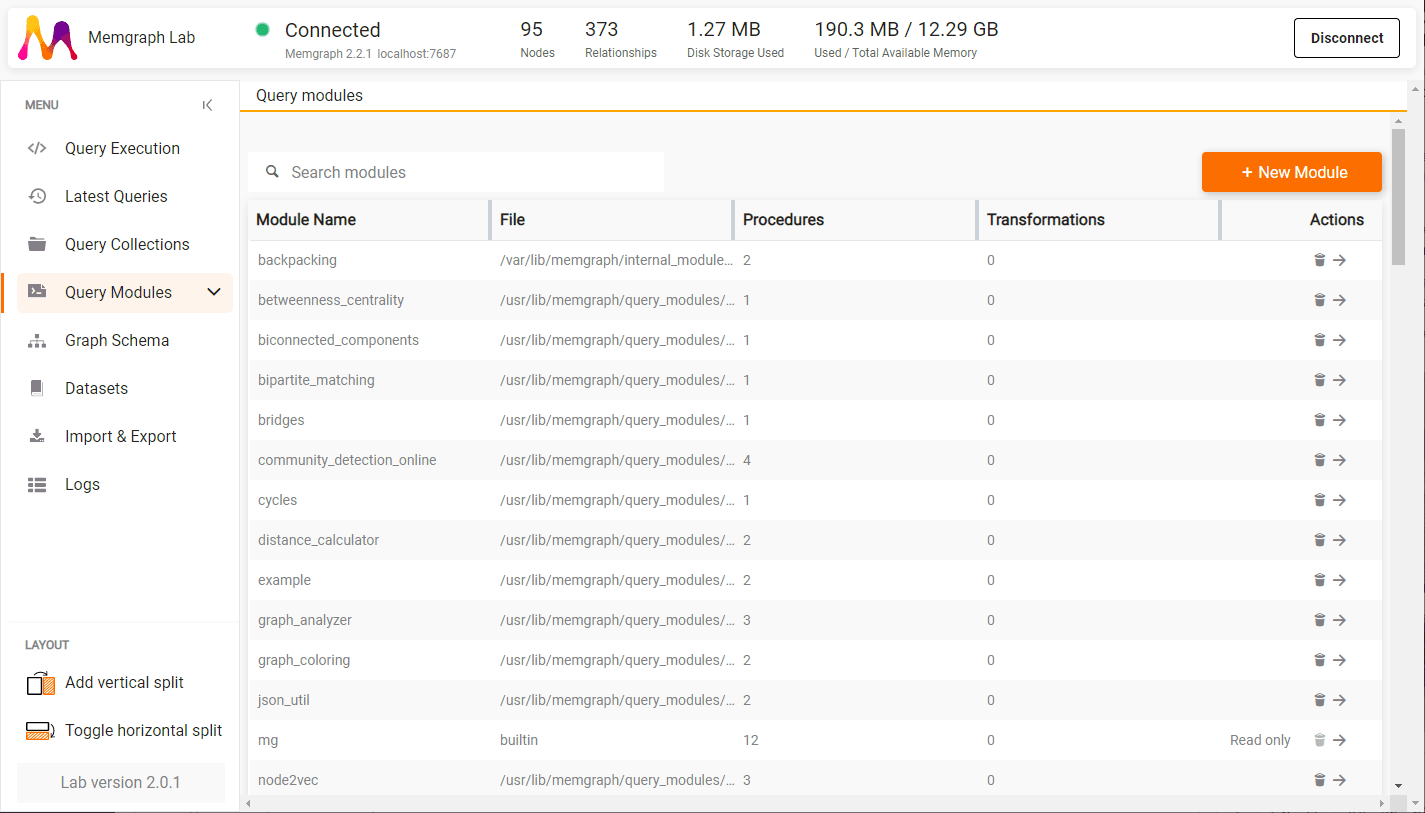
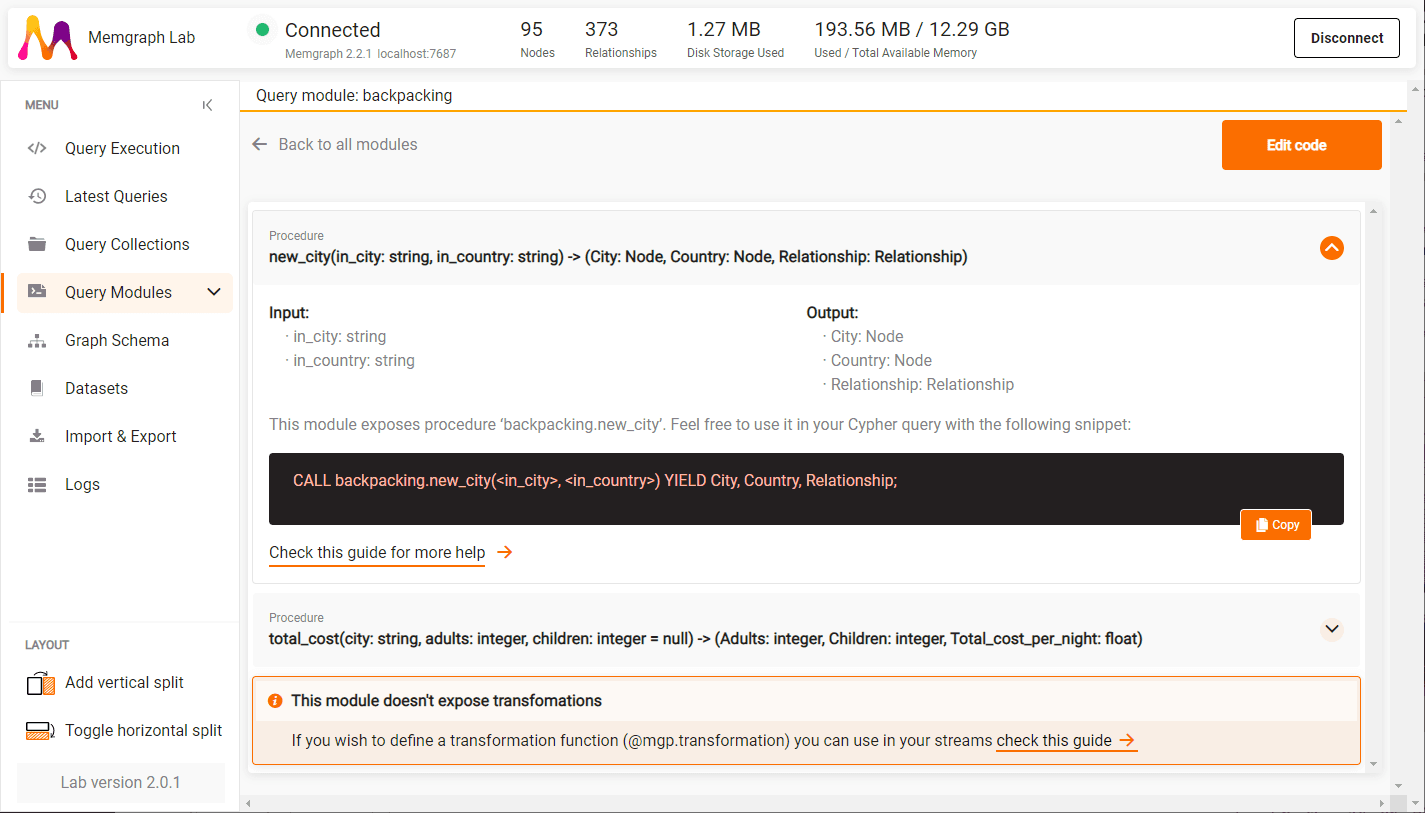
There you can see all the loaded query modules, delete them, or see procedures and transformations they define by clicking on the arrow icon.
By expanding procedures you can receive information about the procedure’s
signature, input and output variables and their data type, as well as the CALL
query you can run directly from the Query Modules view.
Run procedures on subgraph
When executing any MAGE procedure, the algorithm is executed on the whole network.
This can be impractical when:
- the graph is heterogeneous, and you want to run the module only on specific labels,
- the graph is too large, and you only want to use the analytics to update only a portion of it,
- the network contains multiple diverse data models and graphs, and running analytics on mixed graphs at once might yield unexpected results.
That is why Memgraph enables module execution on subgraphs and graph projections. The insights yielded by graph algorithms can then affect only the necessary nodes in the graph, making the data more consistent and up to its specifications.
Built-in deep path traversal algorithms cannot be run on subgraphs.
Available graph projections
Graph projection function in Memgraph is called project(), and it is used in the following way:
MATCH p=(n)-[r]->(m)
WITH project(p) AS subgraph
RETURN subgraph;
The path is specified first which denotes source and target nodes as well as
relationships connecting them. The function project then constructs a subgraph
out of all the generated paths.
Because the matched pattern actually includes all the nodes and the relationships in the graph, the result of this query is a projection of the whole graph. To isolate a certain part of the graph, constraints need to be added to either labels, edge types, or properties, like in the query below:
MATCH p=(n:SpecificLabel)-[r:REL_TYPE]->(m:SpecificLabel)
WITH project(p) AS subgraph
RETURN subgraph;
The query above will return a subgraph of SpecificLabel nodes connected with
the relationships of type REL_TYPE.
Calling query modules on graph projections
If you want to run query modules on subgraphs, specify the projected graph as the first argument of the query module.
CALL module.procedure([optional graph parameter], argument1, argument2, ...) YIELD * RETURN *;If the optional graph projection parameter is not included as the first argument, the query module will be executed on the whole graph.
Example of creating a projection and executing a procedure on a subgraph:
MATCH p=(n:SpecificLabel)-[r:REL_TYPE]->(m:SpecificLabel)
WITH project(p) AS subgraph
CALL module.procedure(subgraph, argument1, argument2, ...) YIELD * RETURN *;
Practical example with Twitter influencers
In this practical example, PageRank algorithm will be executed on a fictional Twitter dataset. PageRank execution is grouped by the Twitter hashtag, and each Tweet can have a different number of retweets.
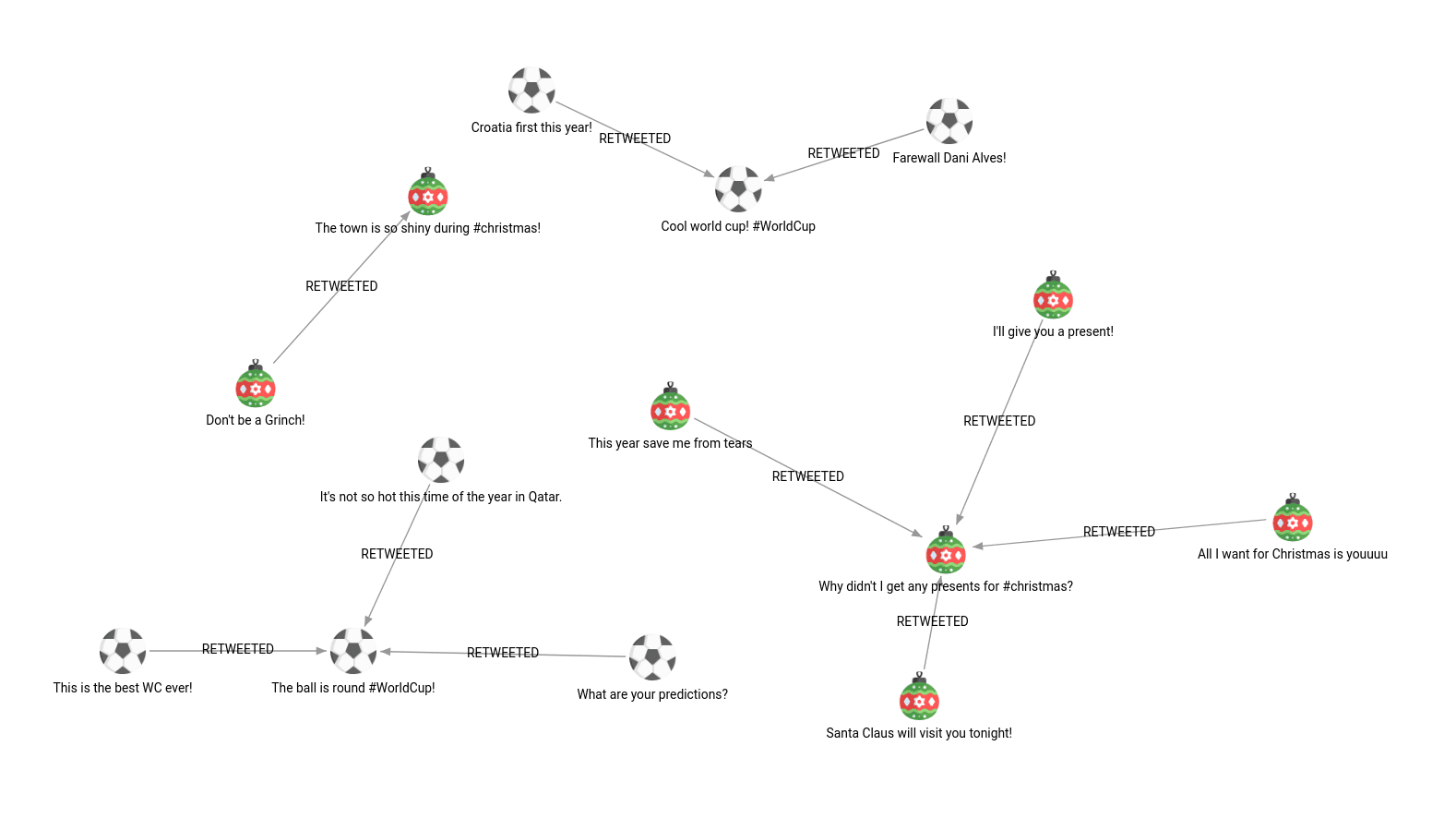
CREATE (n:Tweet {id: 1, hashtag: "#WorldCup", content: "Cool world cup! #WorldCup"});
CREATE (n:Tweet {id: 2, hashtag: "#WorldCup", content: "The ball is round #WorldCup!"});

CREATE (n:Tweet {id: 3, hashtag: "#christmas", content: "The town is so shiny during #christmas!"});
CREATE (n:Tweet {id: 4, hashtag: "#christmas", content: "Why didn't I get any presents for #christmas?"});

MATCH (n:Tweet {id: 1}) MERGE (n)<-[:RETWEETED]-(:Tweet {hashtag: "#WorldCup", content: "Croatia first this year!"});
MATCH (n:Tweet {id: 1}) MERGE (n)<-[:RETWEETED]-(:Tweet {hashtag: "#WorldCup", content: "Farewall Dani Alves!"});
MATCH (n:Tweet {id: 2}) MERGE (n)<-[:RETWEETED]-(:Tweet {hashtag: "#WorldCup", content: "This is the best WC ever!"});
MATCH (n:Tweet {id: 2}) MERGE (n)<-[:RETWEETED]-(:Tweet {hashtag: "#WorldCup", content: "It's not so hot this time of the year in Qatar."});
MATCH (n:Tweet {id: 2}) MERGE (n)<-[:RETWEETED]-(:Tweet {hashtag: "#WorldCup", content: "What are your predictions?"});
MATCH (n:Tweet {id: 3}) MERGE (n)<-[:RETWEETED]-(:Tweet {hashtag: "#christmas", content: "Don't be a Grinch!"});
MATCH (n:Tweet {id: 4}) MERGE (n)<-[:RETWEETED]-(:Tweet {hashtag: "#christmas", content: "I'll give you a present!"});
MATCH (n:Tweet {id: 4}) MERGE (n)<-[:RETWEETED]-(:Tweet {hashtag: "#christmas", content: "Santa Claus will visit you tonight!"});
MATCH (n:Tweet {id: 4}) MERGE (n)<-[:RETWEETED]-(:Tweet {hashtag: "#christmas", content: "This year save me from tears"});
MATCH (n:Tweet {id: 4}) MERGE (n)<-[:RETWEETED]-(:Tweet {hashtag: "#christmas", content: "All I want for Christmas is youuuu"});
Running PageRank on the whole network
To run the PageRank algorithms available in the MAGE library, use the following query:
CALL pagerank.get() YIELD node, rank
SET node.rank = rank;
The PageRank algorithm will take into account all the nodes in the graph. It doesn’t really make sense to correlate tweets about World Cup with tweets about Christmas, as they are thematically quite different and should be analyzed separately.
Running PageRank on a subgraph
To run the PageRank on a subset of Christmas tweets only, that portion of the graph is saved as a projection and used as the first argument of the query module:
MATCH p=(n:Tweet {hashtag: "#christmas"})-[r]->(m)
WITH project(p) AS christmas_graph
CALL pagerank.get(christmas_graph) YIELD node, rank
SET node.rank = rank
RETURN node.hashtag, node.content, rank
ORDER BY rank DESC;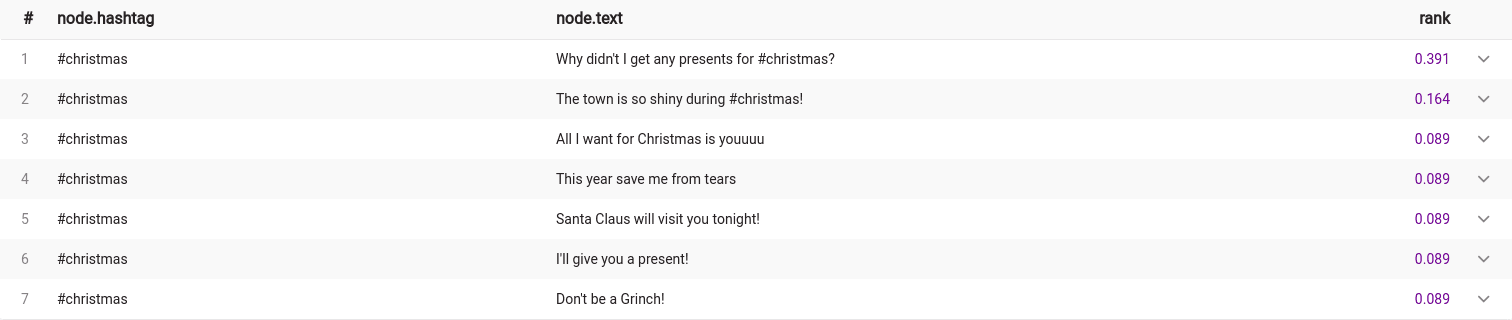
The above query successfully updated the rank of the Christmas tweets only!
Let’s do the same on the World Cup tweets by changing the value of the hashtag property:
MATCH p=(n:Tweet {hashtag: "#WorldCup"})-[r]->(m)
WITH project(p) AS christmas_graph
CALL pagerank.get(christmas_graph) YIELD node, rank
SET node.rank = rank
RETURN node.hashtag, node.content, rank
ORDER BY rank DESC;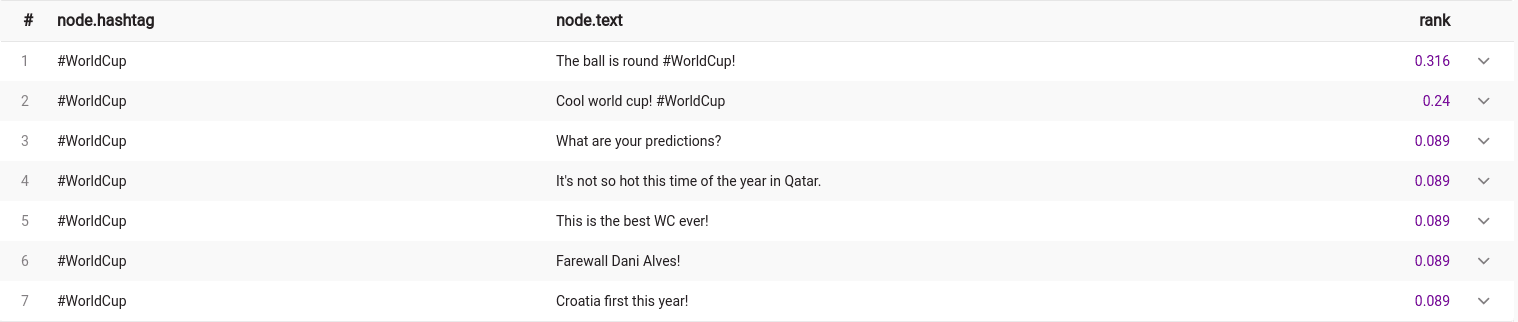
Run procedures on a virtual graph
A virtual graph (also called a derived graph) is an in-query graph that
exists only while the query runs. Like a subgraph created with
project(), it is never written to the database,
but unlike a projection it does not have to mirror the stored data. Instead of
keeping the matched nodes and relationships as they are, a virtual graph lets you
synthesize new relationships from paths: each matched path is collapsed into a
single virtual relationship that connects the path’s endpoints.
You can then run any MAGE procedure over these derived relationships without ever materializing them in the database. This is useful when:
- the relationship you want to analyze is implied by a multi-hop pattern rather than stored as a single edge (for example, two issues that are connected through a chain of dependencies “relate to” each other),
- you want to reshape the graph for an algorithm (override node labels and properties, or attach edge weights) without touching the stored data,
- you want an algorithm to treat directed relationships as undirected.
Virtual graphs are created with the
derive() aggregation function.
Creating a virtual graph with derive()
derive() is an aggregation function, so just like project() it accumulates
all the rows produced by the MATCH (or UNWIND) clause into a single graph:
MATCH p=(n)-[r]->(m)
WITH derive(p, {virtualEdgeType: 'RELATES_TO'}) AS virtual_graph
RETURN virtual_graph;
The function takes two arguments:
- a path (
pin the example above), which defines the source and target nodes of each virtual relationship, - an options map that configures the virtual relationship and its endpoints.
For every matched path, derive() creates one virtual relationship that goes from
the path’s start node to its end node, collapsing any intermediate hops.
Endpoints that appear in more than one path are deduplicated, so accumulating many
paths produces a single overlay graph.
The options map must contain the virtualEdgeType key. The supported options are:
| Option | Type | Description |
|---|---|---|
virtualEdgeType | string | Required. Type of the virtual relationship. Set it dynamically per path with type(r) to carry the original relationship type over. |
relationshipProperties | map | Properties set on every virtual relationship, for example a weight used by a weighted algorithm. |
sourceNodeLabels | list of strings | Labels for the source (start) virtual node. If omitted, the source node inherits all labels from the original path’s start node. |
sourceNodeProperties | map | Properties for the source virtual node. If omitted, the source node inherits all properties from the original path’s start node. |
targetNodeLabels | list of strings | Labels for the target (end) virtual node. If omitted, the target node inherits all labels from the original path’s end node. |
targetNodeProperties | map | Properties for the target virtual node. If omitted, the target node inherits all properties from the original path’s end node. |
undirectedEdgeTypes | list of strings | Virtual edge types that should be treated as undirected. For each listed type, a reverse virtual relationship is also created between distinct endpoints. Use ['*'] to apply this to every virtual edge type. |
Node inheritance is applied per key. If you provide sourceNodeLabels but not
sourceNodeProperties, the source node uses the labels you specified while still
inheriting the properties from the original node, and vice versa.
Running a procedure on a virtual graph
A virtual graph is used exactly like a projected subgraph: pass it as the first argument of the procedure. The procedure then iterates the virtual nodes and relationships instead of the stored ones.
The following example detects communities of issues that are connected through any
chain of relationships, treating each chain as a single RELATES_TO link:
MATCH p=(a:Issue)-[*]-(b:Issue)
WHERE id(a) < id(b)
WITH derive(p, {
  virtualEdgeType: 'RELATES_TO',
  relationshipProperties: {weight: 1}
}) AS virtual_graph
CALL community_detection.get(virtual_graph) YIELD node, community_id
RETURN node.name, community_id;
If the optional graph argument is omitted, the procedure runs on the whole stored graph instead.
Accessing virtual nodes and relationships directly
The value returned by derive() exposes its virtual nodes and relationships
through the nodes and edges fields, which you can UNWIND and inspect. Virtual
relationships support the usual relationship functions, such as
type(),
startNode() and
endNode():
MATCH p=(:Issue {name: 'A'})-[*]->(:Issue {name: 'C'})
WITH derive(p, {virtualEdgeType: 'RELATES_TO', relationshipProperties: {weight: 5}}) AS virtual_graph
UNWIND virtual_graph.edges AS e
RETURN startNode(e).name AS source, type(e) AS rel_type, e.weight AS weight, endNode(e).name AS target;
Setting node labels and properties
By default the virtual endpoints copy the labels and properties of the original path endpoints. You can override either endpoint by providing the corresponding options. The query below relabels the endpoints and attaches custom properties while leaving the stored nodes untouched:
MATCH p=(:Person {name: 'Alice'})-[:KNOWS]->(:Person {name: 'Bob'})
WITH derive(p, {
  virtualEdgeType: 'CONNECTED',
  sourceNodeLabels: ['Expert'],
  sourceNodeProperties: {score: 99},
  targetNodeLabels: ['Target'],
  targetNodeProperties: {rank: 7}
}) AS virtual_graph
UNWIND virtual_graph.edges AS e
RETURN labels(startNode(e)) AS source_labels, startNode(e).score AS score,
       labels(endNode(e)) AS target_labels, endNode(e).rank AS rank;
Treating virtual relationships as undirected
Some algorithms expect undirected relationships. List the relevant virtual edge
types in undirectedEdgeTypes and derive() creates a reverse relationship for
each one between distinct endpoints (self-loops are left as a single relationship).
Use the '*' wildcard to apply this to every virtual edge type:
MATCH p=(:Person)-[r]->(:Person)
WITH derive(p, {virtualEdgeType: type(r), undirectedEdgeTypes: ['*']}) AS virtual_graph
RETURN size(virtual_graph.nodes) AS nodes, size(virtual_graph.edges) AS edges;
Here virtualEdgeType: type(r) carries each original relationship type into the
virtual graph, so a single derive() call can accumulate relationships of several
types at once.
derive() requires exactly two arguments and the first one must be a path. The
options map must contain the virtualEdgeType key, and undirectedEdgeTypes, when
provided, must be a list of strings. Queries that break these rules raise an error.
Mapping custom procedure names to existing query procedures
If you want to replace procedure names your application calls without changing
the application code, you can define the mapping of the old and new procedure
names in a JSON file, then set the path to the files as the value of the
query-callable-mappings-path configuration
flag.
Example of a JSON file:
{
    "db.components": "mgps.components",
    "util.validate": "mgps.validate"
}
Control procedure memory usage
When running a procedure, Memgraph controls the maximum memory usage that the
procedure may consume during its execution. By default, the upper memory limit
when running a procedure is 100 MB. If your query procedure requires more
memory to yield its results, you can increase the memory limit using the
following syntax:
CALL module.procedure(arg1, arg2, ...) PROCEDURE MEMORY LIMIT 100 KB YIELD result;
CALL module.procedure(arg1, arg2, ...) PROCEDURE MEMORY LIMIT 100 MB YIELD result;
CALL module.procedure(arg1, arg2, ...) PROCEDURE MEMORY UNLIMITED YIELD result;
The limit can either be specified to a specific value (either in KB or in
MB), or it can be set to unlimited.