


What Is RAG? Why It Matters & Where It Falls Short
Retrieval-augmented generation (RAG) is a technique that retrieves relevant information from your own data and adds it to a large language model's prompt, so the answer is grounded in that data instead of only in what the model learned during training. Most RAG systems retrieve with vector search; others use keyword search or a knowledge graph.
Large language models (LLMs) have changed how we interact with information. They can write, summarize, and analyze almost anything. However, they have one critical flaw: they do not actually know things beyond their training data. Ask them about last week’s company memo, and they’re clueless.
RAG has become the go-to approach for fixing that. It is powerful, but it also has blind spots. In this article, you'll learn why LLMs need RAG, how it works, when to use it, where it falls short, and how GraphRAG differs.
Why Do LLMs Need RAG?
LLMs need RAG because they only know their training data, and they can only read a limited amount of new information at once. They operate within a limited context window: they can only handle so many tokens at once, and anything beyond that gets forgotten. If you feed them too much text, they lose the thread. If you feed them too little, they hallucinate.
Read more: LLM Limitations: Why Can’t You Query Your Enterprise Knowledge with Just an LLM?
RAG bridges this by storing external information and retrieving only what is relevant at query time. The LLM receives the right context on demand without needing retraining. This makes RAG:
- Dynamic: Can use fresh data without model updates.
- Efficient: No extensive fine-tuning costs.
- Explainable: You can trace which documents informed the answer.
How Does RAG Work?
RAG works in two steps: retrieve the information relevant to a question, then generate an answer with that information in the prompt. The retrieval step can use keyword search, vector search, or graph traversal. The most common choice is vector search, so that's where we'll start.
In vector-based RAG, both your data (documents, images, audio, etc.) and queries are converted into embeddings, which are high-dimensional vectors encoding semantic meaning.
These embeddings live in a vector database or a vector index (e.g. Pinecone, Weaviate, or Memgraph’s vector index, which works on both nodes and relationships).
When a user submits a query:
- The query is turned into an embedding
- The system searches the vector index for nearest neighbors (i.e. text chunks most semantically similar)
- Those top chunks are appended (or injected) into the prompt context
- The LLM generates a response based on both its pretrained knowledge and that retrieved context
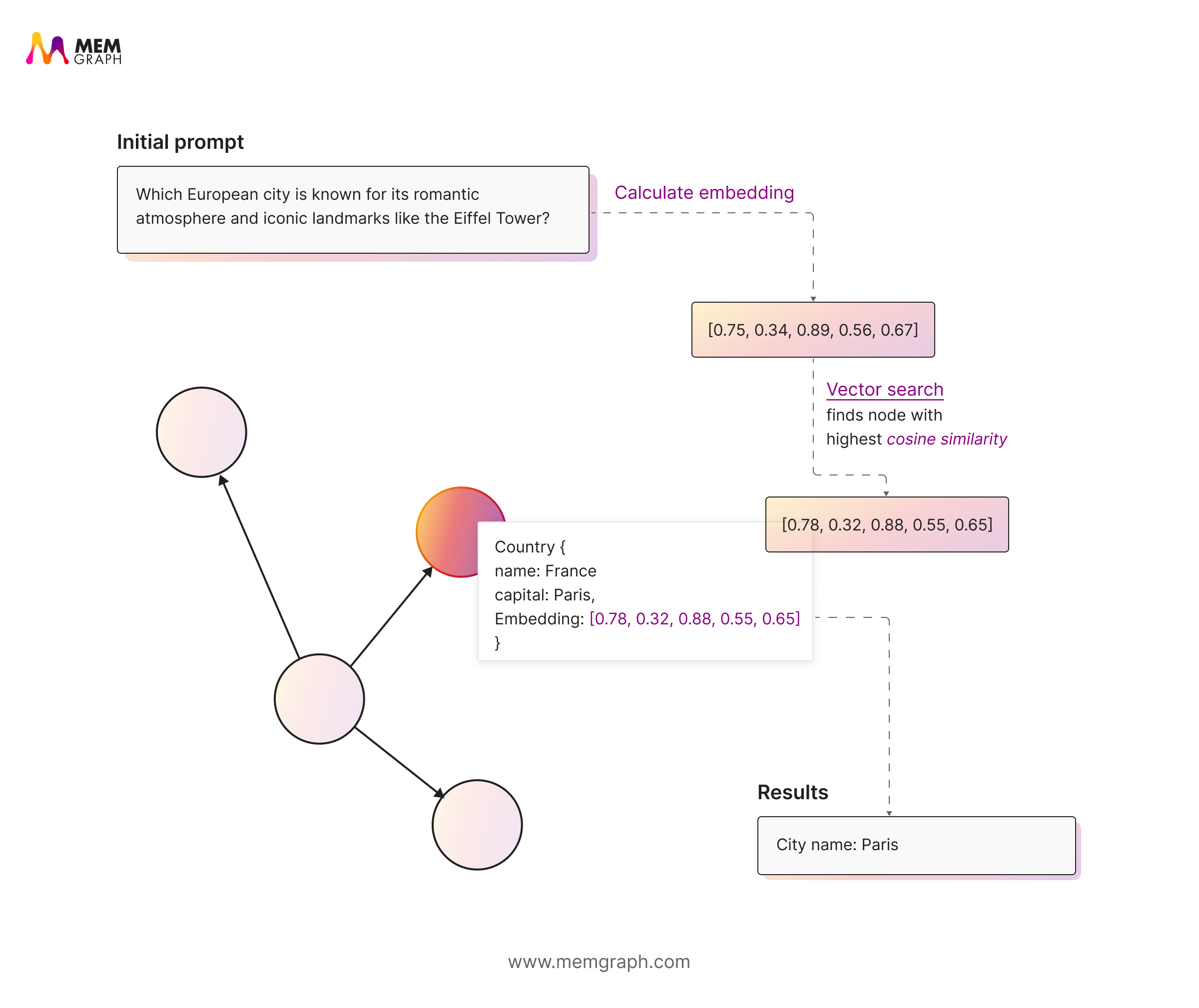
This allows matching based on similarity, not just exact keyword matches. So, it can recognize that phrases like “growth in earnings” and “revenue increase” mean the same thing even though they use different words.
Vector search isn't the only retriever, though. Keyword or full-text search still wins when a question names an exact product code, ID, or person, and many systems combine the two in hybrid retrieval. A third option, GraphRAG, follows the relationships between entities, which we'll come back to below.
Read more: Simplify Data Retrieval with Memgraph’s Vector Search and Decoding Vector Search: The Secret Sauce Behind Smarter Data Retrieval.
When Should You Use RAG?
Use RAG when an LLM needs to answer from your own data, especially unstructured text, and the answer can be found by meaning rather than by following connections between facts.
RAG is powerful because it focuses on context and intent, not just surface-level word matching. By retrieving information based on conceptual similarity, it gives language models the right context to generate more accurate and grounded responses.
This makes it especially effective for unstructured data such as reports, articles, or chat logs, where meaning often depends on how ideas relate rather than on exact phrasing.
It’s also become the preferred approach for enterprise chatbots, document Q&A systems, and support assistants. It retrieves relevant content quickly, adapts to different types of queries, and lets you add new documents without retraining the model.
You’d reach for RAG when:
- You need semantic search that captures meaning rather than keywords.
- Your knowledge base is unstructured or text-heavy.
- You want fast and flexible retrieval that feels natural for users.
- Queries are ambiguous or rely on synonyms.
- You need to find conceptually related information in an unstructured dataset.
At its core, RAG helps systems understand what users mean, not just what they say.
What Are the Limitations of RAG?
Vector-based RAG retrieves by similarity, so it misses how facts connect. The embeddings do not capture how one thing relates to another, only how similar they are. RAG always returns something; the question is whether it returns everything the answer needs.
In our RAG vs GraphRAG demo, we run the same questions against both approaches on 82 pages of enterprise documentation. The gaps in vector RAG fall into five patterns:
- Completeness: does it find everything? When you ask for all dependencies or all affected systems, vector RAG returns the few most similar chunks, which is a sample, not the full list. A graph query follows every matching relationship. Example: "Give me a complete inventory of everything that depends on the Auth module."
- Multi-hop: can it follow the chain? When the answer is spread across three documents, vector RAG often finds one or two of them. Graph traversal chains entity to relationship to entity across all three. Example: "Will my Kafka auth still work after upgrading from v2.8 to v3.2?"
- Causal: what breaks downstream? Change-impact questions ("if I flip this switch, what happens over there?") need to follow dependencies in the right direction. A graph stores those dependencies as relationships; text chunks don't. Example: "What happens to scheduled jobs if we switch to async API mode?"
- Contradiction: which version is current? The docs say a default is 100, and elsewhere that it's 250. Both were true, in different versions. Similarity search returns both and leaves the LLM to guess, while a graph that records which version supersedes which can return the current value. Example: "What is the default value for max_connections?"
- Disambiguation: which one do you mean? When one term maps to two different components, vector search mixes context from both. A graph that resolves entities can tell them apart before retrieving. Example: "How do I configure the monitoring system?"
Chunking and domain jargon make all five worse. Splitting documents into chunks breaks the links between sections, and embedding models trained on general text can miss the meaning of domain-specific terms.
A Multi-Hop Question, Step by Step
Here's the multi-hop problem in practice. Take the question "Which companies does Acme have a stake in?", asked over a collection of news articles:
- One article says Acme bought a stake in Beta.
- Another, published months later, says Beta merged with Gamma. It never mentions Acme.
Vector search returns the first article, because it talks about Acme and stakes. The second article isn't similar to the question, so it's never retrieved. The LLM answers "Beta" and misses Gamma.
In a knowledge graph, the two facts share a node, Beta, so one traversal finds both. In Memgraph, that's a single Cypher query:
MATCH (:Company {name: 'Acme'})-[:OWNS_STAKE_IN|MERGED_WITH*1..3]->(c:Company)
RETURN DISTINCT c.name AS company;
The query follows ownership and merger relationships up to three hops from Acme and returns both Beta and Gamma. This is the kind of connection similarity search can't see: vector-based RAG finds what sounds right, not necessarily what is right.
These are retrieval problems, not LLM problems, so the fix is in how you retrieve.
How Is GraphRAG Different From RAG?
GraphRAG adds graph traversal to retrieval: it finds the entities a question is about with vector or text search, then follows their relationships in a knowledge graph to collect the connected facts.
| Approach | How it retrieves | Good at | Misses |
|---|---|---|---|
| Vector RAG | Nearest-neighbor search over embeddings | Meaning and synonyms in unstructured text | Exact identifiers; how facts connect |
| Hybrid retrieval | Vector search plus keyword (full-text) search | Meaning, plus exact names, codes, and IDs | How facts connect |
| GraphRAG | Vector or text search to find entities, then graph traversal | Multi-hop questions, relationships, provenance | Needs a knowledge graph to build and maintain |
GraphRAG is already in production on Memgraph. NASA uses Memgraph to connect people, skills, and projects across the agency into a knowledge graph for real-time expert discovery. Cedars-Sinai uses it for an Alzheimer's knowledge graph spanning over 230,000 entities that drives drug repurposing research. Read 4 Real-World Success Stories Where GraphRAG Beats Standard RAG for the details.
For a full side-by-side comparison, read RAG vs GraphRAG: Shared Goal & Key Differences.
Wrapping Up
RAG is one of the most effective ways to connect large language models with real-world data. It bridges what models know with what they can learn on demand, making retrieval faster and more meaningful.
It excels at semantic search, finding information by meaning rather than keywords, and works best for unstructured data like reports or chat logs. For document Q&A and support assistants, vector-based RAG is often all you need.
Still, RAG has limits. It can lose context, retrieve irrelevant chunks, or miss logical connections between facts. Knowing these gaps helps you design smarter retrieval pipelines.
With Memgraph, you can use vector search to find the most relevant starting points, then apply relevance expansion to follow their relationships and collect the connected context around them. Because vector search, text search, and graph traversal run in the same database, the whole retrieval can run as a single Cypher query with Atomic GraphRAG.
If your questions depend on how facts connect, not just on what they say, your next read is What Is GraphRAG? A Guide to Connected Context. To see these five patterns walked through live, you can book a RAG vs GraphRAG demo with our team.
Further Reading
- Blog: RAG vs GraphRAG: Shared Goal & Key Differences
- Blog: What Is GraphRAG? A Guide to Connected Context
- Blog: RAG and Why Do You Need a Graph Database in Your Stack?
- Blog: 4 Real-World Success Stories Where GraphRAG Beats Standard RAG
- Blog: Why Knowledge Graphs Are the Ideal Structure for LLM Personalization
- Webinar: From Data to Knowledge Graphs: Building Self-Improving AI Memory Systems
- Docs: Vector Search
