

Demo: How to Build Your Own AI Memory for Agents
Few of us stick to one coding agent anymore. It might be Claude Code one day, Codex the next, then Grok or OpenCode. Sometimes that's personal preference, and sometimes the company switches providers and you have no say. Each harness keeps its own context, so whatever one agent figured out, you end up explaining again to the next.
In our latest community call, Ante Javor, Developer Experience Engineer at Memgraph, showed one way to fix that. It's called Memgraph Context Graph, an AI memory layer that runs on top of Memgraph. He installed it live, connected Claude Code and Codex to it, and asked one agent what the other had been doing.
This post walks through how Context Graph is put together, what happened in the demo, and the questions from the Q&A. For the full session, watch the recording.
How Memgraph Context Graph Works
Memgraph Context Graph is a small Python layer in front of Memgraph. It’s open source and ships as part of the Memgraph AI Toolkit, so you can read the code, run it and change it. Ante described it in three parts:
- Record: As you work in Claude Code or Codex, hooks stream every event, tool call and file read into Memgraph as a graph. You don't have to do anything.
- Recall: The agent reads from the same graph to see where it stopped, or you ask what was decided last week. Recall filters the raw data down to what answers your question.
- Remember: You can also tell the agent explicitly to remember something.
Here’s how it works:
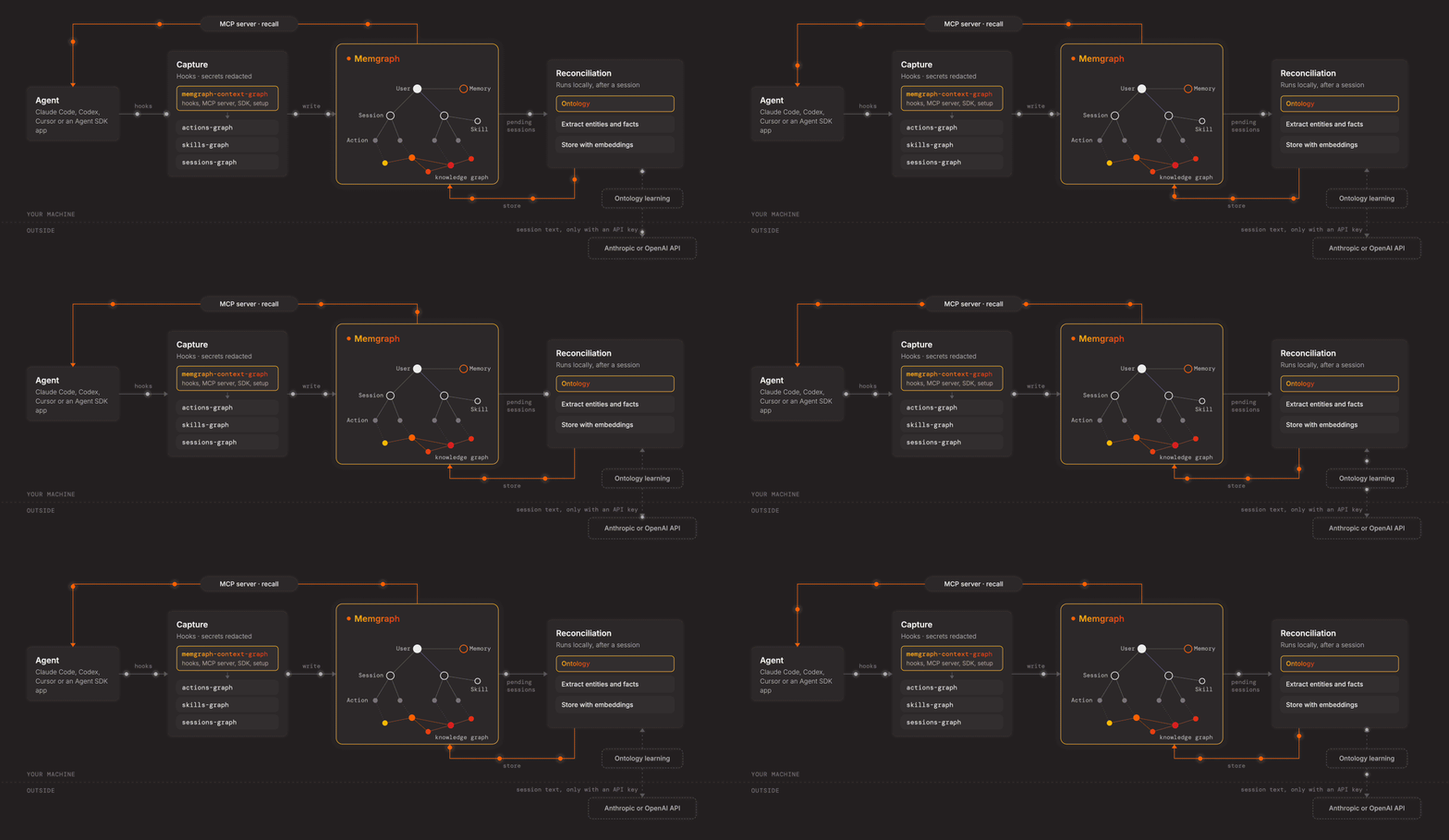
The hooks pass events from your agent to connectors, and each connector handles one kind of event:
- Sessions-Graph: covers sessions.
- Actions-Graph: covers the tools and actions the agent uses.
- Skills-Graph: records which skills were used and in what context.
- Resources-Graph: records the resources the agent touches. For example, if Claude Code fetches a web page, that page is a resource that influenced its decision at that point. This connector is optional.
- Context-Graph-Spaces: handle sharing across a team, which is covered below.
After a session ends, Context Graph can run a second pass. It extracts entities and facts from the session and stores them next to the raw events, where they act as pointers back to the right part of the memory.
By default, reconciliation uses GLiNER2, a local entity extraction model from Fastino Labs that runs on your CPU, so building the memory makes no LLM calls. Everything runs wherever your Memgraph runs, whether that's your laptop if you're working locally or your own server if you deploy it there.
The rest is configurable too. You can swap the extraction and embedding models, and turn connectors on or off to control what gets recorded. The configuration docs list every setting.
If you want to understand why agents need persistent context across sessions, teams and organizations, and why Context Graph keeps the raw events alongside the extracted memories, we've covered that in depth separately.
Live Demo With Claude Code and Codex
Ante ran everything live, from the install to having Codex report on what Claude Code was doing.
Setting Up Context Graph
Ante started by running the install command, which works on macOS, Linux and Windows:
-
Linux or macOS:
curl -sSL https://install.memgraph.com/ai-memory | bash -
Windows, in PowerShell:
iwr https://install.memgraph.com/ai-memory/windows -useb | iex
The installer sets up Memgraph and its dependencies and asks for your name. To match Ante's setup, answer the remaining prompts like this:
- Connect Claude Code and Codex. Ante picked them because they're the two agents he uses most, but you can connect other agents and harnesses too, with different levels of integration.
- Skip the terminal viewer, or enable it if you want to see what's changing in the memory as you work. Ante skipped it for the demo.
- Replace the built-in memory for both agents, so Claude Code and Codex share the same memory pool in Memgraph. The rest of the demo relies on that.
You can rerun the setup later, and the new choices merge with the existing ones. Your settings also live in a config file, where you can switch on features such as reconciliation, which is off by default. If something isn't working, the doctor command checks that each connected agent is set up correctly.
Recalling Work Across Agents
In Claude Code, Ante asked, "What have you done today?" Nothing had happened in the current directory, so it ran a recall against Memgraph and listed the day's sessions.
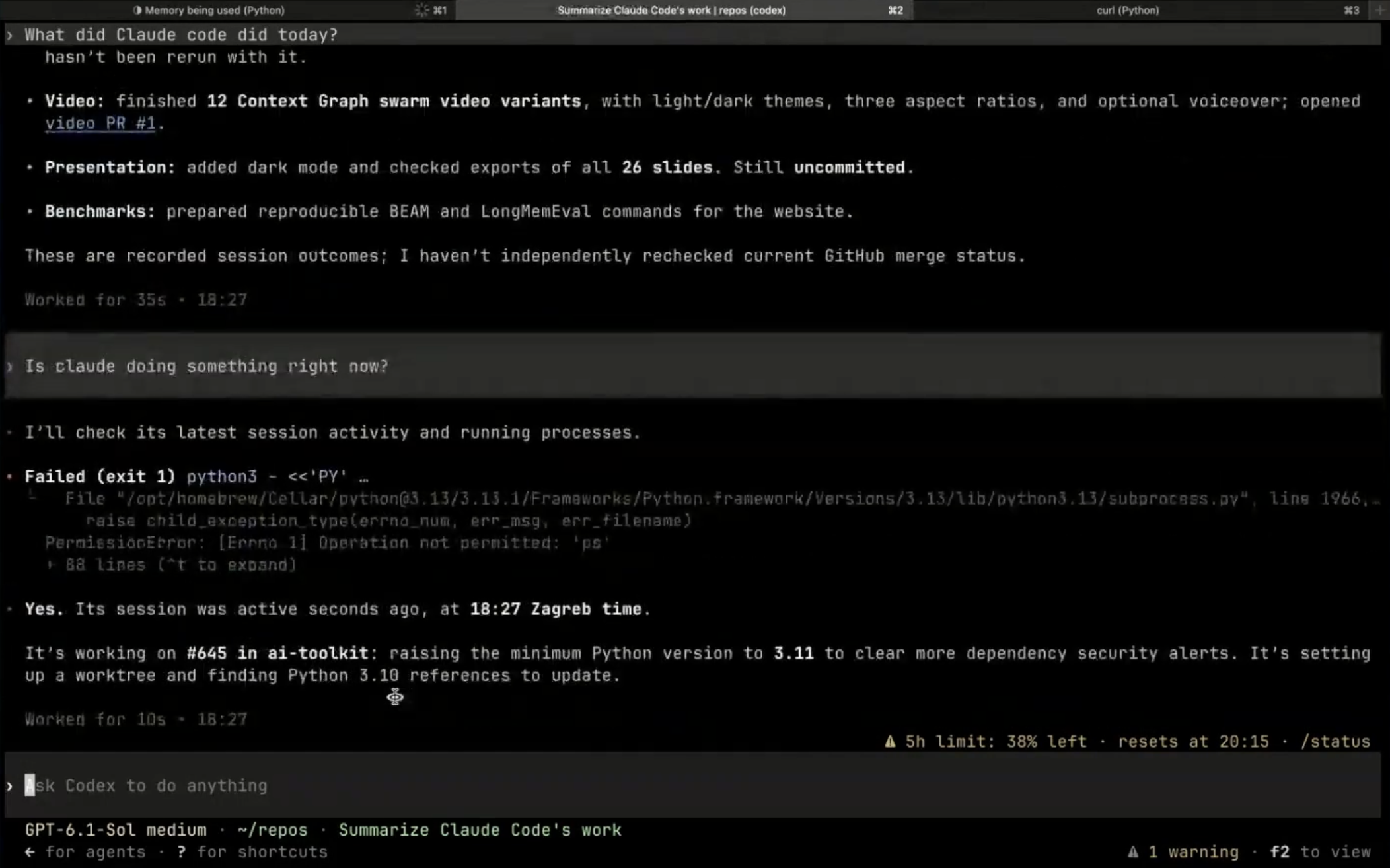
In Codex, he asked, "What did Claude Code do today?" Codex pulled up Claude Code's sessions, including Context Graph video variants, dark mode and exports for a presentation, and reproducible benchmark commands. As Ante noted, each harness phrases its answer in its own way, but both were reading from the same memory.
Tracking Work in Progress
Ante then gave Claude Code a real GitHub issue to work on, raising the AI Toolkit's minimum Python version to 3.11.
While Claude Code was still working, he asked Codex, "Is Claude doing something right now?"
Codex first tried to inspect the running processes and couldn't, so it answered from memory. It said Claude Code's session had been active seconds earlier and was working on issue #645 in ai-toolkit, setting up a worktree and finding the Python 3.10 references to update. Because every step lands in memory as it happens, the second agent could see work that was still in progress.
Ante tied this back to experiments. If you run a thousand attempts to optimize part of a codebase, only the best one lands on GitHub. With memory, the other 999 are still there for the next agent, or the next person, to build on.
Early Benchmark Results
Here are some early results on two public AI memory benchmarks, using the official judges:
| Benchmark | Correct answers | Tokens per answer | Latency |
|---|---|---|---|
| LongMemEval-S | 87.4% | 5,863 | 1.56s |
| BEAM 100K | 63.1% | 5,865 | 0.50s |
However, this is still a moving target. The plan is to lower token use and latency and improve accuracy at larger scales, with BEAM 10M as the next goal.
Try It Yourself
To try Context Graph yourself, run the same install command Ante used, which you'll also find here. The get started guide covers the full setup, including which agents are supported and how to check your connection.
Context Graph is still early, and what comes next depends on how people use it. If you try it and hit a gap or want a feature, open an issue or reach out to Ante via Memgraph Office Hours. He's happy to jump on a call and talk it through.
Q&A
Here’s a compiled list of the questions and answers from the community call Q&A session.
Note that these are paraphrased slightly for brevity. For complete details, watch the full community call recording.
-
Is AI Memory a library that collects logs, creates a graph and grants access to other devs. Is that correct?
- Technically, yes. But it's not about the logs only. As your harness interacts with different tools and the environment, it's also creating changes, and those changes are based on some decisions. You are making tests and hypotheses constantly, and those have some value. So it's not just the latest thing that Claude changed that is the value. The whole process is the value, the whole trace of whatever the agent is doing. And then the question becomes, how are you organizing it? How are you accessing it? How are you going to share it across the organization? What should be shared and what shouldn't be shared? So you are correct on the technical level about what it is.
-
What is the difference between knowledge graphs and AI agent memory?
- As we work in harnesses, we generate a lot of events. The raw data streamed from each harness is very useful for reconstructing what happened, especially because frontier models are quite capable of fetching it and doing a full reconstruction. The knowledge graph part is more about pointers. It changes less, and it acts like a filter. When you ask what Ante did today, there's a lot of noise in those sessions, but at a higher level, my activity points to the right sessions. The knowledge graph is also much more robust and has an ontology. You can define the schema you want and do entity resolution there. So you keep the raw events and use the knowledge graph as a pointer to them.
-
Do you think two users' agent sessions can corrupt memory?
- No, because each user has their own space where they write. Then there's a general space that each user explicitly chooses to share into, and you can apply a filter at that level too. We're not streaming random data from different users into the same graph. The structure is separated.
-
How does a company benefit from using the tool you're presenting?
- The most basic example is experiments. Say I spend the whole day running a hundred experiments. Tomorrow, someone else in my team or organization wants to solve the same problem. Instead of running all hundred experiments again, they'll see that I've already run them, and they can build on top of my results or use what I discovered. It can also point the other way and tell them not to try something at all because I already did. The second benefit is that you're not tied to any harness or LLM provider. You're tied to your data. In this case that's Memgraph, but you can always import and export from Memgraph and move to something else, so it gives you more options across the board.
-
I have a use case where I want to teach the AI a proprietary process of analysis inside financial charts by hearing it, with persistent visual contextual parity. Is it possible to create and add to this memory graph while narrating what I'm doing?
-
I would generalize this a bit. If you're doing an analysis of something, is it possible to collect it and change it? The answer is yes. In your case, Claude or Codex or whatever you are using will open a session, start reading your charts and try to understand them. As the agent is understanding them, it's going to build that memory. From the moment it starts, you can start chatting around it and giving it feedback.
So it is possible to do that. The question now is what you are expecting to be stored there, since you mentioned visual contextual parity. I'm not sure what you mean by that, but basically, if Claude and the harness can read that document, that means it can be stored in the graph, and then it can be retrieved back into the harness.
-
-
Do we have any measure on the storage? For example, one single prompt can make multiple calls, read docs and generate a huge graph. Do we have a measure like X number of tokens and a number of nodes and edges?
-
That's a great question, and it relates to the token budget on top of the memory. We have a limit on how many tokens recall can use, currently around 6,000. When you ask a question and the model decides to pull from memory, it goes to Memgraph, runs a vector search and a text search, pinpoints the chunk you discussed and expands from there, all within that upper limit. The limit is in tokens, not tied to nodes and edges.
As for how many megabytes of storage it uses, that would be a good feature to add. Memgraph persists the memory, but over time you'll start releasing it and forgetting older sessions, so it works more like a temporal container that you can schedule. More statistics would be a good addition, but the basic limit is already there.
-
-
Does the installation completely replace the memory backend used by the harnesses?
- Yes. In the installation process, there's a yes or no for the Claude Code and Codex harnesses. Claude Code and Codex are the most advanced harnesses at the moment in terms of tool support and extensibility, so it's easier to add plugins to them. Others aren't yet, but as soon as a harness supports it, I'm going to add support to completely replace the backend, so that the backend storage for memory writes and reads goes to Context Graph. That works for both Codex and Claude Code at the moment.
-
How do we add filters and ensure privacy?
- The Memgraph docs have a privacy section for AI memory. Currently, you can redact secrets and keep a tagged part of the text out of memory entirely. The privacy docs list what's supported today. If you need something more, open an issue or let me know, and I'm happy to add it.
-
How do teammates retrieve your experiment results the next day? Is it the exact code or an AI response generated from your recent work?
- It's the AI response generated from your recent work that's being driven by the memory. If you have shared spaces set up between teammates, that means I can say, okay, look, I have run these experiments today, and they're related to this project. Let's say I've been improving a query optimizer. Remember these thousand experiments and save them. Then when somebody else comes in and asks about the query optimizer, Context Graph reads within that token budget I was describing. It reads from the spaces and from your own memory, and then you get the response based on that.
-
Does it read processes, thinking tokens, terminal outputs or any prompt outputs?
- It reads the tool calls, the arguments to tool calls and the results of tool calls. It reads what you have said to it and what it's given back to you, so the prompt inputs and outputs, and whatever else the agent is being fed. I think Anthropic doesn't expose the thinking tokens, so what's stored is what you gave it, what it gave back, and the tool calls and context it pulled from the tools in between. If other LLM providers also provide thinking tokens, we are obviously going to store that too.
