How to Connect AI Agents with Context Graphs Across Domains
AI teams rarely struggle because they have no tools. They struggle because the tools don’t talk to each other.
Documents sit in one place. Structured data lives in another. GenAI experiments run in parallel. Agents appear in different teams. Then someone asks the hard question: how do you make all of this work together in production?
That was the focus of our recent Community Call with Previsant cofounders Satya Sachdeva, CTO, and Doug Ramsey, CEO. They walked through Previsant’s Adaptive Intelligence Platform and showed how it connects unstructured documents, domain-specific schemas, AI agents, MCP, structured data, and Memgraph as the graph layer.
Missed the live session? Watch the full Previsant x Memgraph Community Call recording for the full architecture walkthrough, live demos, and Q&A.
Here are the key takeaways from the session.
Key Takeaway 1: Production-Ready AI Apps Need Connected Architecture
The session started with a practical problem. Many organizations now have GenAI applications, AI agents, relational databases, and analytics systems. But those pieces often run in separate corners of the business.
Previsant built its Adaptive Intelligence Platform to connect those pieces into one architecture. The platform brings together the following:
- GenAI
- AI agents
- Memgraph as the graph database
- Structured data from relational databases
- MCP server connectivity
- Vector retrieval for document search
The aim is to build a context layer where extracted entities, document evidence, relationships, rules, and structured business data can be queried together.
That’s where Memgraph fits. In Previsant’s architecture, Memgraph stores the graph of entities and relationships that the rest of the AI workflow can use for reasoning, traceability, and cross-system analysis.
Key Takeaway 2: What Is the Adaptive Intelligence Platform?
Previsant’s Adaptive Intelligence Platform is built for workflows where context is scattered across documents, structured data, source-system code, runtime logs, and AI environments.
The platform brings those pieces into a connected architecture. Unstructured documents can be ingested, entities and relationships can be extracted into Memgraph, and structured data can be brought in through MCP-connected systems.
That makes the platform useful across several applications:
- Knowledge graph and GraphRAG workflows
- Cross-system data lineage
- AI governance
- Payment integrity analysis
The platform started from a practical question: how can teams extract rules from large sets of complex documents and connect them back to operational data?
Healthcare payment integrity was the first use case where this pattern proved useful. Rules from Medicare and Medicaid documents could be extracted, compared across sources, and connected back to claims data for waste and abuse analysis.
But the broader point is the architecture itself. The same pattern now supports insurance claims research, legal workflow analysis, manufacturing inspection reports, and lineage across source systems, data warehouses, and AI environments.
Key Takeaway 3: How Domain-Specific Schemas Improve GraphRAG
Previsant’s knowledge graph application supports multiple domains through a configurable schema layer.
It is possible to select a domain such as insurance, finance, healthcare, retail, or manufacturing. Based on that domain, the platform can populate a default schema that defines what should be extracted into Memgraph.
The schema includes entities, relationships, and synonyms. Synonyms are especially important in document-heavy workflows.
For example, an insurance document might refer to the same person as a policyholder, named insured, or first party claimant. In Previsant’s schema, those terms can map to the same canonical entity in the graph.
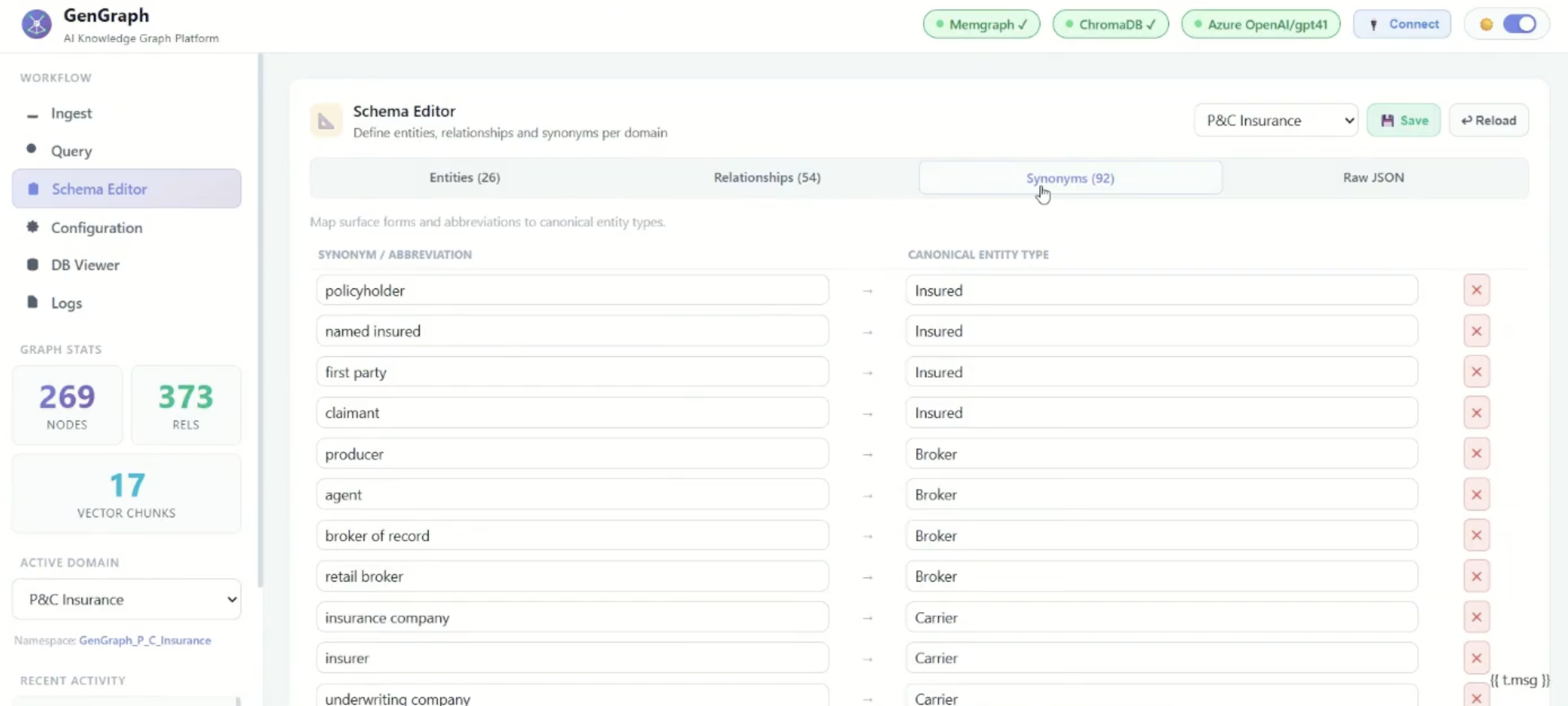
That helps prevent a common document extraction issue where related terms are treated as separate concepts just because the wording changes from one document to another.
This is also where graph-based retrieval becomes more than keyword search or vector similarity. The application can use the schema to extract domain-specific entities and relationships, then let users query across them.
Key Takeaway 4: The Architecture Supports Three Query Modes
Previsant’s platform supports three query modes:
- RAG queries against documents
- Graph queries against Memgraph
- Hybrid queries across both the vector database and the graph database
That separation is important. If you only need to ask a question about a specific document, RAG may be enough. But if you need to understand conflicts, overlaps, or relationships across multiple documents, the graph becomes more useful.
In the architecture shown during the session:
- Document chunks are stored in ChromaDB.
- Extracted entities, nodes, and relationships are stored in Memgraph.
- The LLM layer can translate natural language into Cypher when the query needs to run against the graph.
- Hybrid queries can use both the vector database and the graph database.
The application also exposes practical controls in the UI. Users can either add new data to the existing graph or replace it entirely. The application also gives users practical controls in the UI. They can update the graph, adjust schemas, configure model settings, inspect extracted data, and explore relationships in Memgraph.
That last part matters. A GraphRAG system is easier to trust when users can inspect what it extracted, where it came from, and how entities connect.
Key Takeaway 5: P&C and Specialty Insurance Demo
The first live demo focused on insurance claims research.
The business problem is clear. Property and casualty claims are document-heavy. Claims teams and Special Investigations Units need to understand what happened, what documents support a position, what evidence contradicts it, and which people or organizations appear across the claim lifecycle.
The demo moved through five investigation questions:
- What evidence supports or contradicts full roof replacement?
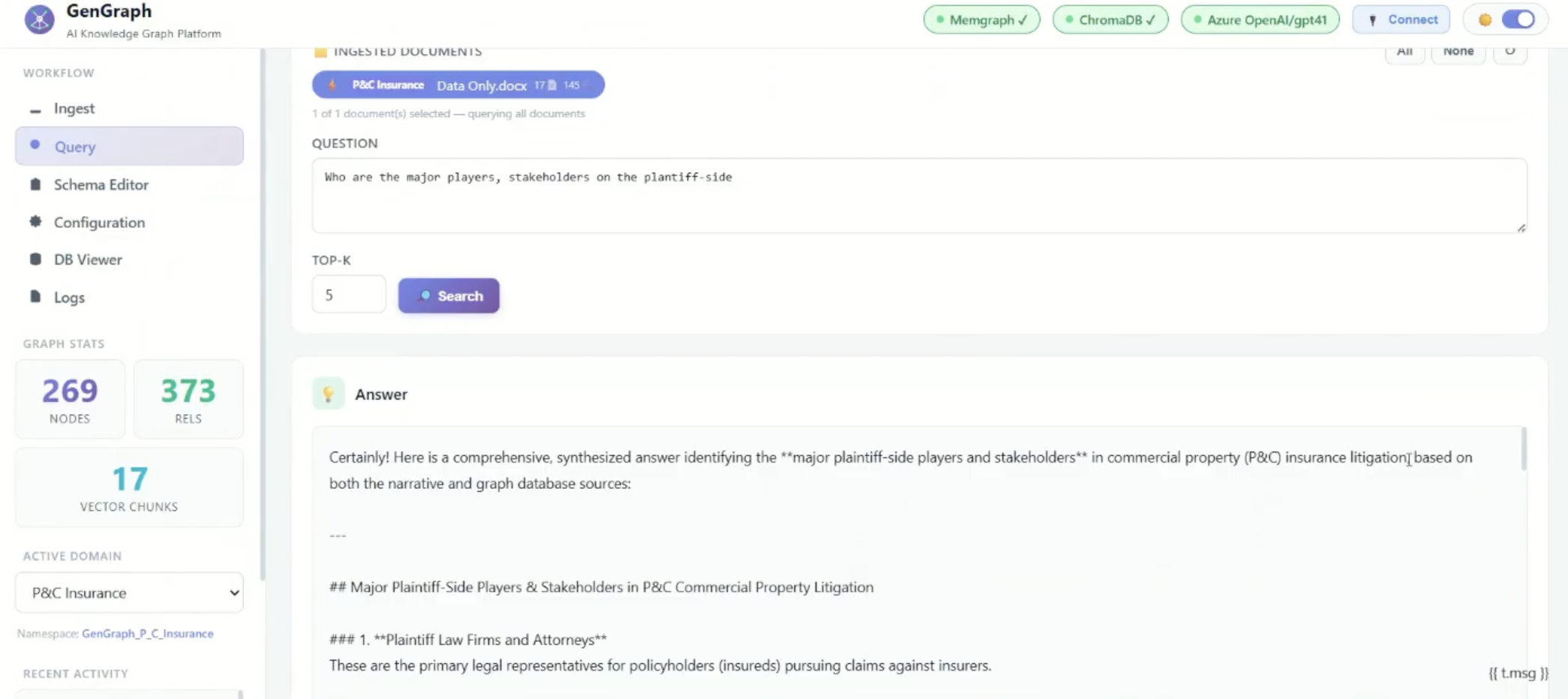
- Who are the major players and stakeholders on the plaintiff-side?
- Which attorney, public adjuster, and contractor combinations appear most frequently?
- How many distinct public adjusters and legal firms appear in this case?
- What is the summary count for each by name?
For the roof replacement question, the platform compared evidence across the claim file. It surfaced support for full roof replacement, but also identified contradicting evidence such as the engineering report, carrier coverage analysis, and policy exclusions.
The plaintiff-side questions moved the demo from evidence review to relationship analysis. Instead of only looking at individual documents, the platform had to identify recurring connections between law firms, public adjusters, contractors, and claims.
The attorney, public adjuster, and contractor combination question helped show whether the same parties appeared together repeatedly. That does not automatically mean anything illegal or unethical happened, but it can point investigators toward claims amplification patterns that deserve closer review.
The summary count question made those patterns easier to compare. By listing the named public adjusters and legal firms with their counts, the platform helped show which actors appeared most often.
The useful point is not that the platform declares fraud. It helps investigators compare evidence, spot recurring relationships, and decide where deeper research is needed.
The same pattern can also support adjacent legal and manufacturing workflows. In legal-heavy insurance cases, the graph can connect law firms, public adjusters, contractors, claims, and supporting documents. In manufacturing, the same approach can compare long inspection reports, such as aircraft engine service reports, to find repeated root causes across failures.
Key Takeaway 6: Cross-System Lineage: Live Demo
The second major demo focused on cross-system data lineage.
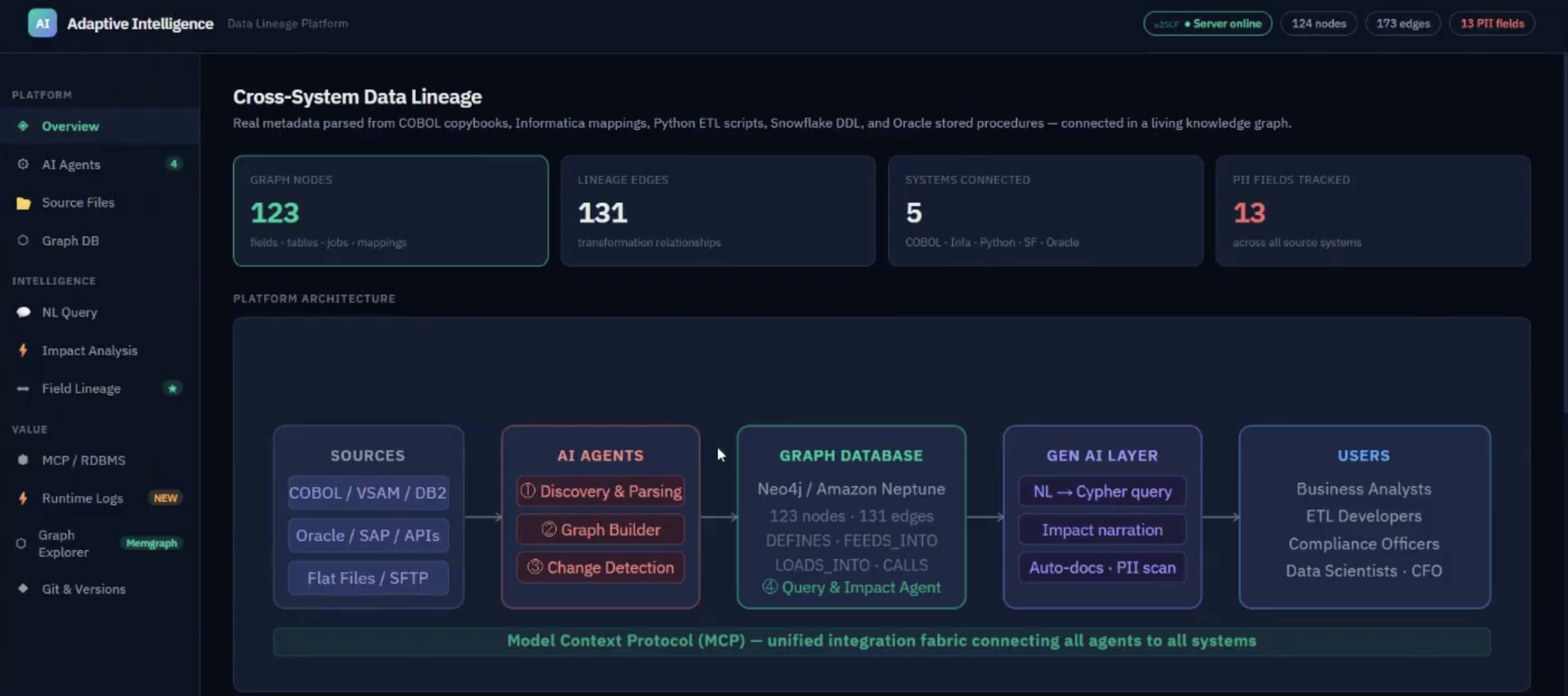
This is the kind of problem every enterprise data team knows too well. Data starts in one system, passes through code, ETL jobs, warehouse layers, reports, analytics tools, and now AI environments. Then someone asks: what happens if this field changes?
Previsant showed how its platform uses agents to discover metadata across systems and store the relationships in Memgraph. The agent pipeline includes discovery agents, change detection agents, querying and impact agents, and graph builder agents.
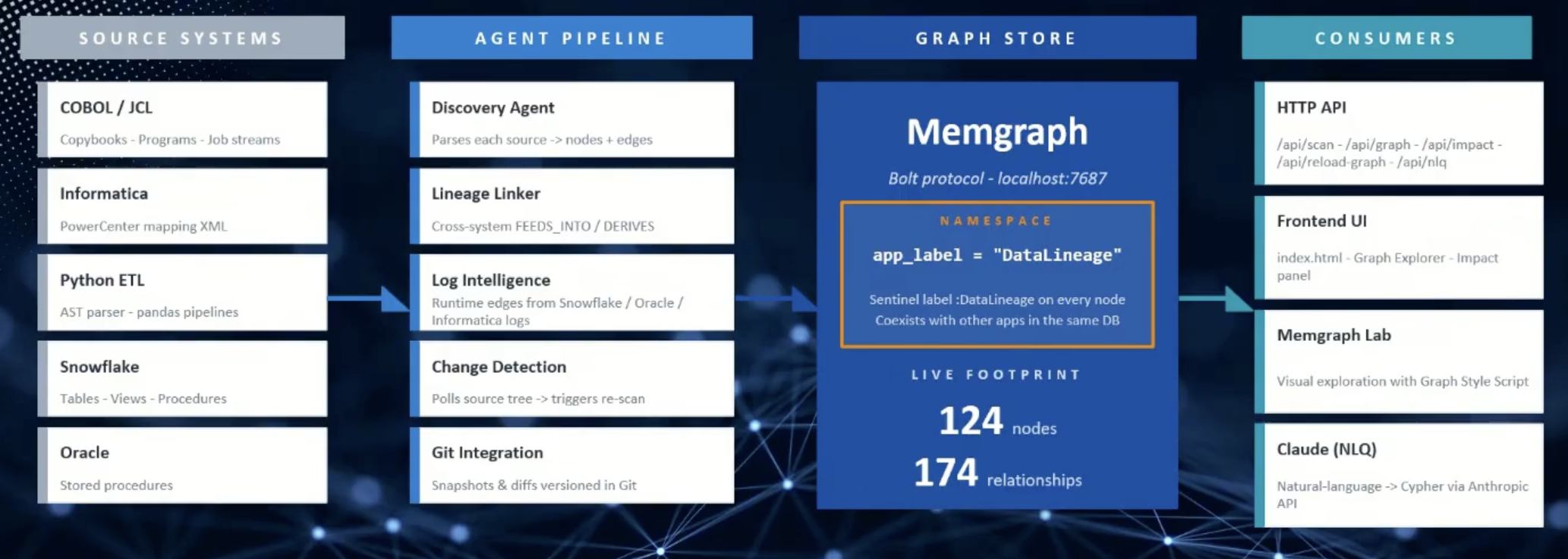
Once the graph is built, users can ask natural language questions such as:
- Which PII fields flow through Informatica for this policy claim?
- What does this normalized amount do?
- What fields does this process read and write?
- What happens if this field changes?
That makes lineage useful outside the data engineering team. Business users can inspect impact, conflicts, and field journeys without reading every workflow log or code file manually.
Watch the full Previsant x Memgraph Community Call recording to see the demos and Q&A in detail.
Wrapping Up
The session showed a practical pattern for moving beyond siloed AI workflows.
Previsant used Memgraph to connect extracted entities, document evidence, structured data, AI agents, and lineage metadata in one graph-backed architecture. The insurance demo showed how that context can support claims research. The lineage demo showed how the same approach can help teams trace data across code, logs, systems, and analytics environments.
The real takeaway is that production AI needs connected context teams can inspect, query, and trace back to source evidence.
Q&A
Here’s a compiled list of the questions and answers from the Community Call Q&A session.
Note that these are paraphrased slightly for brevity. For complete details, watch the full Community Call recording.
-
How are you able to mass classify data from each individual source? How do you label documents so you know that X is a plaintiff?
- The classification comes from a combination of the language model and the domain schema. The LLM can recognize language that points to a legal firm or another stakeholder type. The schema then defines the entities, relationships, and synonyms used during extraction. For example, policyholder, named insured, and first party claimant can all be treated as related terms and mapped to the canonical insured entity in the graph. There is also a human-in-the-loop element. This is not meant to be a set-and-forget workflow.
-
Did I understand correctly that document chunks are stored not just in ChromaDB, but also in Memgraph?
- No. Document chunks are stored in ChromaDB for RAG queries against unstructured data. Memgraph stores the graph layer, which means the extracted entities, nodes, and relationships.
The application can work as a pure RAG system if the graph is not needed. It can also work as a graph query system or as a hybrid GraphRAG system that uses both the vector database and the graph database.
-
How do you handle changes over the lifetime of a project?
- For the GraphRAG application, the system can track document history by using the document ingestion date. That date acts like a slowly changing dimension, so the platform can keep a history of how documents change over time. The date is stored as a property in both the vector database and the graph database.
-
How exactly is lineage tracked in the journey with metadata?
- Lineage is tracked through field-level lineage, flow diagrams, and change history. The application can show recorded modifications across systems, detected by the change agent, and it can show the impact of those changes. The history is captured based on dates or timestamps from the code and related metadata.
-
Why store chunks additionally in Memgraph? Isn’t that duplicated data?
- Chunks are not stored additionally in Memgraph. The document chunks stay in ChromaDB. Memgraph stores the entities, nodes, and relationships extracted from those documents. The graph helps with traceability and explainability, so users can understand where information came from without duplicating the full document content in the graph.