From JSON to GraphRAG: Building the Amazon Reviews Knowledge Graph
GraphRAG systems are only as good as the context they can access. Most teams hit a wall when they try to move beyond small proof-of-concepts. How do you take 571 million reviews and turn them into a governed, queryable knowledge graph?
In our latest Community Call, Russell Watson (Lead Software Engineer at Graph.Build) joined us to demonstrate a production-ready graph development lifecycle. We explored how to design, ingest, and query a dataset at the "Amazon Scale."
If you missed the live session, you should check out the full Community Call recording here.
Below are the key takeaways from the session.
Key Takeaway 1: The Graph Development Lifecycle (GDL)
Building an enterprise-ready graph is not about writing one-off ingestion scripts. Most organizations fail because they lack a clearly defined, governed data structure. Russell introduced the concept of the Graph Development Lifecycle, managed through three decoupled components:
- Graph.Build Studio: A no-code "Graph IDE" for collaborative schema design. It features full Git integration, allowing teams to track model history and restore previous states.
- Transformers: Independent processes that ingest data from Kafka, SQL, or S3. They use "input blocks" to map raw data to the schema and support Change Data Capture (CDC) to keep the graph in sync.
- Graph Writer: The publishing layer that writes data to Memgraph via OpenCypher, supporting high-throughput batch updates.
Key Takeaway 2: Schema Creation
A knowledge graph at this scale is not a weekend project. The model is the product.
The session starts inside Graph.Build Studio and goes straight into schema and model design. Schema is optional in small experiments. It becomes non negotiable once multiple teams touch the same graph and expect consistent structure.
The demo schema centers on four entity types:
UserReviewProductParent Product
A simple but important structural decision is added in the schema.
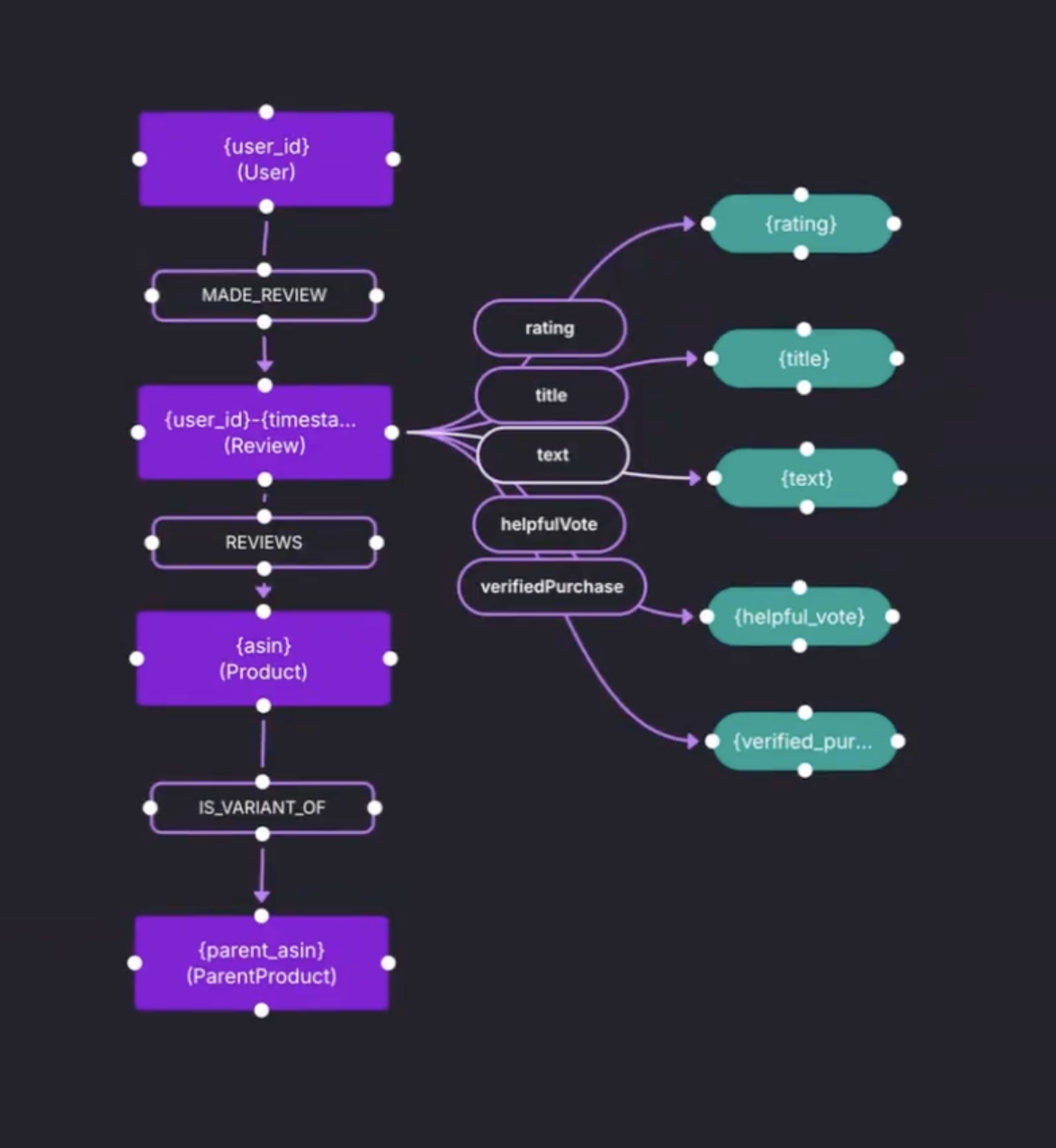
Product connect to Parent Product through an is variant of relationship. This keeps product variants tied to a stable parent entity, which helps later when queries need aggregation across variants.
The schema also adds the missing piece that most GraphRAG setups need. Reviews are not only ratings and metadata. The review text is added as a string property named text.
Key Takeaway 3: Mapping Data to Schema
Graph.Build treats the mapping as a semi structured model. A semi structured model is built against a source, using a JSON snippet from the Amazon reviews dataset. JSON fields are translated into input blocks, then connected to nodes, relationships, and properties.
The important detail is that the mapping is schema informed.
Labels are selected from the published schema. Relationship types are also driven by the schema, so when Product is linked to Parent Product, the model recognizes it as is_variant_of.
Concrete mapping actions shown in the demo:
- parent ID maps to a
Parent Productnode Productlinks toParent Productand inherits the relationship type from
Key Takeaway 4: The "Fail Fast" Transformation Loop
Before running a transformation on tens of millions of records, the demo does something most teams skip. It tests the model.
The mapping is generated and run against a small JSON sample dataset. The output preview shows nodes on one side and edges on the other. A one-star review is visible in the output preview, which makes the point tangible. The transformed graph contains the raw text, not just the numeric rating.
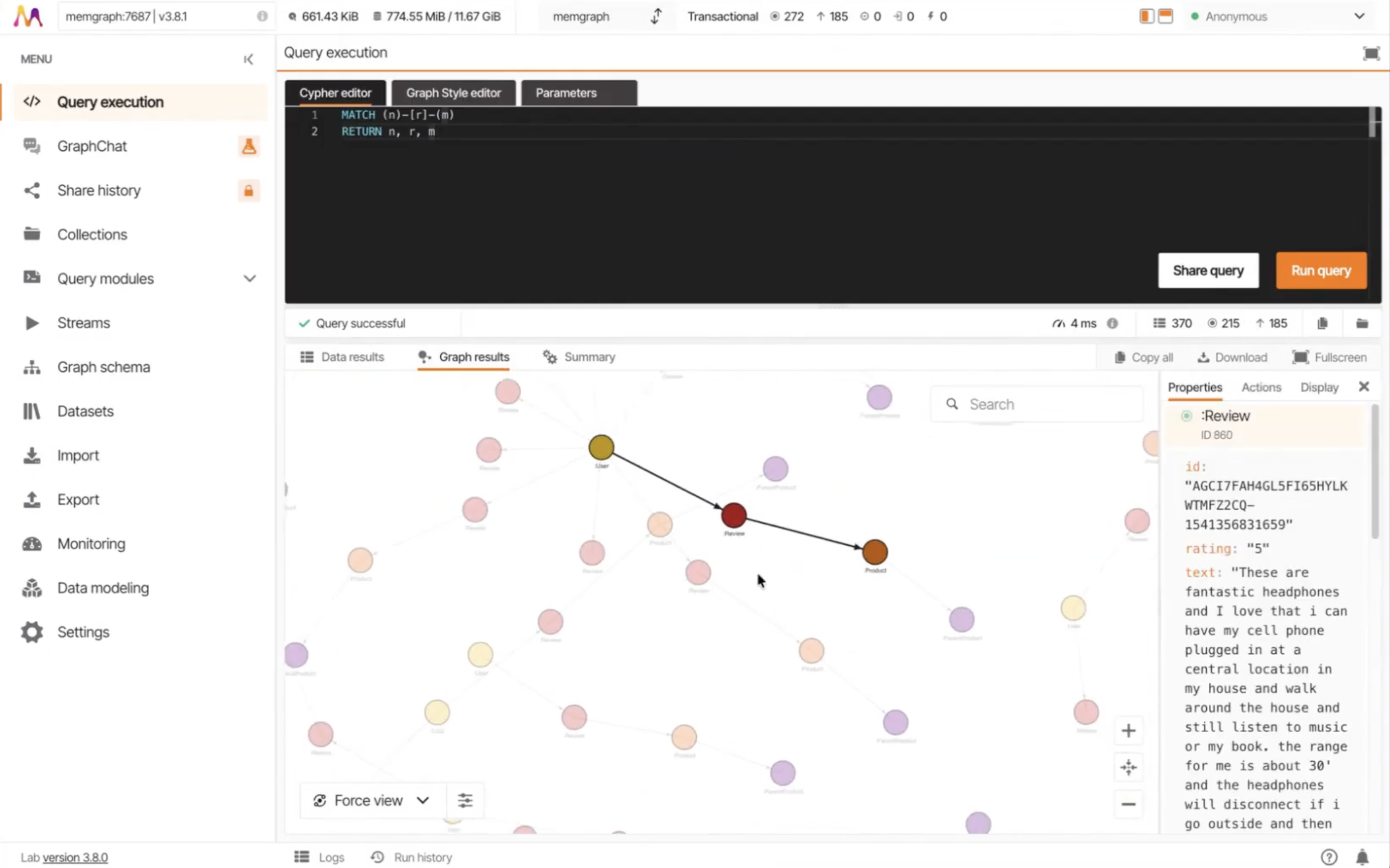
The workflow is iterative:
- test
- adjust mapping
- test again
This iteration loop avoids the high cost of re-running massive ingestion jobs due to simple mapping errors.
Key Takeaway 5: Ingesting 10M+ Records with Kafka
For the full Amazon dataset, a direct API isn't enough. The session explained how Kafka acts as the backbone for streaming large amounts of data.
The Transformer produces nodes and edges files which the Graph Writer automatically picks up. The demo showed a remote Memgraph instance already saturated with 10 million nodes and 16 million edges (roughly 10GB of data). This architectural decoupling ensures that the "Write" phase never bottlenecks the "Transformation" phase.
Key Takeaway 6: Atomic GraphRAG as the Unified Execution Layer
Once the data is in Memgraph, GraphRAG becomes an execution problem.
Stop building a brittle, multi-service pipeline outside the database. the retrieval logic needs to stay inside the database. The Atomic GraphRAG collapses the pipeline inside the database using database primitives, then run it as a single Cypher query.
Three Atomic GraphRAG retrieval patterns are applied to the Amazon data:
- Analytical: Exact queries to find specific products (e.g., fetching a Product ID dataset entry).
- Local: Using a "Pivot Search" to find a specific node and then a "Relevance Expansion" to pull the 1-2 hop neighborhood (variants and reviews).
- Global: Running algorithms like PageRank or Louvain Community Detection for a broader context from a subgraph to identify power-user clusters or thematic cohorts.
By executing these inside a single database transaction, you eliminate the overhead of pulling data out to external Python scripts.
Wrapping Up
Building at the "Amazon Scale" requires moving compute to the data. If you are tired of managing complex, fragmented RAG pipelines, it is time to look at a unified execution layer. This architectural shift ensures faster answers with shorter feedback loops, leaner context windows, and a stable, auditable path to production for even the largest datasets.
Watch the full on-demand recording here to see the live Studio demo and the Atomic GraphRAG queries in action.
Q&A
Here’s a compiled list of the questions and answers from the community call Q&A session.
Note that these are paraphrased slightly for brevity. For complete details, watch the full community call recording.
- How do you handle high memory requirements for Amazon-scale graphs?
- This is a standard challenge for in-memory systems. Memgraph 3.8 optimized this with a "single vector store" feature. Vectors are now stored only once in the index rather than twice. Depending on your embedding dimensions, this can reduce memory usage by up to 4x, making massive datasets much more viable.
- What if the graph schema is too big to pass into an LLM for Cypher generation?
- You should never pass a massive schema into a prompt. The strategy is dynamic schema loading. We are building tools that hit the MCP to prune the ontology graph based on the specific question, ensuring the LLM only sees relevant labels.
- How is the exact entity name being passed? Let’s say the product name in your graph is “MacBook”, but the question u ask is about “Mac”. How do you map to the exact product and how does LLM know what name to put for that product?
- This is a retrieval problem. You can run a text search to find a shortlist of candidate nodes that start with the partial string. Then, you expand from those nodes and pass that surrounding context to the LLM to determine the user's intent.
- What is the current latency for this end-to-end example?
- The transformation process showcased in this session was with a fairly small dataset of about 100 records. So, that was fairly instant. The 10+ million dataset was obviously a little bit longer than that. But, still, the transformation was quicker than the write. The entire transformation and publishing was done in a day, including the designing of the schemas and the models.