
GraphRAG for Devs: Graph-Code Demo Overview
Have you ever asked an AI coding assistant to explain a repository and gotten an answer that only reflected the files it just read?
That limitation shows up fast in real developer workflows. Once you are tracing call chains, checking dependencies, or trying to understand how changes ripple across a large codebase, local context is not enough. You need a way to inspect relationships between files, modules, and functions before you trust the assistant's answer.
In our recent community call, Vitali Avagyan, an AI engineer, showcased Graph-Code, an AI coding assistant that uses GraphRAG to build that repo-wide view. If you missed the session, you can watch the full on-demand recording.
Below are the main ideas and demo moments worth paying attention to.
Key Takeaway 1: The Codebase as a Graph
Most AI coding assistants handle local context well but still struggle with repo-wide reasoning. That gap is what led Vitali to build Graph-Code. A graph-based representation gives the assistant a structural model of the codebase instead of forcing it to reconstruct that model from repeated file reads.
By treating the codebase as a graph, you can:
- Visualize relationships between modules, classes, and functions.
- Understand dependencies.
- Navigate without manually searching through directories.
It provides a much-needed architectural overview with a bird's-eye view of the code that standard CLI workflows and file-by-file assistants do not expose directly.
Key Takeaway 2: The Current Landscape
The current AI-assisted coding tool landscape includes:
- Claude Code: Strong at terminal-first repo exploration, using shell commands and targeted file reads to help developers inspect a project quickly.
- Cursor: Combines file navigation with semantic search by indexing the codebase with embeddings.
Both approaches are useful, but they still need repeated file reads to recover cross-file relationships. What they usually lack is an explicit architectural map of the repository.
Key Takeaway 3: What is Graph-Code?
Graph-Code represents a codebase as an interconnected graph, capturing relationships between entities such as functions, modules, and external packages.
It serves as both a visualization tool for the code graph and an AI assistant. The tool combines the benefits of graph-based search with a grep-style fallback, allowing the agent to decide which is most appropriate for a given prompt.
Its core capabilities include:
- "Surgical code replacement": This is a powerful feature where the tool uses abstract syntax trees (ASTs) to find and apply precise diffs.
- Visual diffs: You get a visual interface to see code differences before any changes are applied, giving you full control.
- Secure design: The tool is designed to be secure by being confined to a specific project directory.
The workflow is straightforward. It parses your code and builds a graph model of the repository. Once the graph is built, you can ask questions in plain English, such as "What is the maximum function call chain length?"
The tool then uses a large language model (LLM) to convert your natural language query into a precise Cypher query, which is run on the graph. The results are displayed in an interactive, visual format using Memgraph Lab. This is how it goes from a high-level question to actionable graph insights.
Key Takeaway 4: Technology Under the Hood
Graph-Code's architecture is built on a robust, developer-friendly stack, which includes:
- Graph Database: Graph-Code uses Memgraph for in-memory storage, which supports fast graph queries and updates as code changes.
- Parsing: The tool uses Tree-sitter for parsing. This library generates abstract syntax trees (ASTs) for supported languages and is highly modular and extensible. It is the core component that helps Graph-Code understand code structure without being tied to a single language.
- Language Model Integration: The default LLM is Gemini 2.5, but the tool is configurable. You can easily switch to OpenAI, Anthropic, or any other API-compatible LLM. This provides flexibility for developers to use their preferred model.
- Deployment: The setup is Dockerized for portability and designed to be local-first. This ensures privacy and security, as your code never leaves your machine. A future option for a cloud-hosted service is also on the roadmap for enterprise needs.
Key Takeaway 5: A Walkthrough of the Live Demo
During the community call, Vitali provided a live, hands-on demo to show exactly how Graph-Code works and what makes it so powerful. The demo, which used the Graph-Code repository itself, highlighted the key steps in a typical developer workflow.
Step 1: Building the Code Graph
The first step is to build a graph representation of the codebase. In the demo, this is done with python main.py build-graph ., which builds the graph for the current directory. That indexing step turns the repository into something you can query structurally instead of navigating only by files and folders.
Step 2: Visualizing the Graph in Memgraph Lab
Once the graph is built, it can be visualized in Memgraph Lab, a dedicated workspace for exploring graphs. The visualization provides a high-level architectural view of the repository, showing how different files, modules, and functions are interconnected.
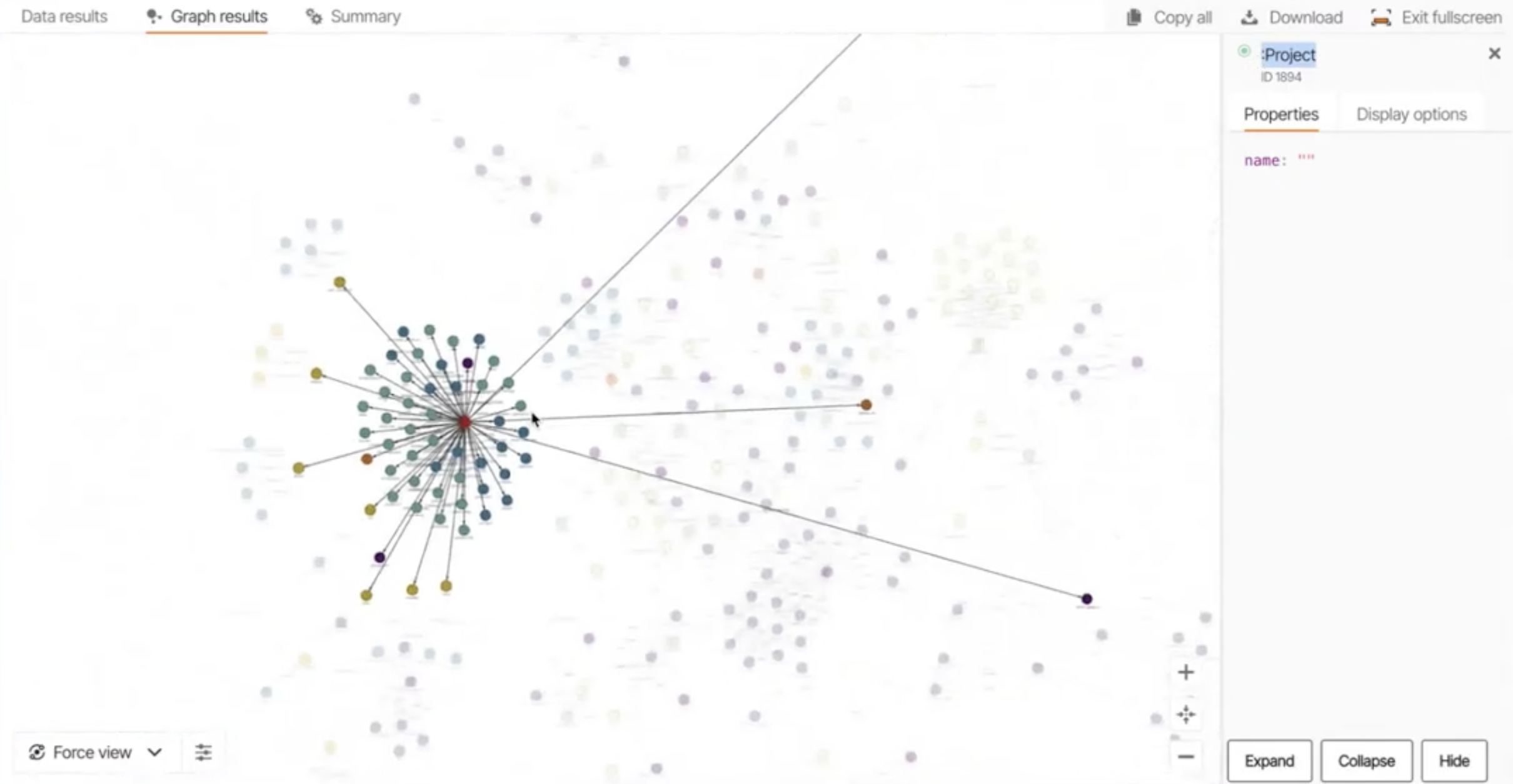
You can see how a project node connects to various packages, which in turn define modules, classes, and functions. This visual representation makes it easy to spot relationships that are far apart in the traditional file system.
Step 3: Interacting with the Graph
Next, Vitali showed how to use the interactive command-line interface to query the codebase using natural language. The tool decides whether a prompt should be handled as a simple search (like grep) or translated into a Cypher query against the graph database.
- Simple Query: When asked, "what is this repo about?", the agent performs a quick search on the
READMEfile and provides a summary. This shows its ability to handle straightforward requests efficiently.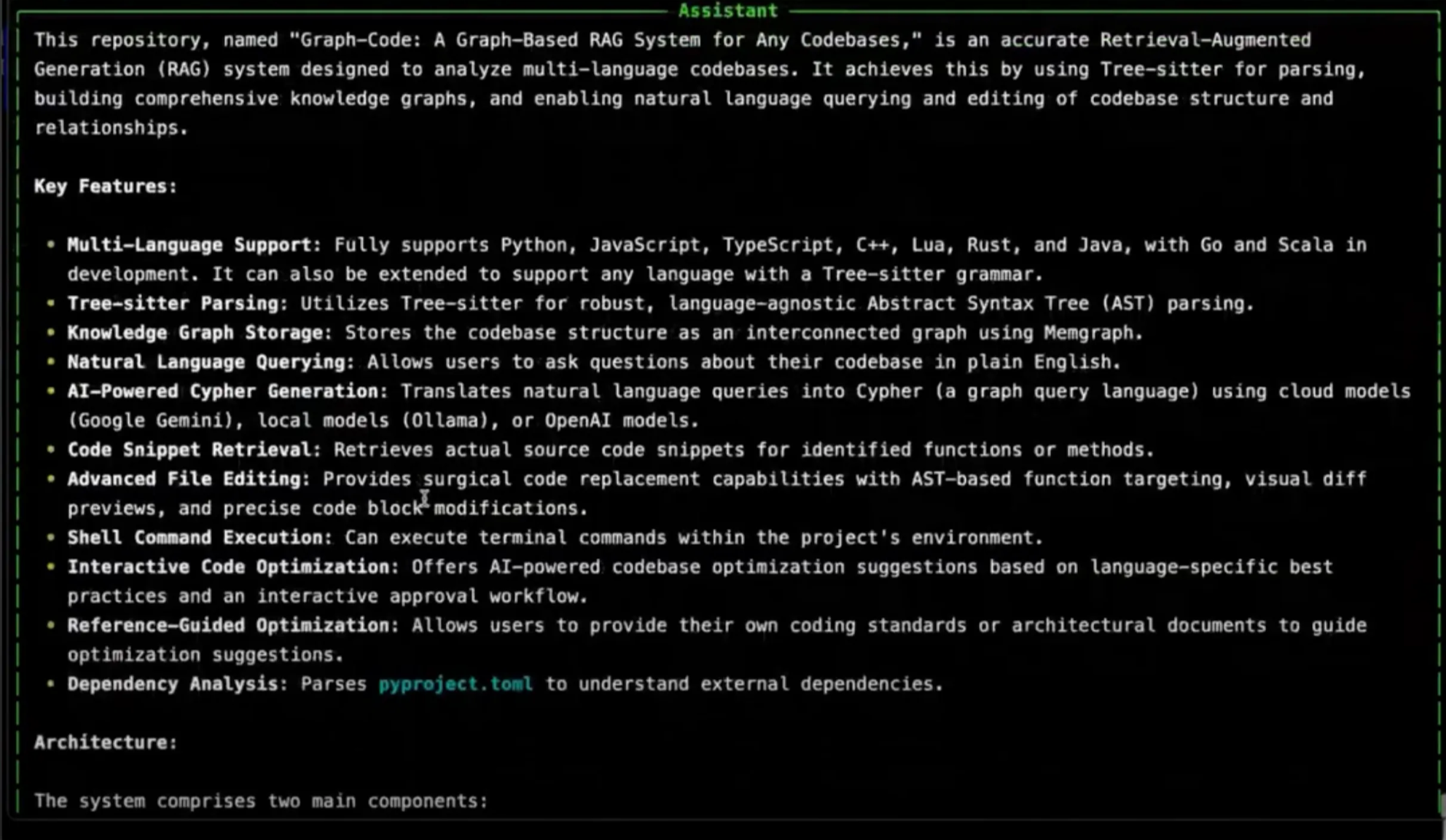
- Complex Graph-Based Query: For a question like, "what is the maximum function call chain in this repo?", the agent's orchestrator paraphrases the query and generates a Cypher command. The command is then executed on the graph to find the answer, which is
11in this case.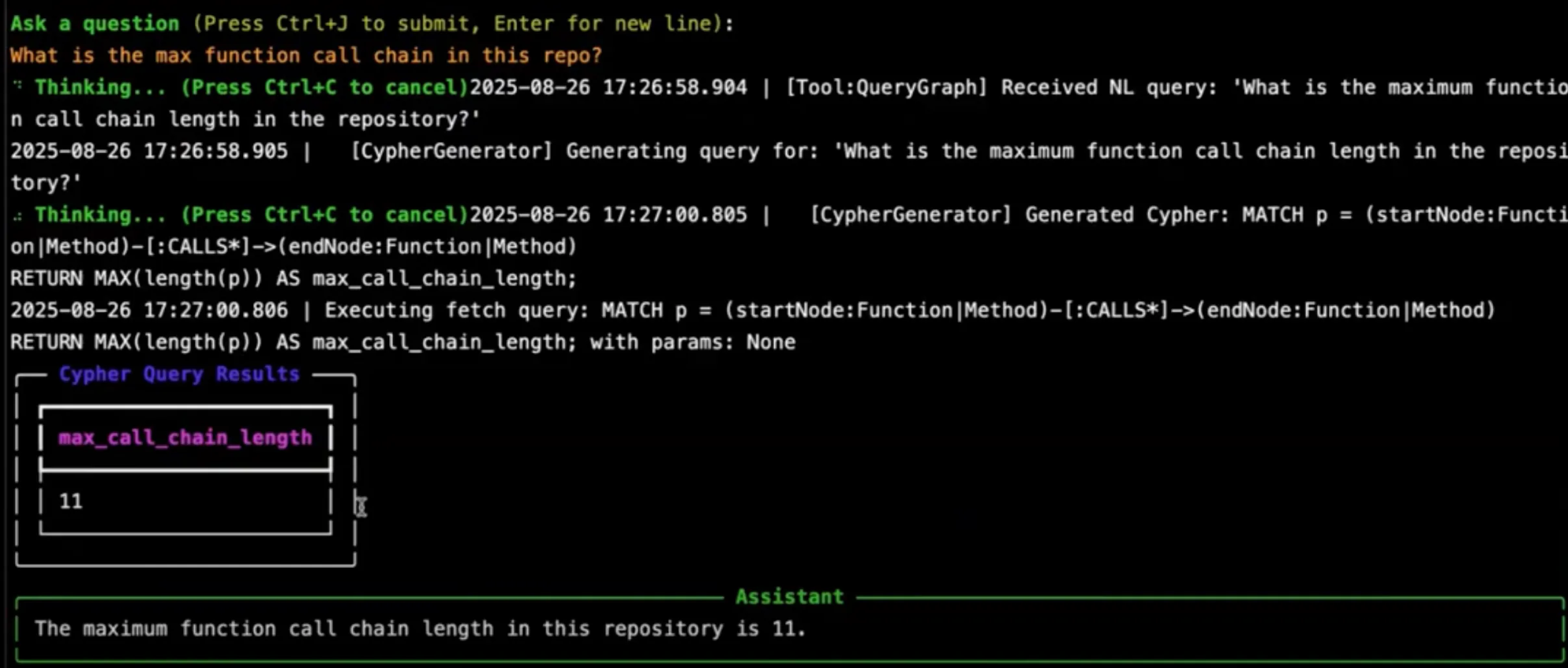
The process demonstrates how Graph-Code leverages the graph structure to answer questions that would be difficult or impossible with traditional search methods.
Step 4: Editing Files
The demo also showed how Graph-Code can perform surgical code replacement. Vitali asked the tool to add the result of the previous query (the maximum function call chain) to the README file. The tool confirms the edit operation, and a visual diff shows the exact line that was added.

This showcases how the tool can not only understand and query the codebase but also modify it based on the conversation history.
A more detailed look at the Graph-Code demo can be seen in the full community call recording.
Key Takeaway 6: Language Support and Roadmap
Graph-Code is designed to be versatile, supporting a growing list of programming languages and a clear vision for the future.
- Current Languages: The project currently supports Python, JavaScript, TypeScript, C++, Rust, Java, and Lua.
- Planned Languages: The roadmap includes support for Go, Scala, C#, Ruby, PHP, and Kotlin.
The development roadmap is focused on expanding the tool's capabilities for larger-scale projects and teams. Key goals include:
- Monorepo Support: Adding better support for multi-language codebases within monorepos.
- Web-Based Visualization: Developing a web-based graph visualization for easier access.
- Enhanced Performance: Better handling for large repositories
- Graph-Code’s MCP Server: It will act as a centralized knowledge hub for any AI development environment.
- Cloud-Hosted Option: Offering an enterprise-level, cloud-hosted option for teams that require it.
Key Takeaway 7: Where Graph-Code Helps Most
What makes Graph-Code effective is that it combines a semantic view of code with a structural one. Instead of stopping at a local snippet, it gives you a global architectural view.
It is particularly useful for:
- Large or complex repositories: When a codebase is too big to hold in your head, Graph-Code provides a visual map to navigate it.
- Multi-language environments: With its language-agnostic parsing, it can manage dependencies across different languages in a single system.
- Teams with distributed dependencies: It speeds up critical tasks like dependency analysis, onboarding new developers, and refactoring by making connections visible.
Graph-Code fits teams that need repository-wide reasoning, not just single-file autocomplete. It is especially useful when you need to trace dependencies, understand architecture, or inspect how a proposed change could affect the rest of the codebase.
When to Use GraphRAG in Developer Workflows
If you mainly need quick help inside a small set of files, a standard coding assistant with grep or semantic search is often enough. If you need to trace call chains, inspect architecture, or reason across packages and repositories, a graph-backed workflow like Graph-Code becomes much more useful.
If you want to build or evaluate a similar workflow with Memgraph, start with the GraphRAG docs and AI demos below, then watch the full community call for the end-to-end walkthrough .
Q&A
Here’s a compiled list of the questions and answers from the community call Q&A session.
Note that these are paraphrased slightly for brevity. For complete details, watch the full community call recording.
- What are the challenges of adding different languages, and what do you need to handle when adding a new one?
- Adding new languages to Graph-Code presents the challenge of not being proficient in every language. However, the project's architecture is designed to address this. The core is built on Tree-sitter, a language-agnostic library that parses code and creates an abstract syntax tree (AST), regardless of the specific language. This allows the system to understand the code structure without being tied to a single language. The process of adding a new language is streamlined and takes a test-driven approach. The developer first defines the specific relationships to extract from the code, such as import or function call relationships. Then, with the help of AI assistance, the system is optimized to identify and capture these relationships in the code. This iterative process is so efficient that adding a new language, including thorough testing and bug fixes, can take as little as one or two days.
- Is Python 2.7 supported?
- No, Python 2 is not supported. The codebase is well-tested with Python 3.12 and the UV ecosystem. While a user may try to use it with more recent versions of Python, it will most likely not work. Support for legacy codebases written in Python 2 could be discussed if there is a high demand.
- How to deal with different Git branches?
- The approach to dealing with different Git branches involves using standard best practices. One can either use Git worktrees or create a separate clone of the repository to work on multiple features in parallel. The choice between these methods depends on the specific task.
- Does Tree-sitter create edges for function calls, or does Graph-Code add those edges?
- Tree-sitter does not create edges for function calls; Graph-Code adds those edges. With Tree-sitter, the system can see which module imports which other modules and what type of symbols from those modules. So, basically, these caller relationships are manually constructed in Graph-Code.
- Can I update the existing knowledge graph with new data points without disturbing the existing relations?
- Yes, you can. Due to the flexibility of Tree-sitter, you don't have to rebuild the entire graph. You can simply add the diff from your edited codebase to the existing graph.
- Do you have any idea how to make connections in a graph between repositories in a microservice system?
- Yes, there is experimental support for this. The system is designed so you don't have to clean the graph for a new repository. You can simply add multiple repositories on top of each other. If there is an existing connection between them, the system can find that. However, manually adding connections is not currently supported.
- What do you think is the best way to construct a knowledge graph with text-dense data? Should the focus be more on entity/relationship extraction upfront, or on using embeddings and semantic techniques once the data is in Memgraph?
- Having a clean knowledge graph is superior to simply stuffing data into chunks. A knowledge graph offers multiple advantages, including better memory usage and the ability to selectively reference files rather than storing their entire text. For instance, a node can represent a file, but instead of storing all the text, it can just store a corresponding embedding. There has been some discussion about whether to also include embedding nodes in the graph, but this has not been implemented. Semantic search over a codebase is not a simple, out-of-the-box solution and requires a lot of optimization to determine what to embed and what pointers to use to find information faster.
- Have you worked on a project that converts PDFs to graphs?
- Yes, a lot. This is a core part of the work. There are many ways to do this, including using third-party solutions, Vision Language Models (VLMs), or OCR techniques. Each approach has its pros and cons, but there is a preference for VLMs because of their spatial understanding of documents. For example, it can be beneficial to convert a PDF into multiple images and then have a VLM read those images to extract information. This is particularly useful because standard PDF parsers can sometimes lose crucial information, such as the relationships between different representations like graphs and tables.
Further Reading
- Blog: Memgraph AI Toolkit: A Codebase for Graph-Powered Applications
- Community Call: From Chaos to Context: Building Knowledge Graphs with AI Agents and Vector Search
- Blog: How to build multi-agent RAG system with LlamaIndex?
- Docs: Memgraph in GraphRAG Use Cases
- Webinar: Talking to Your Graph Database with LLMs Using GraphChat
- Blog: 4 Real-World Success Stories Where GraphRAG Beats Standard RAG