

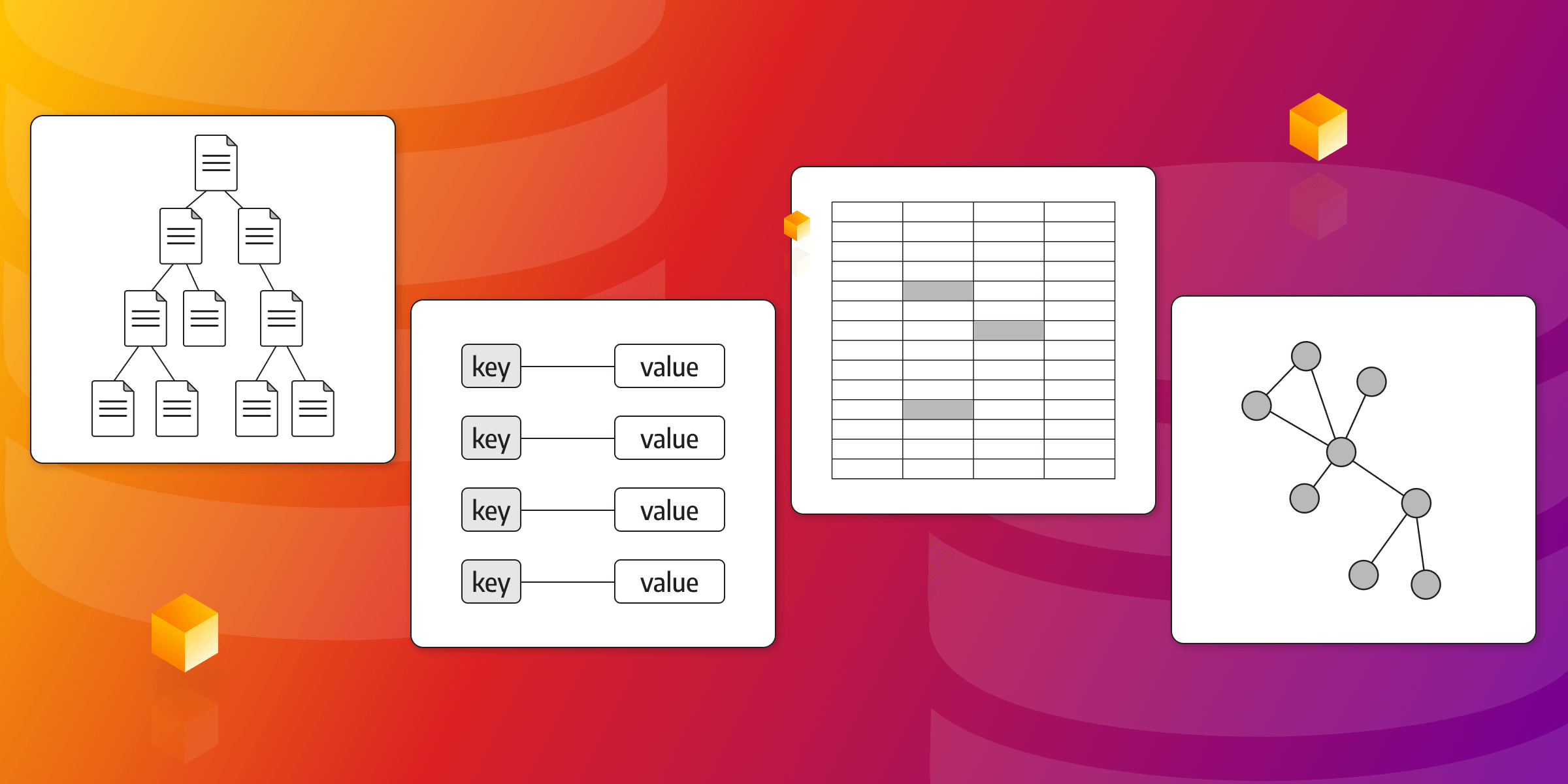
Types of NoSQL Databases: Deep Dive
NoSQL databases store data in models other than relational tables: key-value pairs, documents, columns, wide columns, graphs, and, most recently, vectors. Each model fits a different kind of workload. This article explains what NoSQL databases have in common, how each type works, which databases are popular examples, and what to consider when you choose one.
What Is a NoSQL Database?
A NoSQL database, or "Not Only SQL," is a type of database that provides a flexible and scalable approach to storing and managing large volumes of unstructured and semi-structured data. Unlike classical relational database management systems, a NoSQL database doesn't rely on a fixed schema, which allows for dynamic and agile data modeling.
SQL/Relational Databases vs. NoSQL Databases
SQL and NoSQL databases represent two distinct approaches to data storage and management, each with its own set of strengths and trade-offs. SQL, or relational, databases have been the conventional choice for structured data. NoSQL databases became popular for their ability to handle large volumes of unstructured and semi-structured data. For a closer comparison, read SQL vs. NoSQL databases.
SQL databases enforce a rigid schema, ensuring data integrity through predefined tables, columns, and relationships. They excel in complex queries, transactional consistency, and data integrity enforcement. They also offer powerful ACID (Atomicity, Consistency, Isolation, Durability) properties, making them suitable for applications with stringent data integrity requirements, such as financial systems or inventory management.
On the other hand, NoSQL databases provide a flexible schema-less approach, allowing for agile development and accommodating evolving data structures. Many offer horizontal scalability, distributed architectures, and high-performance read-and-write operations. In addition, NoSQL databases shine in handling unstructured data, providing fast data retrieval, and scaling to meet the demands of modern applications. ACID transactions aren't exclusive to SQL databases, either: many NoSQL databases support them too, so check the guarantees of the specific database you're considering.
Key Characteristics of NoSQL Databases
Before diving into the different types of NoSQL databases, let's take a look at the key characteristics that distinguish them from relational databases:
Schemaless
NoSQL databases are schemaless, which means they don't require a predefined schema for data storage. How do you benefit from it? This flexibility makes it easy to adapt to evolving data structures and reduces the need for costly database migrations. The structure still exists, though: your application code now has to handle it.
Scalability
Horizontal scalability is another feature of many NoSQL databases. They can distribute data across multiple servers or clusters, which makes it easier to handle massive amounts of data and high traffic loads.
Top-Level Performance
As a rule of thumb, NoSQL databases are designed to provide fast read-and-write operations, which makes them suitable for use cases that require real-time data processing and low-latency responses.
Flexible Data Models
NoSQL databases also offer a variety of data models, such as key-value, document, columnar, wide-column, graph, and vector. Developers can choose the one that best fits their project. This gives them a major advantage over the fixed schemas of relational databases. If you're still deciding whether you need one at all, read when to use a NoSQL database.
NoSQL Database Categories
Now, speaking of data models, NoSQL databases can be broadly classified into several categories. Let's explore each of them in more detail:
Key-Value Databases: Flexible and Fast Data Retrieval
Key-value databases are a type of NoSQL database that stores data as a collection of key-value pairs. They offer a simple and efficient way to store and retrieve data, making them ideal for use cases that require fast data access. Key-value databases excel in scenarios where the primary operation is retrieving data based on a unique key. Learn more in what is a key-value database.
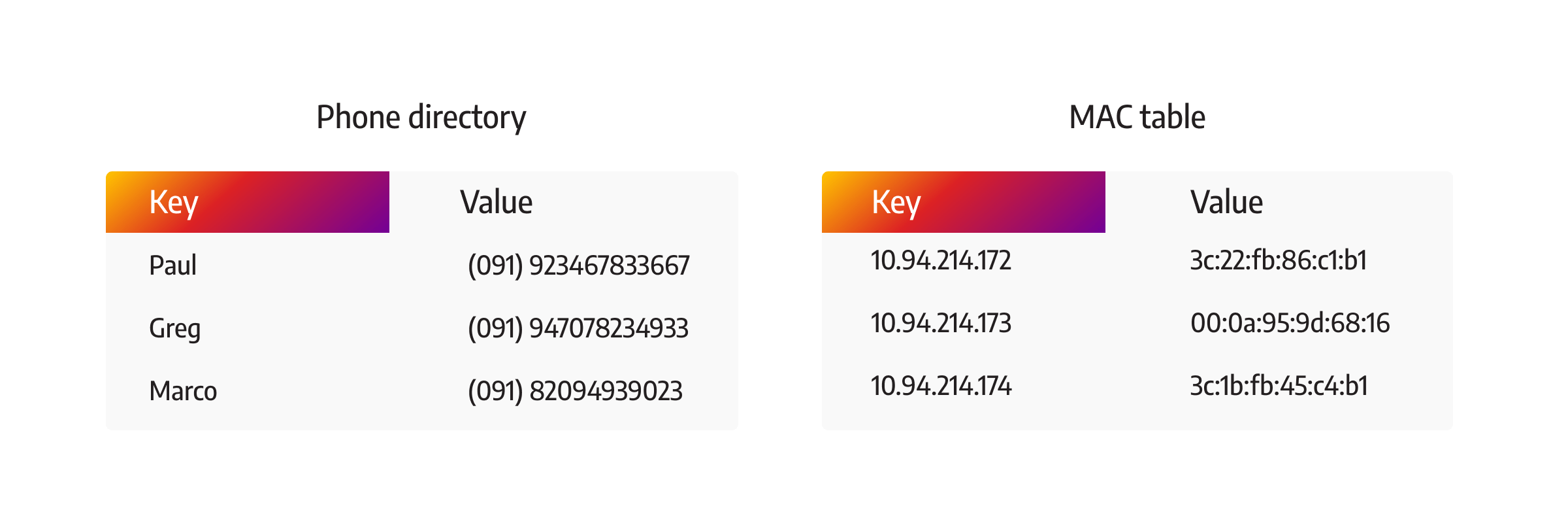
One of the benefits key-value databases provide is their flexibility. They don't enforce any specific schema, allowing developers to store values of any data type associated with a key. This flexibility makes key-value databases well-suited for caching, session management, and storing user preferences.
Key-Value Database Examples
Popular key-value stores include Redis, Amazon DynamoDB, and Microsoft Azure Cosmos DB (all of them also multi-model). Redis, in particular, has gained popularity due to its in-memory caching capabilities, high performance, and support for advanced data structures like lists, sets, and sorted sets.
Document Databases: Agile and Versatile Data Management
A document database, also known as a document store, is designed to store and manage semi-structured or unstructured data in a self-describing format such as JSON or XML. That, in turn, allows for flexible and agile data modeling. In document databases, data is organized into collections or buckets, and each document can have its own structure.
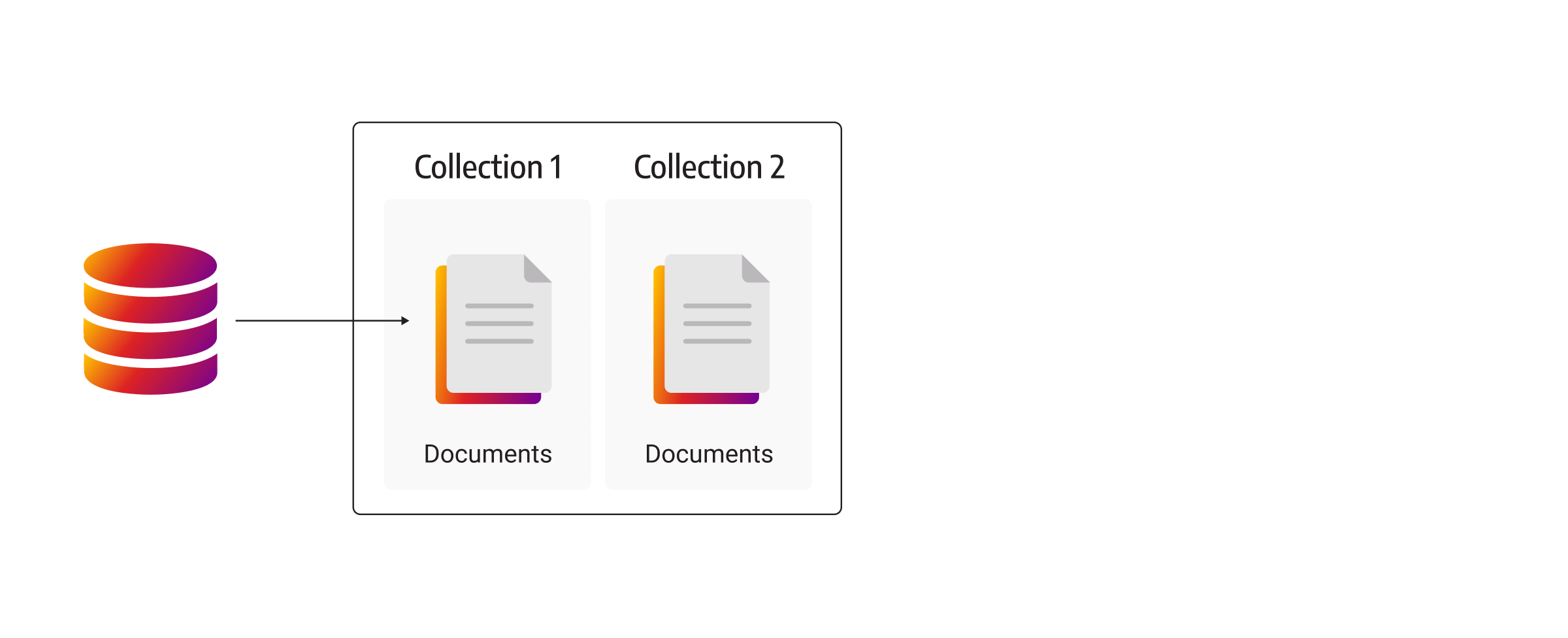
Document databases provide powerful querying capabilities, making it easier to retrieve and manipulate data within the documents. Many also offer automatic sharding and replication for high availability and scalability. Document databases are particularly well-suited for content management systems, blogging platforms, and applications dealing with complex and changing data structures.
Document Database Examples
MongoDB, one of the most popular document databases, offers a rich set of features, including flexible querying, automatic sharding, and seamless integration with programming languages. Couchbase and Google Cloud Firestore are also widely used document databases worth looking into.
Columnar Databases: Efficient Analytics and Large-Scale Data Processing
Columnar or column-oriented databases are optimized for storing and processing large volumes of data. As the name suggests, instead of storing data elements in rows, columnar databases organize data in columns. This columnar arrangement allows for efficient compression and faster query performance when working with specific attributes.
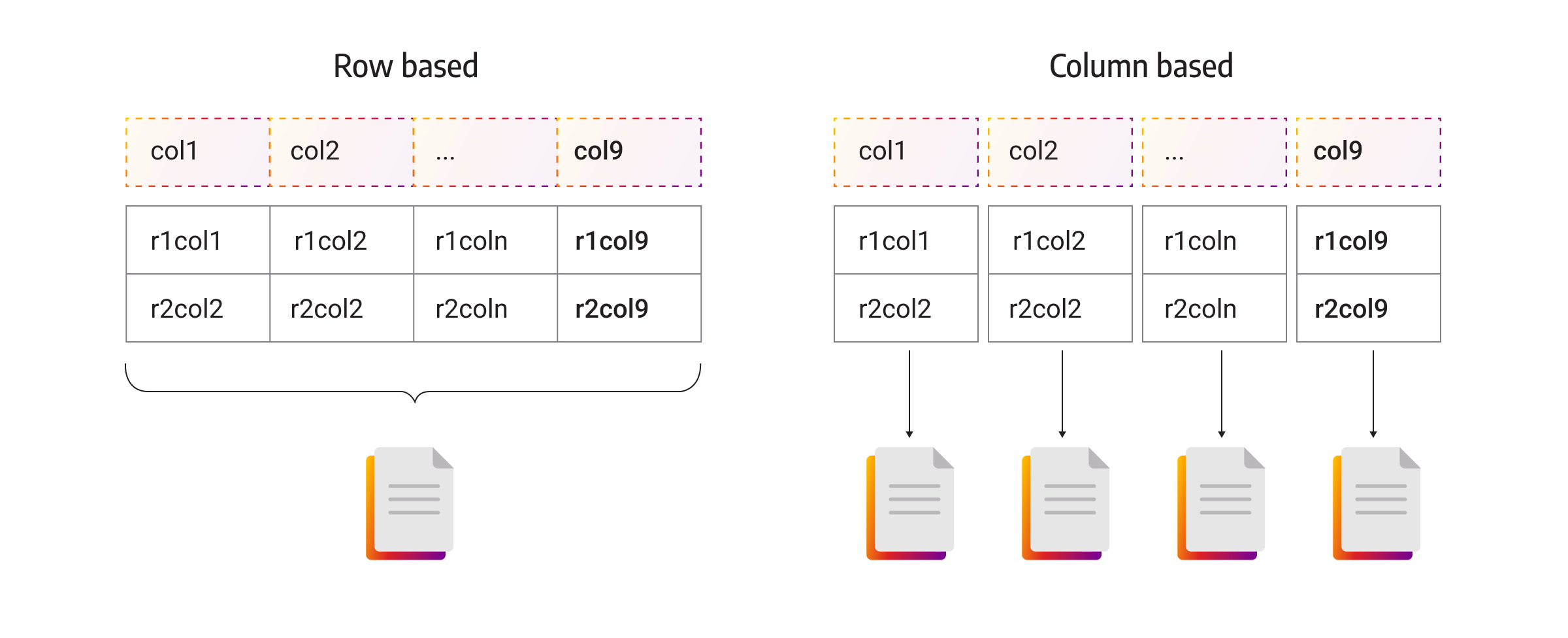
Column-oriented databases are used in data warehousing, business intelligence, and analytical applications, where the focus is on complex queries that involve aggregations, filtering, and searching across large datasets. Columnar databases provide excellent read performance and enable rapid data analysis.
Columnar Database Examples
ClickHouse is a popular column-oriented database for analytics, and Apache Kudu is a columnar storage system for the Hadoop ecosystem, usually queried through engines like Apache Spark or Apache Impala. Both are built for large analytical datasets. Keep in mind that columnar is a storage layout, not a query language: many columnar databases, including ClickHouse, are queried with SQL.
Wide-Column Stores: Scalable and High-Performance Data Storage
Wide-column stores, also known as wide-column databases, combine characteristics of tables and key-value databases. Despite the similar name, they aren't columnar databases: they group data into column families and store it row by row within each family.
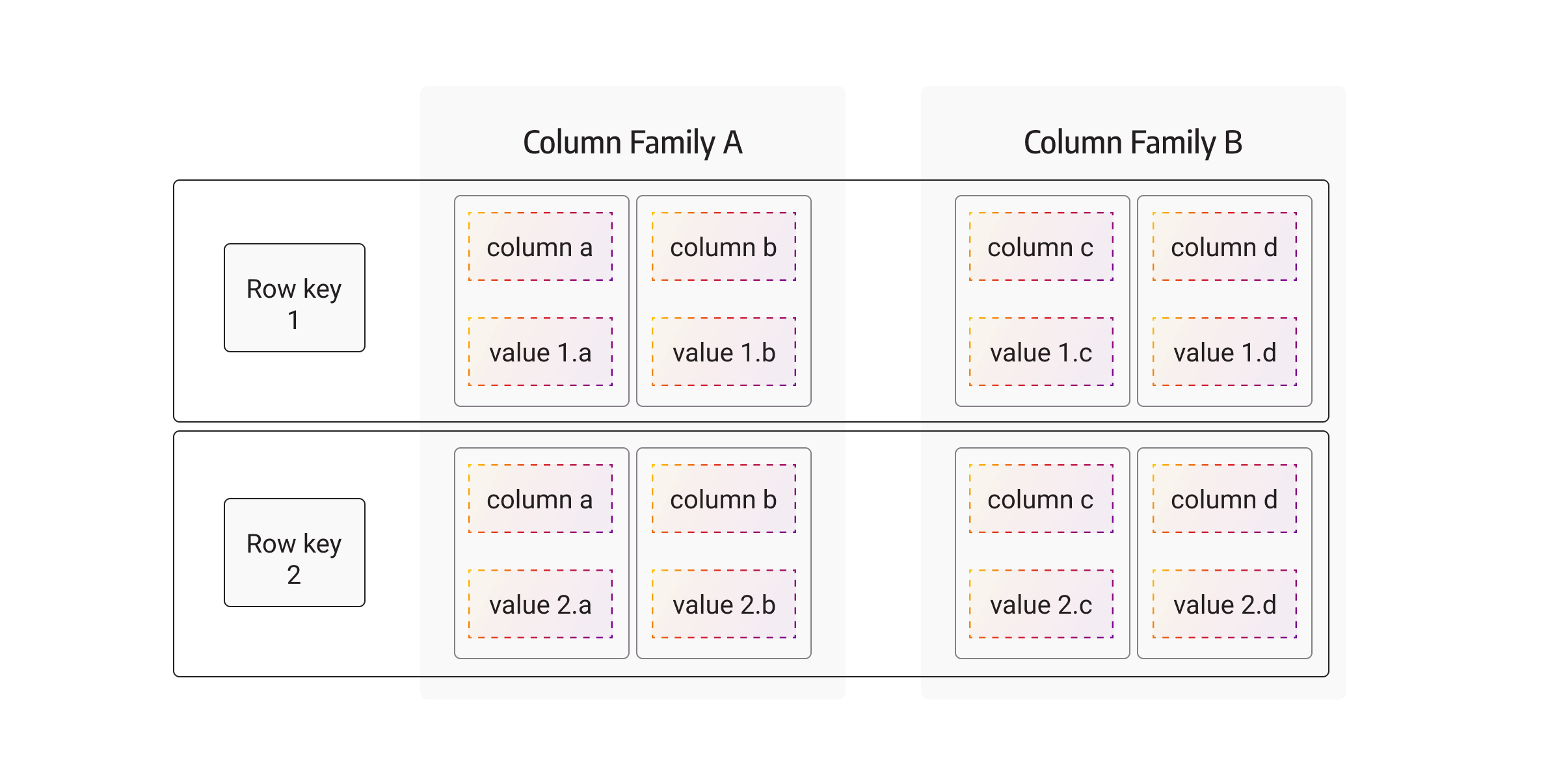
Each column family can contain multiple columns and hold a large number of rows, and each row can have a different set of columns. This structure allows for efficient data retrieval and enables flexible schema design. Wide-column stores are known for their ability to handle massive workloads and provide low-latency read-and-write operations.
Wide-Column Store Examples
Apache HBase, Apache Cassandra, and ScyllaDB are good examples of wide-column stores. Apache HBase is built on top of the Hadoop ecosystem and provides consistent, real-time access to large datasets. Apache Cassandra, on the other hand, offers high availability, fault tolerance, and linear scalability.
Graph Databases: Exploring Relationships in Connected Data
Graph databases manage and query interconnected data, making them ideal for applications that rely heavily on relationships. Unlike other types of NoSQL databases, a graph database represents data as nodes, edges, and properties, allowing for efficient traversal and exploration of relationships. For a fuller introduction, read what is a graph database.
One of the assets offered by graph databases is their ability to handle complex queries involving relationships. They excel at finding patterns, identifying connections, and performing graph-based operations such as pathfinding, recommendation systems, and social network analysis. Furthermore, graph databases enable the expression of complex relationships and hierarchies, enabling developers to model their data more accurately.
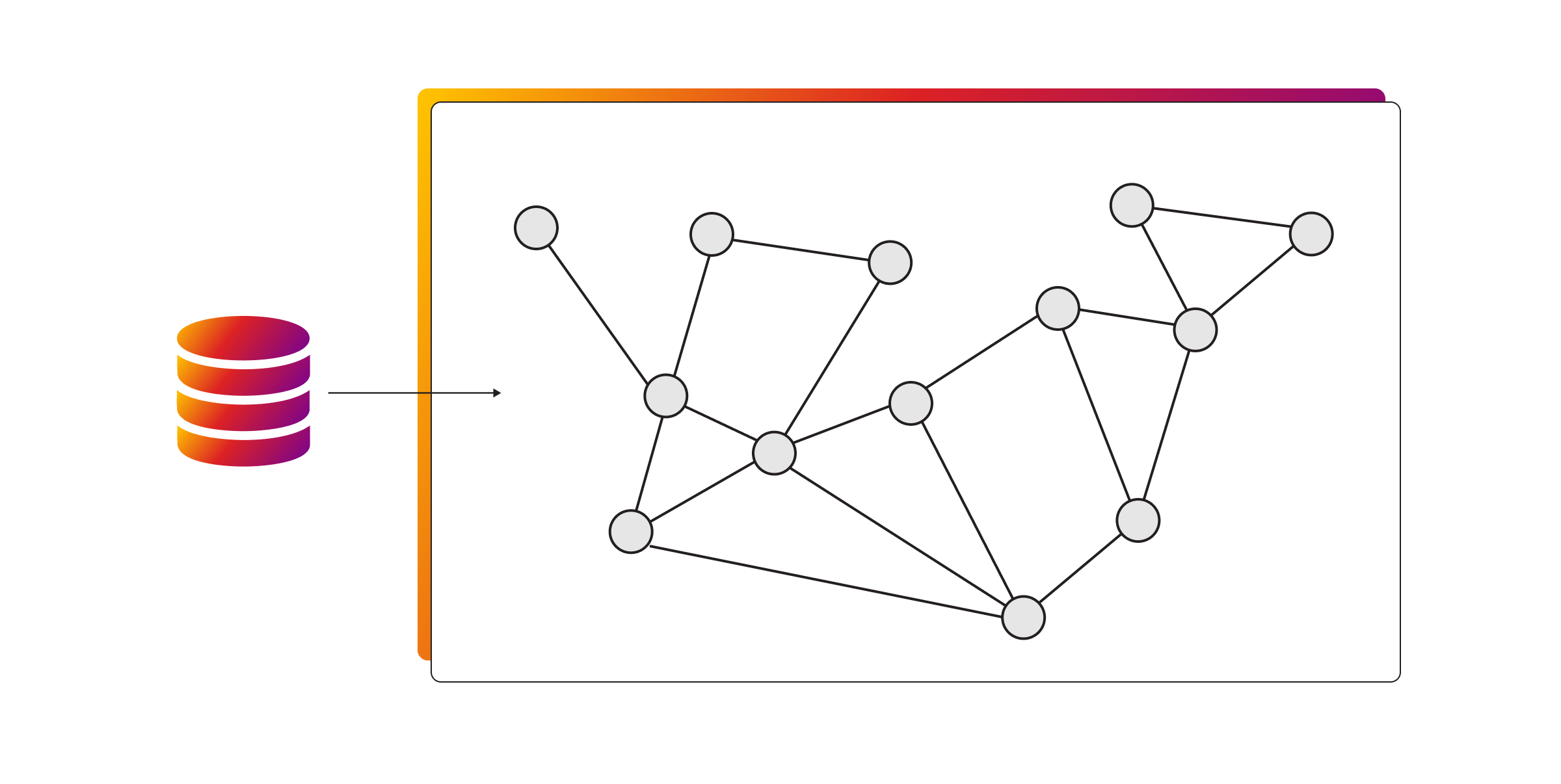
Graph databases find applications in various domains. Social networks use them to map connections between users, recommend friends, and identify communities. E-commerce platforms can use graph databases to provide personalized recommendations based on user preferences and purchase histories. Knowledge graphs built with graph databases help organize and retrieve vast amounts of information. They also give AI applications structured context: in GraphRAG, an LLM retrieves connected facts from a knowledge graph instead of only similar text.
The power of graph databases lies in their ability to uncover hidden insights and discover meaningful connections in the data. By using the graph structure, developers can gain a deeper understanding of the relationships between entities and find new opportunities for analysis.
Graph Database Examples
Memgraph and Neo4j are two of the best-known graph databases. Although Neo4j has a longer history, Memgraph is an in-memory graph database implemented in C++, built for real-time graph analytics and AI context such as GraphRAG and AI memory. Neo4j, in comparison, uses disk-based storage. To compare their performance, check out the performance benchmarks, or feel free to recreate and evaluate them using your own data.
Amazon Neptune is another notable graph database, offered as a managed service on AWS. Apache Giraph often appears in graph database lists too, but it was a graph processing framework for Hadoop rather than a database, and the project has since been retired.
Vector Databases: Similarity Search for AI
Vector databases are the newest type of NoSQL database. They store embeddings, which are numeric representations of text, images, or other data produced by machine learning models, and they find the items most similar to a query. That makes them a common building block for semantic search and retrieval-augmented generation (RAG).
Vector search finds what's similar, but not what's connected. That's why many databases now combine vector search with another data model. Memgraph, for example, has a vector index on nodes and relationships, so you can find similar entities and then traverse the graph around them in the same query.
Vector Database Examples
Pinecone, Milvus, Weaviate, and Qdrant are popular dedicated vector databases. Many other databases, including Redis, MongoDB, and Memgraph, also offer vector search alongside their main data model.
What to Consider When Choosing a Database?
Choosing a database can make or break your project. Keep the following factors in mind before making a decision:
Data Model Requirements
Understand the structure and nature of your data. Consider whether a key-value, document, columnar, wide-column, graph, or vector data model aligns better with your application's data requirements. Selecting the right data model will ensure efficient storage, retrieval, and manipulation of your data.
Scalability
Determine the scalability needs of your application. Will your data and user base grow over time? To what extent? Consider a database that offers horizontal scalability, allowing you to distribute data across multiple servers or clusters with ease.
Performance Demands
Assess the performance requirements of your application. Are you dealing with real-time data processing or high-volume transactional operations? Look for a database that provides fast read-and-write operations, low latency, and robust indexing mechanisms.
Query Patterns
Analyze the types of queries your application will frequently perform. Different databases excel in different query patterns. Some prioritize read-heavy workloads, while others handle complex analytical queries more efficiently. Choose a database that aligns with your predominant query patterns to optimize performance.
Consistency and Durability
Consider the level of consistency and durability your application requires. Some databases prioritize strong consistency, ensuring that all nodes in the system have the same view of data, while others may offer eventual consistency or trade-offs to achieve high availability. An insider tip: evaluate the data durability guarantees provided by the database to ensure data integrity.
Ecosystem and Tooling
Examine the available ecosystem and tooling around the database. Look for an active community, comprehensive documentation, and responsive support to make development, troubleshooting, and maintenance easier.
Cost and Licensing
Take into account the financial implications and licensing requirements associated with the database. Evaluate factors such as upfront costs, operational expenses, and any limitations or restrictions imposed by the licensing terms.
By carefully considering these factors and matching them with your application's specific needs, you can make an informed decision when selecting a database. Keep in mind that there is no one-size-fits-all solution, and the right database choice will depend on the unique requirements and constraints of your project.
Wrap Up
NoSQL databases offer a flexible and scalable alternative to traditional relational databases. Here's when each type fits best:
- Key-value store: fast lookups and caching
- Document database: evolving application data
- Columnar database: analytics over large datasets
- Wide-column store: massive, write-heavy workloads
- Graph database: connected data and relationship-heavy queries
- Vector database: similarity search
If your data is connected, or your AI application needs context that similarity search alone can't provide, try Memgraph on your own data.
